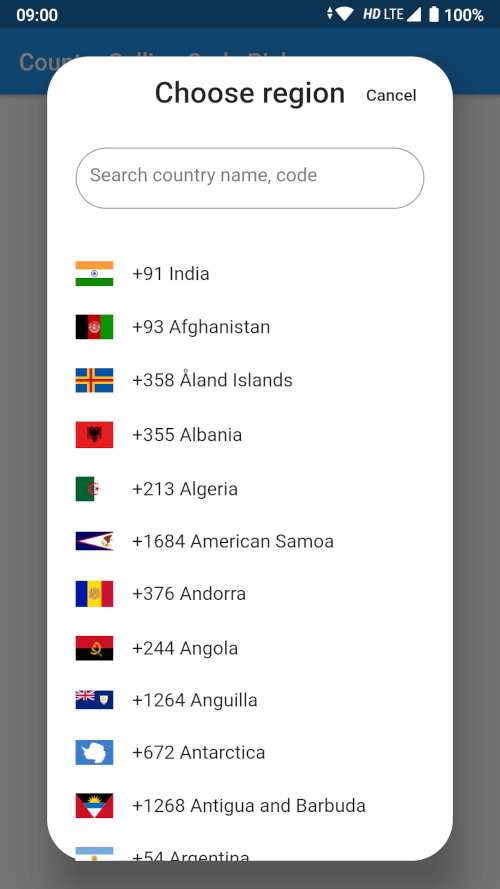
Orientação gerada a partir de informações públicas. Apenas para referência.
Um widget de seleção de país flexível e personalizável para Flutter que permite aos usuários selecionar um país e recuperar seu código de país e código de chamada correspondentes. Projetado para integração perfeita em formulários que exigem entrada de números de telefone internacionais, suporta as plataformas Android e iOS. O pacote oferece uma interface intuitiva com funcionalidade de pesquisa e exibição de bandeiras, melhorando a experiência do usuário durante a seleção de países. Leve e fácil de implementar, é ideal para aplicativos que precisam de informações precisas sobre discagem internacional.
Casos de uso
entrada de número de telefone internacional
Configuração do perfil de usuário com seleção de país
Localização de aplicativos multi-região
Formulário de contato com suporte a código do país
Fluxos de autenticação que exigem verificação por telefone
Principais recursos
Lista de países pesquisáveis
Exibição de bandeiras de países
Recuperação automática de códigos de chamada
Temas de interface personalizáveis
Suporte para saída de código do país e código de chamada
Indicado para
Aplicativos móveis que exigem entrada de telefone internacional
Fluxos de onboarding do usuário
Plataformas globais de comércio eletrônico
Aplicativos de mensagens ou chamadas
Formulários com informações de contato internacionais
Considerações
Requer manipulação manual do armazenamento de código de país
Personalização limitada além do estilo básico
Nenhuma validação embutida para números de telefone
Depende de fonte externa de dados para a lista de países
Pode exigir lógica adicional para correspondência de fuso horário ou idioma
README original
Snapshot do README original do repositório-fonte vinculado. Consulte o repositório para o conteúdo mais recente.
Country Calling Code Picker
A searchable country picker for Flutter, ready to use in a dialog, a bottom sheet
or full screen. Gives you the country name, its ISO code, its international
calling code and a bundled flag image for 250 countries and territories.
Pure Dart — no platform channels, no native build setup. It runs on Android,
iOS, web, macOS, Windows and Linux.
class_MyPageStateextendsState<MyPage> {
Country? _selectedCountry;
bool _didInit = false;
@overridevoiddidChangeDependencies() {
super.didChangeDependencies();
if (!_didInit) {
_didInit = true;
_initCountry();
}
}
Future<void> _initCountry() async {
final country = awaitgetDefaultCountry(context);
if (!mounted) return;
setState(() => _selectedCountry = country);
}
}
getDefaultCountry resolves the device region from the platform locale. Pass
fallbackCountryCode to choose what happens when the platform reports a region
that is not in the list:
final country = awaitgetDefaultCountry(context, fallbackCountryCode: 'US');
Bottom sheet
final country = awaitshowCountryPickerSheet(context);
if (country != null) {
setState(() => _selectedCountry = country);
}
Dialog
final country = awaitshowCountryPickerDialog(context);
// Every country, for your own custom picker.finalList<Country> countries = awaitgetCountries(context);
// Or without a BuildContext, e.g. from a repository or a unit test.finalList<Country> countries = awaitgetCountriesFromBundle();
// A single country by ISO code (case insensitive, null when unknown).finalCountry? india = awaitgetCountryByCountryCode(context, 'IN');
// The device region, e.g. 'IN'. Null when the platform reports none.finalString? code = getDeviceCountryCode(context);
Showing a flag
Flag images ship inside this package, so they need the package name:
Or skip the images entirely and use the emoji flag:
Text(country.flagEmoji); // 🇮🇳
CountryPickerWidget options
Parameter
Default
Description
onSelected
null
Called with the tapped Country.
itemTextStyle
TextStyle(fontSize: 16)
Text style of a list item.
searchInputStyle
TextStyle(fontSize: 16)
Text style of the search box.
searchInputDecoration
null
Replaces the search box decoration entirely.
searchHintText
'Search country name, code'
Hint of the search box.
flagIconSize
32
Width of the flag image.
showSeparator
false
Draw a Divider between items.
focusSearchBox
false
Open the keyboard as soon as the picker shows.
showDeviceCountryFirst
true
Move the device's country to the top of the list.
Search matches the country name (accent insensitive, so aland finds Åland),
the ISO code, and the calling code with or without its leading +.
Upgrading from 2.x
Version 3.0.0 requires Dart 3 / Flutter 3.24 or newer.
The flutter_sim_country_code dependency is gone.getDefaultCountry
now reads the device region from the platform locale instead of the SIM card,
which is why the package no longer needs any native code and works on web and
desktop. On a device whose region setting and SIM disagree, the resolved
country can differ from 2.x.
getCountryByCountryCode now really returns null for an unknown code.
It used to throw a StateError. Its match is also case insensitive now.
The country matching the device is still moved to the top of the picker, but
countries that merely share its calling code are no longer removed from the
list — picking the US no longer made Canada disappear.
getDefaultCountry takes an optional fallbackCountryCode.
CountryPickerWidget.focusSearchBox is now actually forwarded by
showCountryPickerSheet and showCountryPickerDialog.