


 v2.3.0
expandable_text
Widget que exibe apenas as primeiras linhas de um texto e adiciona um link para expandir o texto completo.
291Curtidas 32,2 milDownloads em 30 dias140Pontos Pub
AndroidiOSWebmacOSWindowsLinux
Plugin do Flutter com um widget de texto expansível

Texto original em inglês. Visite o GitHub para a versão atual.


This Flutter package includes the widget ExpandableText which you can use to initially only show a
defined number of lines of a probably long text. The widget appends a configurable text link which
lets the user expand the full text, or collapse it again.

Add this to your package's pubspec.yaml file:
dependencies:
  expandable_text: 2.3.0
Next, import the package into your dart code:
import 'package:expandable_text/expandable_text.dart';
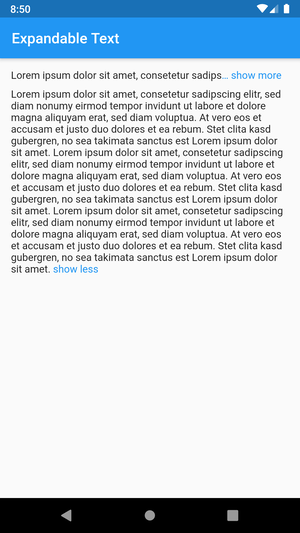
Show an expandable text if longText exceeds one line:
Widget build(BuildContext context) {
    return ExpandableText(
        longText,
        expandText: 'show more',
        collapseText: 'show less',
        maxLines: 1,
        linkColor: Colors.blue,
    );
}
This example shows a message that was posted by a user.
The username is always visible right before the text and tapping on it opens the user profile.
The text is truncated after two lines and can be expanded by tapping on the link show more at the end or the text itself.
After the text was expanded it cannot be collapsed again as no collapseText was provided.
URLs, @mentions and #hashtags in the text are styled differently and can be tapped to open the browser or the user profile.
Widget build(BuildContext context) {
    return ExpandableText(
        message,
        expandText: 'show more',
        maxLines: 2,
        linkColor: Colors.blue,
        animation: true,
        collapseOnTextTap: true,
        prefixText: username,
        onPrefixTap: () => showProfile(username),
        prefixStyle: TextStyle(fontWeight: FontWeight.bold),
        onHashtagTap: (name) => showHashtag(name),
        hashtagStyle: TextStyle(
            color: Color(0xFF30B6F9),
        ),
        onMentionTap: (username) => showProfile(username),
        mentionStyle: TextStyle(
            fontWeight: FontWeight.w600,
        ),
        onUrlTap: (url) => launchUrl(url),
        urlStyle: TextStyle(
            decoration: TextDecoration.underline,
        ),
    );
}
expandText)animation, animationDuration, animationCurve)collapseText)linkStyle / linkColor)linkEllipsis)prefixText, prefixStyle, onPrefixTap)onUrlTap, urlStyle)onMentionTap, mentionStyle)onHashtagTap, hashtagStyle)maxLines)expanded, onLinkTap)onExpandedChanged)expandOnTextTap, collapseOnTextTap)Have a bug or a feature request? Please first search for existing and closed issues. If your problem or idea is not addressed yet, please open a new issue.
Code copyright 2020–2022 Florian Weinaug. Code released under the MIT license.
Lista de dependências 2 itens
{"sdk":"flutter"}{"sdk":"flutter"}Filtre pelo caso de uso, compare a atividade e confira o projeto original antes de adotá-lo.
“A repository is the most basic element of GitHub.”
GitHub Docs — About repositories ↗