Buscar pacotes, repositórios e categorias de apps

Capa de expandable_text
Detalhes do pacotev2.3.0

expandable_text

Widget que exibe apenas as primeiras linhas de um texto e adiciona um link para expandir o texto completo.

AndroidiOSWebmacOSWindowsLinux
Downloads em 30 dias
32,2 mil
Curtidas
291
Pontos Pub
140

Instalar pacote

flutter pub add expandable_text

Visão geral do pacote

Orientação gerada a partir de informações públicas. Apenas para referência.

O pacote expandable_text fornece um widget Flutter que exibe apenas as linhas iniciais de um texto, com um link clicável para revelar o conteúdo completo. É ideal para gerenciar trechos longos de texto de forma limpa e amigável ao usuário. O widget suporta animações suaves ao expandir ou colapsar e funciona em todas as principais plataformas, incluindo Android, iOS, Web, macOS, Windows e Linux. Melhora a legibilidade evitando o uso excessivo de espaço vertical, mantendo a acessibilidade.

Casos de uso

  • Exibindo descrições longas em listas
  • Exibindo comentários ou avaliações truncadas
  • Melhorando o desempenho da interface com grandes blocos de texto
  • Criando seções de conteúdo interativo
  • Reduzindo o acúmulo de tela em interfaces de bate-papo

Principais recursos

  • Animações suaves de expansão/diminuição
  • Número personalizável de linhas visíveis
  • Texto expansível/colapsável configurável
  • Suporta texto rico e formatação
  • Compatibilidade multiplataforma
  • Integração fácil com widgets existentes

Indicado para

  • Aplicativos com conteúdo de texto longo
  • Interfaces de usuário que exigem expansão dinâmica de texto
  • Desenvolvedores procurando gerenciamento leve de texto
  • Projetos que precisam de layout de texto responsivo
  • Designers de UI/UX focados em minimalismo

Considerações

  • Pode exigir estilos adicionais para aparência consistente
  • Impacto no desempenho com textos muito grandes
  • Personalização limitada para layouts complexos
  • Não adequado para exibição de texto não interativo
  • Requer manipulação cuidadosa da sobreposição de texto

README original

Snapshot do README original do repositório-fonte vinculado. Consulte o repositório para o conteúdo mais recente.

Build pub package codecov license

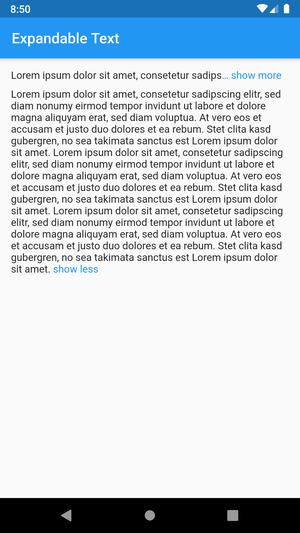
This Flutter package includes the widget ExpandableText which you can use to initially only show a defined number of lines of a probably long text. The widget appends a configurable text link which lets the user expand the full text, or collapse it again.

Example with maxLines=1

Getting started

Add this to your package's pubspec.yaml file:

dependencies:
  expandable_text: 2.3.0

Next, import the package into your dart code:

import 'package:expandable_text/expandable_text.dart';
Usage

Show an expandable text if longText exceeds one line:

Widget build(BuildContext context) {
    return ExpandableText(
        longText,
        expandText: 'show more',
        collapseText: 'show less',
        maxLines: 1,
        linkColor: Colors.blue,
    );
}
Advanced example

This example shows a message that was posted by a user. The username is always visible right before the text and tapping on it opens the user profile. The text is truncated after two lines and can be expanded by tapping on the link show more at the end or the text itself. After the text was expanded it cannot be collapsed again as no collapseText was provided. URLs, @mentions and #hashtags in the text are styled differently and can be tapped to open the browser or the user profile.

Widget build(BuildContext context) {
    return ExpandableText(
        message,
        expandText: 'show more',
        maxLines: 2,
        linkColor: Colors.blue,
        animation: true,
        collapseOnTextTap: true,
        prefixText: username,
        onPrefixTap: () => showProfile(username),
        prefixStyle: TextStyle(fontWeight: FontWeight.bold),
        onHashtagTap: (name) => showHashtag(name),
        hashtagStyle: TextStyle(
            color: Color(0xFF30B6F9),
        ),
        onMentionTap: (username) => showProfile(username),
        mentionStyle: TextStyle(
            fontWeight: FontWeight.w600,
        ),
        onUrlTap: (url) => launchUrl(url),
        urlStyle: TextStyle(
            decoration: TextDecoration.underline,
        ),
    );
}

Features

  • Link to expand the collapsed text (expandText)
  • Expand and collapse animation (animation, animationDuration, animationCurve)
  • Optional link to collapse the expanded text (collapseText)
  • Configure the style of the link (linkStyle / linkColor)
  • Control whether the ellipsis is part of the link (linkEllipsis)
  • Optional prefix text with style and tap callback (prefixText, prefixStyle, onPrefixTap)
  • Text with tappable and styled links (onUrlTap, urlStyle)
  • Text with tappable and styled @mentions (onMentionTap, mentionStyle)
  • Text with tappable and styled #hashtags (onHashtagTap, hashtagStyle)
  • Configure the number of visible lines of the collapsed text (maxLines)
  • Control the default expanded state (expanded, onLinkTap)
  • Callback for expanded changed event (onExpandedChanged)
  • Tap on the text to expand or collapse the text (expandOnTextTap, collapseOnTextTap)

Bugs and feature requests

Have a bug or a feature request? Please first search for existing and closed issues. If your problem or idea is not addressed yet, please open a new issue.

Copyright & License

Code copyright 2020–2022 Florian Weinaug. Code released under the MIT license.

Categorias

Repositório-fonte

Projetos que usam este pacote