v0.0.4textuality
Textuality é um pacote Flutter que aprimora o widget Text com opções avançadas de estilização como gradiente, contorno, efeito neon, sombras e muito mais.
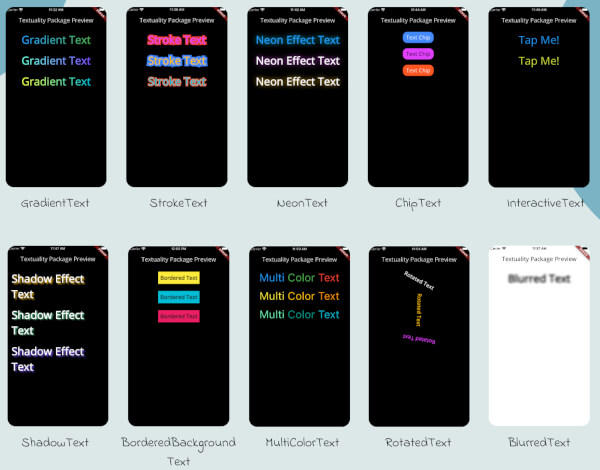
Textuality é um poderoso pacote do Flutter que melhora a aparência dos widgets de texto com uma variedade de efeitos e estilos personalizáveis. Com este pacote, você pode facilmente adicionar texto em gradiente, texto com traço, efeitos neon, efeitos de sombra, texto interativo e muito mais ao seu aplicativo Flutter.
{"sdk":"flutter"}{"sdk":"flutter"}^3.0.0Texto original em inglês. Visite o GitHub para a versão atual.
Textuality is a powerful Flutter package that enhances the appearance of text widgets with a variety of customizable text effects and styles. With this package, you can easily add gradient text, stroke text, neon effects, shadow effects, interactive text, and more to your Flutter app.
Textuality
Each widget accepts various optional parameters for customization, such as style, text alignment, maxLines, overflow, and more.
To use the textuality package in your Flutter project, follow these steps:
Add the package to your pubspec.yaml file:
dependencies:
textuality: ^0.0.1
Run the following command to install the package:
flutter pub get
💻Example
Below is an example of how to use the Textuality package in your Flutter app:
import 'package:flutter/material.dart';
import 'package:textuality/textuality.dart';
class TextualityExample extends StatefulWidget {
const TextualityExample({super.key});
@override
State<TextualityExample> createState() => _TextualityExampleState();
}
class _TextualityExampleState extends State<TextualityExample> {
@override
Widget build(BuildContext context) {
return Scaffold(
backgroundColor: Colors.white,
appBar: AppBar(
backgroundColor: Colors.white,
title: Text(
'Textuality Package Preview',
style: TextStyle(color: Colors.black),
)),
body: SingleChildScrollView(
padding: EdgeInsets.all(16.0),
child: Center(
child: Column(
children: [
// Gradient Text
GradientText(
text: 'Gradient Text',
giveGradient: [Colors.blue, Colors.green],
style: TextStyle(fontSize: 40, fontWeight: FontWeight.bold),
),
SizedBox(height: 20),
// Stroke Text
StrokeText(
text: 'Stroke Text',
strokeColor: Colors.red,
strokeWidth: 8.0,
style: TextStyle(
fontSize: 40,
fontWeight: FontWeight.bold,
color: Colors.purpleAccent),
),
SizedBox(height: 20),
// Neon Text
NeonText(
text: 'Neon Effect Text',
glowColor: Colors.cyan,
blurRadius: 20.0,
style: TextStyle(
fontSize: 40,
fontWeight: FontWeight.bold,
color: Colors.blue),
),
SizedBox(height: 20),
// Text Chips
ChipText(
text: 'Text Chip',
chipColor: Colors.blueAccent,
style: TextStyle(fontSize: 20, color: Colors.white),
),
SizedBox(height: 20),
// Shadow Text
ShadowText(
text: 'Shadow Effect Text',
shadows: [
Shadow(
blurRadius: 5.0,
color: Colors.amber,
offset: Offset(5, 5),
),
],
style: TextStyle(
fontSize: 40,
fontWeight: FontWeight.bold,
color: Colors.white)),
SizedBox(height: 20),
ShadowText.simple(
text: 'Simple Shadow Effect Text',
style: TextStyle(
fontSize: 24,
fontWeight: FontWeight.bold,
color: Colors.blue,
),
shadowColor: Colors.red,
shadowBlurRadius: 8.0,
shadowOffset: Offset(3, 3),
),
SizedBox(height: 20),
// Multi-Color Text
MultiColorText(
spans: [
TextSpan(
text: 'Multi',
style: TextStyle(color: Colors.blue, fontSize: 40),
),
TextSpan(
text: 'Color ',
style: TextStyle(color: Colors.green, fontSize: 40),
),
TextSpan(
text: 'Text',
style: TextStyle(color: Colors.red, fontSize: 40),
),
],
),
SizedBox(height: 20),
// InteractiveTextuality
InteractiveText(
text: 'on Tap',
onTap: () {},
style: TextStyle(fontSize: 20, fontWeight: FontWeight.bold),
),
SizedBox(height: 20),
// Rotated Text
RotatedText(
text: 'Rotated Text',
rotationAngle: 0.5, // Rotate 90 degrees
style: TextStyle(fontSize: 40, fontWeight: FontWeight.bold),
),
SizedBox(height: 20),
// Blurred Text
BlurredText(
text: 'Blurred Text',
blurStrength: 5.0,
style: TextStyle(fontSize: 40, fontWeight: FontWeight.bold),
),
SizedBox(height: 20),
// Bordered Background Text
BorderedBackgroundText(
text: 'Bordered Background Text',
borderColor: Colors.black,
borderWidth: 3.0,
backgroundColor: Colors.yellow,
style: TextStyle(fontSize: 40, fontWeight: FontWeight.bold),
),
],
),
),
),
);
}
}
GradientTextuality GradientText
ChipTextuality ChipText
StrokeTextuality StrokeText
InteractiveTextuality InteractiveText
NeonTextuality NeonText
ShadowTextuality ShadowText
MultiColorTextuality MultiColorText
RotatedTextuality RotatedText
BlurredTextuality BlurredText
BorderedBackgroundTextuality BorderedText
See the CHANGELOG.md file for updates.
This package is licensed under the MIT License.