Buscar pacotes, repositórios e categorias de apps

Capa de textuality
Detalhes do pacotev0.0.4

textuality

Textuality é um pacote Flutter que aprimora o widget Text com opções avançadas de estilização como gradiente, contorno, efeito neon, sombras e muito mais.

AndroidiOSWebmacOSWindowsLinux
Downloads em 30 dias
374
Curtidas
39
Pontos Pub
140

Instalar pacote

flutter pub add textuality

Visão geral do pacote

Orientação gerada a partir de informações públicas. Apenas para referência.

Textuality é um pacote do Flutter que expande a funcionalidade do widget Text com efeitos visuais avançados. Permite que desenvolvedores apliquem preenchimentos em gradiente, contornos de traço, iluminação neon e efeitos de sombra diretamente no texto, aprimorando a estética da interface sem necessidade de pintura personalizada complexa. Projetado para facilitar o uso, integra-se perfeitamente em projetos existentes do Flutter. O pacote oferece suporte a múltiplas plataformas, incluindo Android, iOS, Web, macOS, Windows e Linux, tornando-o ideal para aplicativos multiplataforma que exigem tipografia expressiva.

Casos de uso

  • Criando títulos chamativos
  • Adicionando efeitos decorativos de texto em jogos
  • Melhorando telas de boas-vindas do aplicativo
  • Designando interfaces temáticas com texto vibrante
  • Melhorando a acessibilidade por meio do contraste visual

Principais recursos

  • Estilo de texto em gradiente
  • Efeitos de traço e contorno
  • efeitos de brilho neon
  • Aprimoramentos de sombra e profundidade
  • Integração simples da API

Indicado para

  • Designers de UI em busca de charme visual
  • Desenvolvedores de aplicativos criativos
  • Projetos móveis e web multiplataforma
  • Aplicativos com texto dinâmico ou animado

Considerações

  • Pode afetar o desempenho com efeitos pesados
  • Personalização limitada além dos estilos fornecidos
  • Requer testes cuidadosos em várias plataformas
  • Não adequado para animações de alto desempenho

README original

Snapshot do README original do repositório-fonte vinculado. Consulte o repositório para o conteúdo mais recente.

Textuality Package

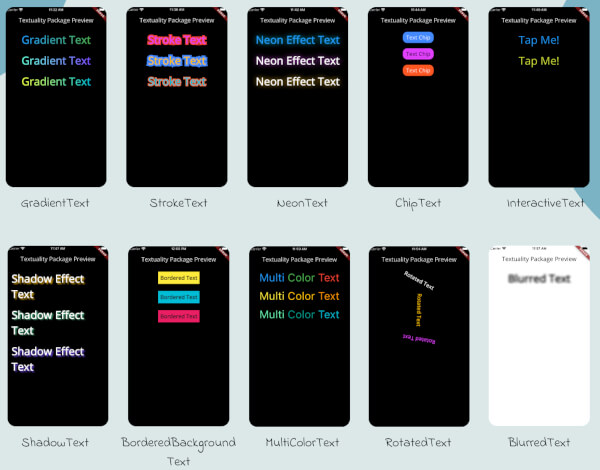
Textuality is a powerful Flutter package that enhances the appearance of text widgets with a variety of customizable text effects and styles. With this package, you can easily add gradient text, stroke text, neon effects, shadow effects, interactive text, and more to your Flutter app.

Textuality

Features

  • GradientText: Add gradient colors to your text.
  • StrokeText: Apply an outline or stroke around your text.
  • NeonText: Create a glowing neon text effect.
  • ChipText: Display text inside stylish chip-like containers.
  • ShadowText: Add customizable shadows to your text.
  • InteractiveText: Make text interactive for clicks, taps, or custom gestures.
  • MultiColorText: Display text in multiple colors, even within the same string.
  • RotatedText: Rotate the text in any direction, including vertical.
  • BlurredText: Add a blurred effect to your text.
  • BorderedBackgroundText: Add a border around the background of your text.

Each widget accepts various optional parameters for customization, such as style, text alignment, maxLines, overflow, and more.

Installation

To use the textuality package in your Flutter project, follow these steps:

  1. Add the package to your pubspec.yaml file:

    dependencies:
      textuality: ^0.0.1


Run the following command to install the package:

flutter pub get

💻Example

Below is an example of how to use the Textuality package in your Flutter app:

import 'package:flutter/material.dart';
import 'package:textuality/textuality.dart';

class TextualityExample extends StatefulWidget {
  const TextualityExample({super.key});

  @override
  State<TextualityExample> createState() => _TextualityExampleState();
}

class _TextualityExampleState extends State<TextualityExample> {
  @override
  Widget build(BuildContext context) {
    return Scaffold(
      backgroundColor: Colors.white,
      appBar: AppBar(
          backgroundColor: Colors.white,
          title: Text(
            'Textuality Package Preview',
            style: TextStyle(color: Colors.black),
          )),
      body: SingleChildScrollView(
        padding: EdgeInsets.all(16.0),
        child: Center(
          child: Column(
            children: [
              // Gradient Text
              GradientText(
                text: 'Gradient Text',
                giveGradient: [Colors.blue, Colors.green],
                style: TextStyle(fontSize: 40, fontWeight: FontWeight.bold),
              ),
              SizedBox(height: 20),

              // Stroke Text
              StrokeText(
                text: 'Stroke Text',
                strokeColor: Colors.red,
                strokeWidth: 8.0,
                style: TextStyle(
                    fontSize: 40,
                    fontWeight: FontWeight.bold,
                    color: Colors.purpleAccent),
              ),
              SizedBox(height: 20),
              // Neon Text
              NeonText(
                text: 'Neon Effect Text',
                glowColor: Colors.cyan,
                blurRadius: 20.0,
                style: TextStyle(
                    fontSize: 40,
                    fontWeight: FontWeight.bold,
                    color: Colors.blue),
              ),
              SizedBox(height: 20),
              // Text Chips
              ChipText(
                text: 'Text Chip',
                chipColor: Colors.blueAccent,
                style: TextStyle(fontSize: 20, color: Colors.white),
              ),
              SizedBox(height: 20),

              // Shadow Text
              ShadowText(
                  text: 'Shadow Effect Text',
                  shadows: [
                    Shadow(
                      blurRadius: 5.0,
                      color: Colors.amber,
                      offset: Offset(5, 5),
                    ),
                  ],
                  style: TextStyle(
                      fontSize: 40,
                      fontWeight: FontWeight.bold,
                      color: Colors.white)),
              SizedBox(height: 20),
               ShadowText.simple(
                  text: 'Simple Shadow Effect Text',
                  style: TextStyle(
                     fontSize: 24,
                     fontWeight: FontWeight.bold,
                     color: Colors.blue,
                  ),
                  shadowColor: Colors.red,
                  shadowBlurRadius: 8.0,
                  shadowOffset: Offset(3, 3),
               ),
               SizedBox(height: 20),
              // Multi-Color Text
              MultiColorText(
                spans: [
                  TextSpan(
                    text: 'Multi',
                    style: TextStyle(color: Colors.blue, fontSize: 40),
                  ),
                  TextSpan(
                    text: 'Color ',
                    style: TextStyle(color: Colors.green, fontSize: 40),
                  ),
                  TextSpan(
                    text: 'Text',
                    style: TextStyle(color: Colors.red, fontSize: 40),
                  ),
                ],
              ),
              SizedBox(height: 20),
              // InteractiveTextuality
              InteractiveText(
                text: 'on Tap',
                onTap: () {},
                style: TextStyle(fontSize: 20, fontWeight: FontWeight.bold),
              ),
              SizedBox(height: 20),
              // Rotated Text
              RotatedText(
                text: 'Rotated Text',
                rotationAngle: 0.5, // Rotate 90 degrees
                style: TextStyle(fontSize: 40, fontWeight: FontWeight.bold),
              ),
              SizedBox(height: 20),

              // Blurred Text
              BlurredText(
                text: 'Blurred Text',
                blurStrength: 5.0,
                style: TextStyle(fontSize: 40, fontWeight: FontWeight.bold),
              ),
              SizedBox(height: 20),

              // Bordered Background Text
              BorderedBackgroundText(
                text: 'Bordered Background Text',
                borderColor: Colors.black,
                borderWidth: 3.0,
                backgroundColor: Colors.yellow,
                style: TextStyle(fontSize: 40, fontWeight: FontWeight.bold),
              ),
            ],
          ),
        ),
      ),
    );
  }
}


GradientTextuality GradientText

ChipTextuality ChipText

StrokeTextuality StrokeText

InteractiveTextuality InteractiveText

NeonTextuality NeonText

ShadowTextuality ShadowText

MultiColorTextuality MultiColorText

RotatedTextuality RotatedText

BlurredTextuality BlurredText

BorderedBackgroundTextuality BorderedText

Changelog

See the CHANGELOG.md file for updates.

License

This package is licensed under the MIT License.

Author

Hassan Zaheer

Categorias

Repositório-fonte

Projetos que usam este pacote

Ainda não há dados.