Buscar pacotes, repositórios e categorias de apps

Repositório GitHubjonas-zebari/interactive_slider

slider interativo

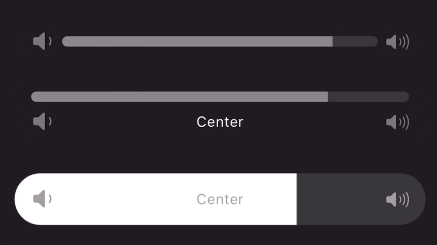
Um widget de controle deslizante contínuo interativo com tema Cupertino.

Capa do projeto slider interativo
Estrelas
16
Forks
15
Último push (UTC)
20 de jan. de 2025
Status do projeto
Ativo

README original

Texto original em inglês. Visite o GitHub para a versão atual.

A continuous or segmented slider widget inspired by the volume slider in the Apple Music app. This widget can be used with little to no setup but is still fully customizable!

Animated gif of slider being used Animated gif of slider being used Animated gif of slider being used

Features

Use the stock slider or customize:

  • Built in padding for convenience
  • Adjustable size transition
  • Use any widget for a start/end icon and center label
  • Use any transition duration and curve
  • Provide any shape border for the progress bar
  • Use the normalized progress value or easily provide a min/max to be automatically transformed
  • Animate start and end icons using slider progress
  • Color the slider's porgress with a gradient
  • Create any number of discrete segments to slide through

Getting started

Add to your dependencies:

dependencies:
  interactive_slider: ^0.5.0

Then import:

import 'package:interactive_slider/interactive_slider.dart';

Usage

InteractiveSlider(
  startIcon: const Icon(CupertinoIcons.volume_down),
  centerIcon: const Text('Center'),
  endIcon: const Icon(CupertinoIcons.volume_up),
  min: 1.0,
  max: 15.0,
  onChanged: (value) => setState(() => _value = value),
)

Additional information

Please report any bugs and open any pull requests via GitHub.

Jonas Zebari GitHub avatar
Autor no GitHub

Jonas Zebari ↗

Mobile Application Software Developer

LinguagensDartC++CMakeHTMLSwiftCKotlinObjective-C

Pacotes publicados por este repositório

Dependências usadas

Lista de dependências 3 itens

  • flutter{"sdk":"flutter"}
  • flutter_testDesenvolvimento{"sdk":"flutter"}
  • flutter_lintsDesenvolvimento^5.0.0

Como escolher um repositório para seu projeto?

Filtre pelo caso de uso, compare a atividade e confira o projeto original antes de adotá-lo.

  1. Busque por nome, autor ou descrição e filtre por tema.
  2. Compare estrelas, forks e envios recentes. Estrelas indicam interesse, mas não garantem qualidade.
  3. Confira o README, a licença e as issues no GitHub antes de usar o projeto.

Fontes e manutenção

“A repository is the most basic element of GitHub.”

GitHub Docs — About repositories ↗