Flutter 3D Controller
The most complete Flutter package for rendering interactive 3D models in various formats (GLB, GLTF, OBJ, FBX), with the ability to control animations, textures, camera, and more.
Why Flutter 3D Controller?
The Flutter 3D Controller package is the most comprehensive solution for rendering various 3D model formats, offering extensive functionality to give users optimal control over 3D models.
It leads in implementing new features, while some other packages have just copied Flutter 3D Controller's features and code without proper credit or adherence to licensing.
Notably, when testing other available packages, users may experience gesture malfunctions on iOS and certain Android devices. However, Flutter 3D Controller is the first and only package to resolve this issue with its gesture interceptor feature, introduced in version 2.0.0, released on October 5, 2024.
Features
- Mobile and Web stable version (fully support glb, gltf and obj format)
- macOS beta version
- Load 3D model from assets
- Load 3D model from URL
- Change 3D models by setState
- Gesture interceptor (Prevents gesture recognizers from malfunctioning)
- Controller model loading value listener
- Model loading states callbacks, onProgress, onLoad and onError
- Load obj 3D models with textures and mtl files
- Scale and camera properties for obj 3D models
- Play animation
- Play animation with loop count
- Switch between animations
- Pause animation
- Reset animation
- Stop animation
- Get available animations list
- Start rotation & set speed 🆕
- Pause rotation 🆕
- Stop rotation 🆕
- Switch between textures
- Get available textures list
- Set camera target
- Reset camera target
- Set camera orbit
- Reset camera orbit
- Default loading progressbar color
- Enable/disable touch control
Compatibility
- Android
- iOS
- Web
- macOS (Beta)
- Windows (Coming Soon)
Mobile & Web Samples
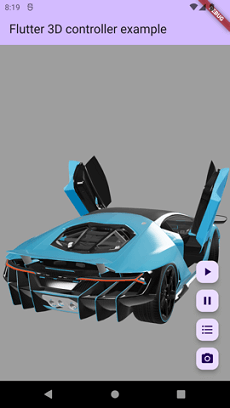
Model1 Model2 Model3 Model3 Model3
Model1 Model2 Model3 Model3 Model3
Desktop(macOS) Samples
macOS_Model1 macOS_Model2
Notes
- For now this package supports GLB, glTF and OBJ format, other 3D formats coming soon.
- Visit the full example to see how to use this package.
Brief Examples
How to use controller
//Create controller object to control 3D model.
Flutter3DController controller = Flutter3DController();

//Listen to model loading state via controller
controller.onModelLoaded.addListener(() {
  debugPrint('model is loaded : ${controller.onModelLoaded.value}');
});

//It will play 3D model animation, you can use it to play or switch between animations.
controller.playAnimation();

//If you pass specific animation name it will play that specific animation.
//If you pass null and your model has at least 1 animation it will play first animation.
controller.playAnimation(animationName: chosenAnimation);

//If you pass loopCount > 0, the animation will repeat for the specified number of times.
//To play the animation only once, set loopCount to 1.
controller.playAnimation(loopCount: 1);

//The loopCount argument can also be used with a specific animation.
controller.playAnimation(loopCount: 2, animationName: chosenAnimation);

//It will pause the animation at current frame.
controller.pauseAnimation();

//It will reset and play animation from first frame (from beginning).
controller.resetAnimation();

//It will stop the animation.
controller.stopAnimation();

//It will return available animation list of 3D model.
await controller.getAvailableAnimations();

//It will Starts the rotation of the 3D model with default speed value (10deg/second).
controller.startRotation();

//It will Starts the rotation of the 3D model with desire speed value deg/s.
controller.startRotation(rotationSpeed: 30);

//It will Pauses the ongoing rotation, keeping the 3D model at its current orientation.
controller.pauseRotation();

//It will Stops the rotation completely and resets the rotation state to the initial position.
controller.stopRotation();

//It will load desired texture of 3D model, you need to pass texture name.
controller.setTexture(textureName: chosenTexture);

//It will return available textures list of 3D model.
await controller.getAvailableTextures();

//It will set your desired camera target.
controller.setCameraTarget(0.3, 0.2, 0.4);

//It will reset the camera target to default.
controller.resetCameraTarget();

//It will set your desired camera orbit.
controller.setCameraOrbit(20, 20, 5);

//It will reset the camera orbit to default.
controller.resetCameraOrbit();
How to load glb and gltf models
//The 3D viewer widget for glb and gltf format
Flutter3DViewer(
    //If you pass 'true' the flutter_3d_controller will add gesture interceptor layer
    //to prevent gesture recognizers from malfunctioning on iOS and some Android devices.
    //the default value is true
    activeGestureInterceptor: true,
    //If you don't pass progressBarColor, the color of defaultLoadingProgressBar will be grey.
    //You can set your custom color or use [Colors.transparent] for hiding loadingProgressBar.
    progressBarColor: Colors.orange,
    //You can disable viewer touch response by setting 'enableTouch' to 'false'
    enableTouch: true,
    //This callBack will return the loading progress value between 0 and 1.0
    onProgress: (double progressValue) {
      debugPrint('model loading progress : $progressValue');
    },
    //This callBack will call after model loaded successfully and will return model address
    onLoad: (String modelAddress) {
      debugPrint('model loaded : $modelAddress');
    },
    //this callBack will call when model failed to load and will return failure error
    onError: (String error) {
      debugPrint('model failed to load : $error');
    },
    //You can have full control of 3d model animations, textures and camera
    controller: controller,
    src: 'assets/business_man.glb', //3D model with different animations
    //src: 'assets/sheen_chair.glb', //3D model with different textures
    //src: 'https://modelviewer.dev/shared-assets/models/Astronaut.glb', // 3D model from URL
)
How to load obj models
//The 3D viewer widget for obj format
Flutter3DViewer.obj(
    src: 'assets/flutter_dash.obj',
    //src: 'https://raw.githubusercontent.com/m-r-davari/content-holder/refs/heads/master/flutter_3d_controller/flutter_dash_model/flutter_dash.obj',
    scale: 5,
    // Initial scale of obj model
    cameraX: 0,
    // Initial cameraX position of obj model
    cameraY: 0,
    //Initial cameraY position of obj model
    cameraZ: 10,
    //Initial cameraZ position of obj model
    //This callBack will return the loading progress value between 0 and 1.0
    onProgress: (double progressValue) {
      debugPrint('model loading progress : $progressValue');
    },
    //This callBack will call after model loaded successfully and will return model address
    onLoad: (String modelAddress) {
      debugPrint('model loaded : $modelAddress');
    },
    //this callBack will call when model failed to load and will return failure erro
    onError: (String error) {
      debugPrint('model failed to load : $error');
    },
)
Installation
pubspec.yaml
dependencies:
  flutter_3d_controller: ^2.3.0
AndroidManifest.xml (Android only)
Configure your app's android/app/src/main/AndroidManifest.xml as follows:
+   <uses-permission android:name="android.permission.INTERNET"/>

     <application
        android:name="${applicationName}"
        android:icon="@mipmap/ic_launcher"
-       android:label="example">
+       android:label="example"
+       android:usesCleartextTraffic="true">
        <activity
            android:name=".MainActivity"
app/build.gradle (Android only)
Change minSdkVersion to 21.
defaultConfig {
    ...
    minSdkVersion 21
    ...
}
Info.plist (iOS only)
To use this package on iOS, you need to opt-in to the embedded views preview
by adding a boolean property to your app's ios/Runner/Info.plist file, with
the key io.flutter.embedded_views_preview and the value YES:
  <key>io.flutter.embedded_views_preview</key>
  <true/>
web/index.html (Web only)
Modify the <head> tag of your web/index.html to load the JavaScript, like so:
<head>
  <!-- Other stuff -->
    <script type="module" src="./assets/packages/flutter_3d_controller/assets/model_viewer.min.js" defer></script>
</head>
Outgoing Connections(Client) (macOS only)
For loading 3D models in macOS you need to configure the macOS App Sandbox by enabling the Outgoing Connections (Client) option in your MacOS XCode Project, under Runner > Signing & Capabilities.
macOS_runner_sc
AppDelegate.html (macOS only)
Add the following codes to your macOS AppDelegate file to support transparent background for flutter_3d_controller
import flutter_inappwebview_macos

extension InAppWebView {
    @objc public override func viewDidMoveToWindow() {
        super.viewDidMoveToWindow()

        if window != nil {
            print("InAppWebView moved to window, enforcing transparency")
            self.setValue(false, forKey: "opaque")
            self.setValue(false, forKey: "drawsBackground")
            self.layer?.backgroundColor = NSColor.clear.cgColor
        }
    }
}
Frequently Asked Questions
- Desktop(macOS) rare issues : You may experience unexpected issues in desktop(macOS) beta version.
- The 3D model could not load : First check the example, if models in examples loads, may be there is problem with your model or your model path.
- The animation list could not be retrieved : Check if there are any special characters in the animation names that might cause a JSON encoding error.
- The 3D model could not load from url : It might be due to [CORS] security restrictions. The server hosting the model file must send appropriate CORS response headers for viewer to be able to load the file. See google/model-viewer#1015
More Info
This package uses Google's model-viewer to render 3D models and it may have some issue in rendering some models/textures, the core of package (Model Viewer) will change in future to support all type of 3D models.


 v2.3.0