
 v1.0.4
page_route_animator
Pacote de transição de rota de página do Flutter, com 62 transições diferentes.
94Curtidas 114Downloads em 30 dias160Pontos Pub
AndroidiOSWebmacOSWindowsLinux
Pacote de transição de rota de página do Flutter, com 62 transições diferentes

{"sdk":"flutter"}{"sdk":"flutter"}^3.0.2Texto original em inglês. Visite o GitHub para a versão atual.
Flutter page route transition package, with 62 different page transitions.
flutter platform pub package BSD-3-Clause effective dart
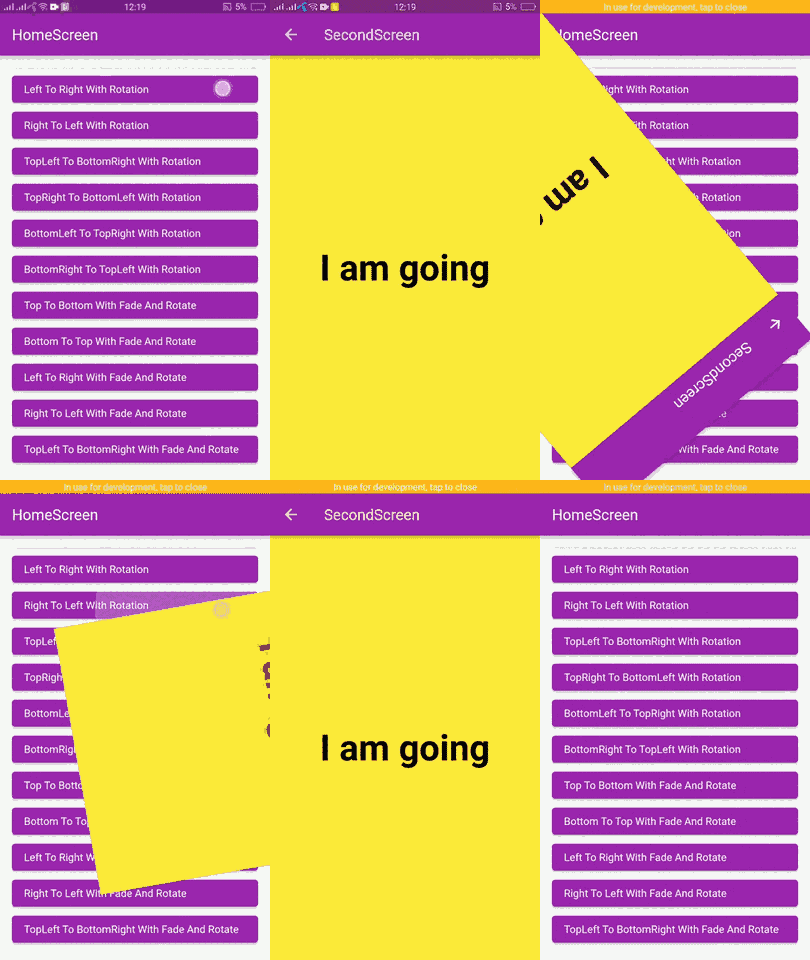
| page_route_animator_20_transitions_p1 | page_route_animator_20_transitions_p2 | page_route_animator_20_transitions_p3 |
In the pubspec.yaml of your flutter project, add the following dependency:
dependencies:
  page_route_transition: ^1.0.4
To use this package you have to import it in your file by using below command:
import 'package:page_route_animator/page_route_animator.dart';
import 'package:flutter/material.dart';
import 'package:page_route_animator/page_route_animator.dart';

void main(List<String> args) => runApp(const MyApp());

/// This widget is the root of your app.
class MyApp extends StatelessWidget {
  const MyApp({Key? key}) : super(key: key);

  @override
  Widget build(BuildContext context) {
    return MaterialApp(
      debugShowCheckedModeBanner: false,
      title: 'Page Route Animator Code Example',
      theme: ThemeData(primarySwatch: Colors.purple),
      home: const HomeScreen(),

      /// using onGenerateRoute
      onGenerateRoute: (settings) {

        switch (settings.name) {
          case '/second-screen':
            return PageRouteAnimator(
              child: const SecondScreen(),
              routeAnimation: RouteAnimation.topToBottom,
              settings: settings,
              curve: Curves.linear,
              duration: const Duration(milliseconds: 500),
              reverseDuration: const Duration(milliseconds: 500),
            );
          default:
            return null;
        }
      },
    );
  }
}

/// HomeScreen
class HomeScreen extends StatelessWidget {
  const HomeScreen({Key? key}) : super(key: key);

  @override
  Widget build(BuildContext context) {
    return Scaffold(
      appBar: AppBar(
        title: const Text('HomeScreen'),
      ),
      body: Padding(
        padding: const EdgeInsets.all(16.0),
        child: ListView(
          children: [
            /// Push using onGenerateRoute
            /// Navigator.pushNamed()
            ElevatedButton(
              onPressed: () {
                Navigator.pushNamed(
                  context,
                  '/second-screen',
                  arguments: 'I am going',
                );
              },
              child: getText('Top To Bottom - onGenerateRoute'),
            ),

            /// Navigator.push()
            ElevatedButton(
              onPressed: () {
                Navigator.push(
                  context,
                  PageRouteAnimator(
                    child: const SecondScreen(),
                    routeAnimation: RouteAnimation.bottomToTop,
                    settings: const RouteSettings(arguments: 'I am going'),
                    curve: Curves.slowMiddle,
                    duration: const Duration(milliseconds: 500),
                    reverseDuration: const Duration(milliseconds: 500),
                  ),
                );
              },
              child: getText('Bottom To Top'),
            ),

            ElevatedButton(
              onPressed: () {
                Navigator.push(
                  context,
                  PageRouteAnimator(
                    child: const SecondScreen(),
                    routeAnimation: RouteAnimation.leftToRight,
                    settings: const RouteSettings(arguments: 'I am going'),
                    curve: Curves.linear,
                  ),
                );
              },
              child: getText('Left To Right'),
            ),

            ElevatedButton(
              onPressed: () {
                Navigator.push(
                  context,
                  PageRouteAnimator(
                    child: const SecondScreen(),
                    routeAnimation: RouteAnimation.rightToLeft,
                    settings: const RouteSettings(arguments: 'I am going'),
                    curve: Curves.easeOut,
                  ),
                );
              },
              child: getText('Right To left'),
            ),

            ElevatedButton(
              onPressed: () {
                Navigator.push(
                  context,
                  PageRouteAnimator(
                    child: const SecondScreen(),
                    routeAnimation: RouteAnimation
                        .bottomRightToTopLeftWithFadeRotateAndScale,
                    settings: const RouteSettings(arguments: 'I am going'),
                    curve: Curves.easeOut,
                  ),
                );
              },
              child:
                  getText('BottomRight To TopLeft With Fade, Rotate And Scale'),
            ),
          ],
        ),
      ),
    );
  }
}

/// SecondScreen
class SecondScreen extends StatelessWidget {
  const SecondScreen({Key? key}) : super(key: key);

  @override
  Widget build(BuildContext context) {
    String? argument = ModalRoute.of(context)?.settings.arguments as String?;
    return Scaffold(
      backgroundColor: Colors.yellow,
      appBar: AppBar(
        title: const Text('SecondScreen'),
      ),
      body: Center(
        child: Text(
          argument ?? 'No Data',
          style: const TextStyle(
            fontSize: 48.0,
            fontWeight: FontWeight.bold,
            color: Colors.black,
          ),
        ),
      ),
    );
  }
}

// Helper Widget
Widget getText(String text) {
  return Align(
    alignment: Alignment.centerLeft,
    child: Text(text),
  );
}
Learn about Curves from official docs, curves.