Buscar pacotes, repositórios e categorias de apps

Capa de page_route_animator
Detalhes do pacotev1.0.4

page_route_animator

Pacote de transição de rota de página do Flutter, com 62 transições diferentes.

AndroidiOSWebmacOSWindowsLinux
Downloads em 30 dias
138
Curtidas
95
Pontos Pub
160

Instalar pacote

flutter pub add page_route_animator

Visão geral do pacote

Orientação gerada a partir de informações públicas. Apenas para referência.

Um pacote Flutter que fornece 62 transições de rota de página integradas para aprimorar as animações de navegação. Simplifica a implementação de transições de tela dinâmicas e visualmente atraentes em todas as plataformas. Os desenvolvedores podem facilmente aplicar animações pré-definidas, como deslizar, desvanecer, escalar e efeitos personalizados com pouca codificação. O pacote suporta todas as principais plataformas, incluindo Android, iOS, Web, macOS, Windows e Linux, garantindo comportamento consistente entre dispositivos. Ideal para aplicativos que buscam melhorar a experiência do usuário por meio de fluxos de navegação suaves e envolventes.

Casos de uso

  • Melhorando a navegação do aplicativo com transições suaves
  • Criando experiências imersivas de onboarding
  • Adicionando acabamento visual às alterações de guia ou tela
  • Criando tutoriais interativos
  • Projetando interfaces modernas com navegação animada
  • Melhorando o engajamento do usuário por meio de transições dinâmicas

Principais recursos

  • 62 animações de transição pré-construídas
  • API simples com configuração intuitiva
  • Compatibilidade multiplataforma
  • Parâmetros de animação personalizáveis
  • Suporte para transições de empurrar e puxar
  • Leve e fácil de integrar

Indicado para

  • Desenvolvedores Flutter procurando efeitos de navegação ricos
  • Aplicativos que exigem fluxos de onboarding ou tutoriais bem acabados
  • Designers focados em experiência do usuário e design de movimento
  • Projetos com foco em interfaces modernas e animadas
  • Desenvolvedores que querem implementação rápida de transição sem codificação complexa

Considerações

  • Pode aumentar ligeiramente o tamanho do pacote devido às animações incluídas
  • Algumas animações avançadas podem exigir ajustes de desempenho em dispositivos de baixa potência
  • Personalização limitada para lógica de transição altamente única
  • Não ideal para aplicativos que priorizam minimalismo em vez de animação
  • Requer entendimento do sistema de Navigator e roteamento do Flutter

README original

Snapshot do README original do repositório-fonte vinculado. Consulte o repositório para o conteúdo mais recente.

Page Route Animator Package

Flutter page route transition package, with 62 different page transitions.

flutter platform pub package BSD-3-Clause effective dart

Examples

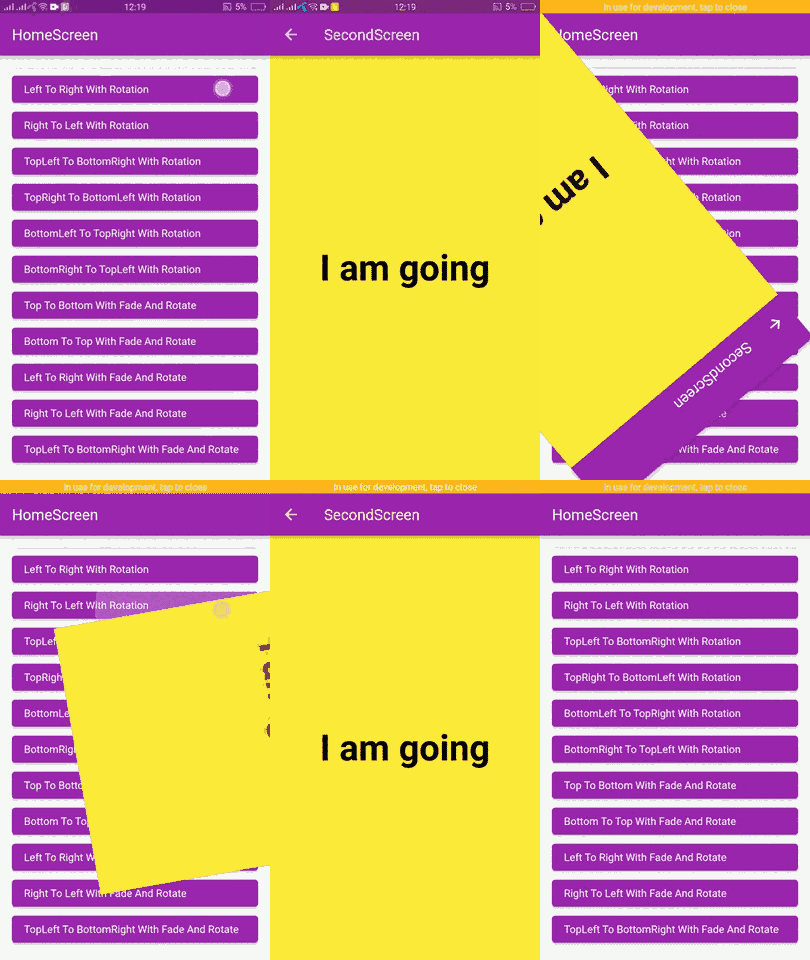
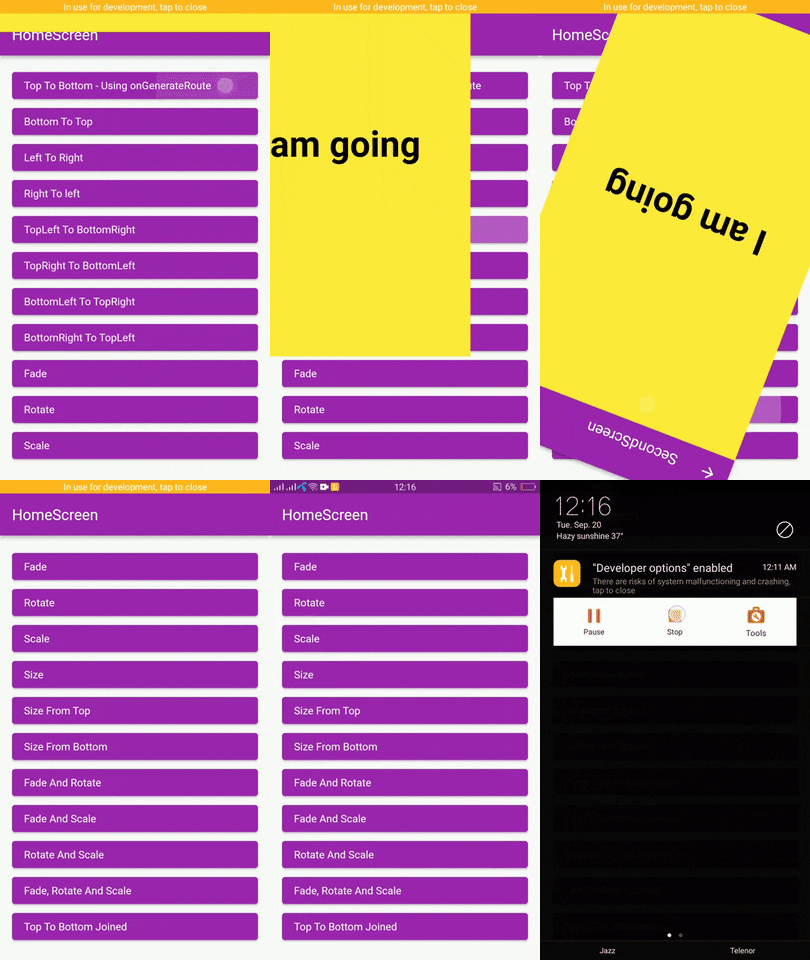
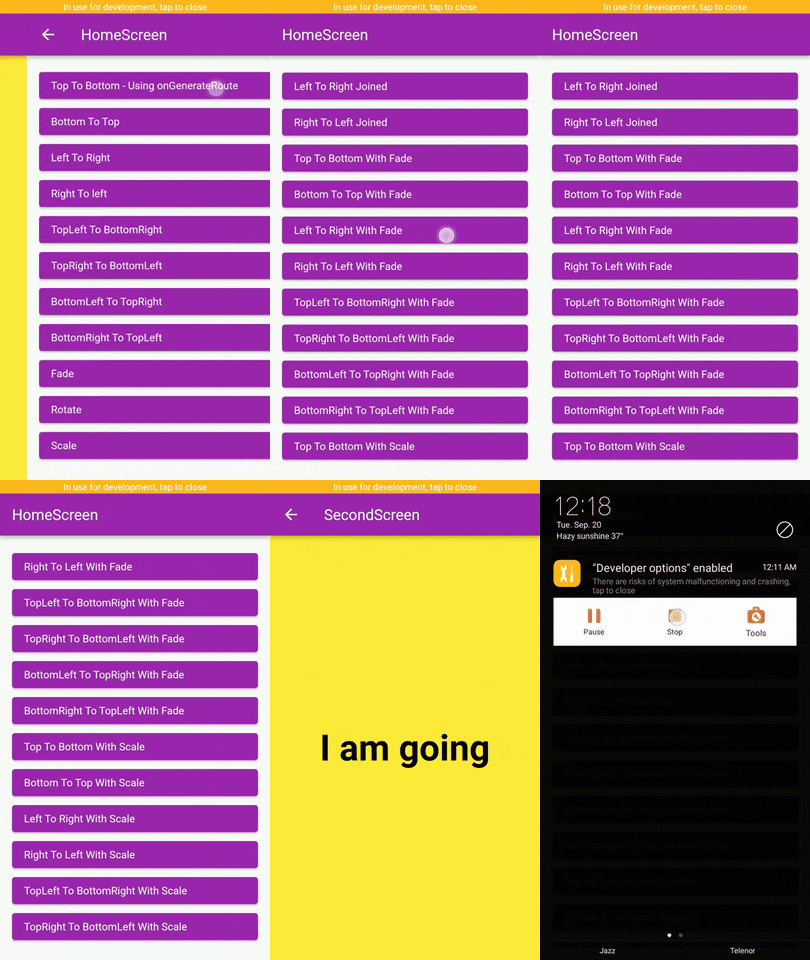
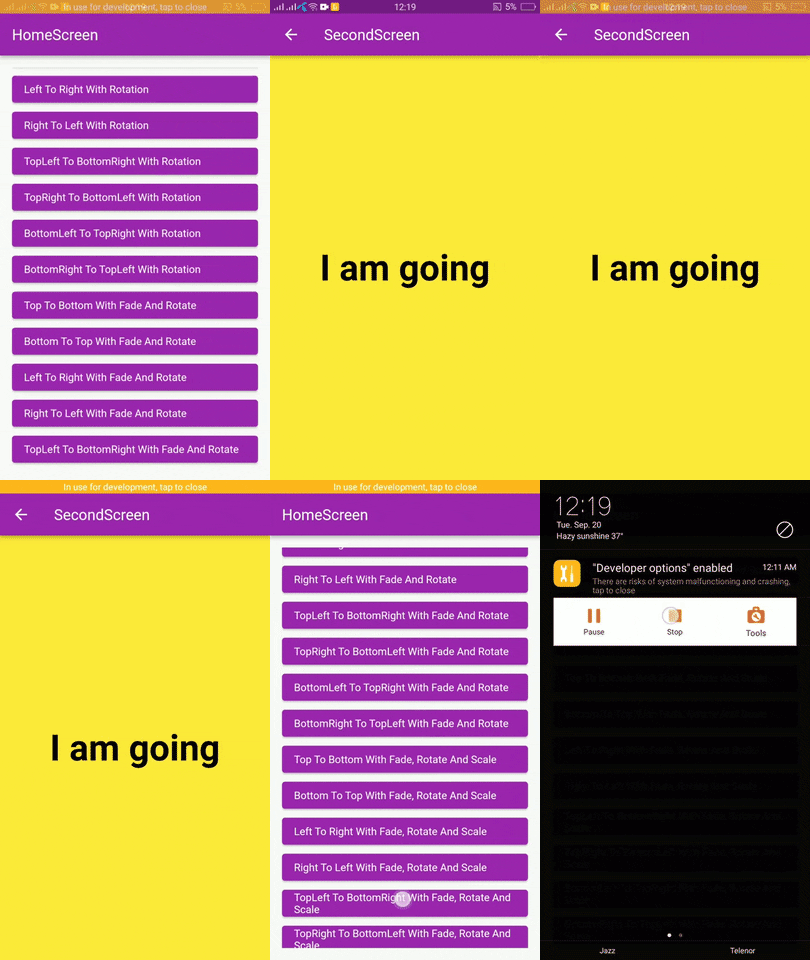
page_route_animator_20_transitions_p1 page_route_animator_20_transitions_p2 page_route_animator_20_transitions_p3

Getting Started

In the pubspec.yaml of your flutter project, add the following dependency:

dependencies:
  page_route_transition: ^1.0.4

Usage

To use this package you have to import it in your file by using below command:

import 'package:page_route_animator/page_route_animator.dart';

Code Example

import 'package:flutter/material.dart';
import 'package:page_route_animator/page_route_animator.dart';

void main(List<String> args) => runApp(const MyApp());

/// This widget is the root of your app.
class MyApp extends StatelessWidget {
  const MyApp({Key? key}) : super(key: key);

  @override
  Widget build(BuildContext context) {
    return MaterialApp(
      debugShowCheckedModeBanner: false,
      title: 'Page Route Animator Code Example',
      theme: ThemeData(primarySwatch: Colors.purple),
      home: const HomeScreen(),

      /// using onGenerateRoute
      onGenerateRoute: (settings) {

        switch (settings.name) {
          case '/second-screen':
            return PageRouteAnimator(
              child: const SecondScreen(),
              routeAnimation: RouteAnimation.topToBottom,
              settings: settings,
              curve: Curves.linear,
              duration: const Duration(milliseconds: 500),
              reverseDuration: const Duration(milliseconds: 500),
            );
          default:
            return null;
        }
      },
    );
  }
}

/// HomeScreen
class HomeScreen extends StatelessWidget {
  const HomeScreen({Key? key}) : super(key: key);

  @override
  Widget build(BuildContext context) {
    return Scaffold(
      appBar: AppBar(
        title: const Text('HomeScreen'),
      ),
      body: Padding(
        padding: const EdgeInsets.all(16.0),
        child: ListView(
          children: [
            /// Push using onGenerateRoute
            /// Navigator.pushNamed()
            ElevatedButton(
              onPressed: () {
                Navigator.pushNamed(
                  context,
                  '/second-screen',
                  arguments: 'I am going',
                );
              },
              child: getText('Top To Bottom - onGenerateRoute'),
            ),

            /// Navigator.push()
            ElevatedButton(
              onPressed: () {
                Navigator.push(
                  context,
                  PageRouteAnimator(
                    child: const SecondScreen(),
                    routeAnimation: RouteAnimation.bottomToTop,
                    settings: const RouteSettings(arguments: 'I am going'),
                    curve: Curves.slowMiddle,
                    duration: const Duration(milliseconds: 500),
                    reverseDuration: const Duration(milliseconds: 500),
                  ),
                );
              },
              child: getText('Bottom To Top'),
            ),

            ElevatedButton(
              onPressed: () {
                Navigator.push(
                  context,
                  PageRouteAnimator(
                    child: const SecondScreen(),
                    routeAnimation: RouteAnimation.leftToRight,
                    settings: const RouteSettings(arguments: 'I am going'),
                    curve: Curves.linear,
                  ),
                );
              },
              child: getText('Left To Right'),
            ),

            ElevatedButton(
              onPressed: () {
                Navigator.push(
                  context,
                  PageRouteAnimator(
                    child: const SecondScreen(),
                    routeAnimation: RouteAnimation.rightToLeft,
                    settings: const RouteSettings(arguments: 'I am going'),
                    curve: Curves.easeOut,
                  ),
                );
              },
              child: getText('Right To left'),
            ),

            ElevatedButton(
              onPressed: () {
                Navigator.push(
                  context,
                  PageRouteAnimator(
                    child: const SecondScreen(),
                    routeAnimation: RouteAnimation
                        .bottomRightToTopLeftWithFadeRotateAndScale,
                    settings: const RouteSettings(arguments: 'I am going'),
                    curve: Curves.easeOut,
                  ),
                );
              },
              child:
                  getText('BottomRight To TopLeft With Fade, Rotate And Scale'),
            ),
          ],
        ),
      ),
    );
  }
}

/// SecondScreen
class SecondScreen extends StatelessWidget {
  const SecondScreen({Key? key}) : super(key: key);

  @override
  Widget build(BuildContext context) {
    String? argument = ModalRoute.of(context)?.settings.arguments as String?;
    return Scaffold(
      backgroundColor: Colors.yellow,
      appBar: AppBar(
        title: const Text('SecondScreen'),
      ),
      body: Center(
        child: Text(
          argument ?? 'No Data',
          style: const TextStyle(
            fontSize: 48.0,
            fontWeight: FontWeight.bold,
            color: Colors.black,
          ),
        ),
      ),
    );
  }
}

// Helper Widget
Widget getText(String text) {
  return Align(
    alignment: Alignment.centerLeft,
    child: Text(text),
  );
}

Types Of Transitions

  • topToBottom,
  • bottomToTop,
  • leftToRight,
  • rightToLeft,
  • fade,
  • rotate,
  • scale,
  • size,
  • sizeFromTop,
  • sizeFromBottom,
  • fadeAndRotate,
  • fadeAndScale,
  • rotateAndScale,
  • fadeRotateAndScale,
  • topToBottomJoined,
  • bottomToTopJoined,
  • leftToRightJoined,
  • rightToLeftJoined,
  • topLeftToBottomRight,
  • topRightToBottomLeft,
  • bottomLeftToTopRight,
  • bottomRightToTopLeft,
  • topToBottomWithFade,
  • bottomToTopWithFade,
  • leftToRightWithFade,
  • rightToLeftWithFade,
  • topLeftToBottomRightWithFade,
  • bottomLeftToTopRightWithFade,
  • bottomRightToTopLeftWithFade,
  • topRightToBottomLeftWithFade,
  • topToBottomWithRotation,
  • bottomToTopWithRotation,
  • leftToRightWithRotation,
  • rightToLeftWithRotation,
  • topLeftToBottomRightWithRotation,
  • bottomLeftToTopRightWithRotation,
  • bottomRightToTopLeftWithRotation,
  • topRightToBottomLeftWithRotation,
  • topToBottomWithFadeAndRotate,
  • bottomToTopWithFadeAndRotate,
  • leftToRightWithFadeAndRotate,
  • rightToLeftWithFadeAndRotate,
  • topLeftToBottomRightWithFadeAndRotate,
  • topRightToBottomLeftWithFadeAndRotate,
  • bottomLeftToTopRightWithFadeAndRotate,
  • bottomRightToTopLeftWithFadeAndRotate,
  • topToBottomWithScale,
  • bottomToTopWithScale,
  • leftToRightWithScale,
  • rightToLeftWithScale,
  • topLeftToBottomRightWithScale,
  • topRightToBottomLeftWithScale,
  • bottomLeftToTopRightWithScale,
  • bottomRightToTopLeftWithScale,
  • topToBottomWithFadeRotateAndScale,
  • bottomToTopWithFadeRotateAndScale,
  • leftToRightWithFadeRotateAndScale,
  • rightToLeftWithFadeRotateAndScale,
  • topLeftToBottomRightWithFadeRotateAndScale,
  • topRightToBottomLeftWithFadeRotateAndScale,
  • bottomLeftToTopRightWithFadeRotateAndScale,
  • bottomRightToTopLeftWithFadeRotateAndScale,

Curves

Learn about Curves from official docs, curves.

License

BSD 3-Clause

Categorias

Repositório-fonte

Projetos que usam este pacote

Ainda não há dados.