
 v0.0.2+3
camera_deep_ar
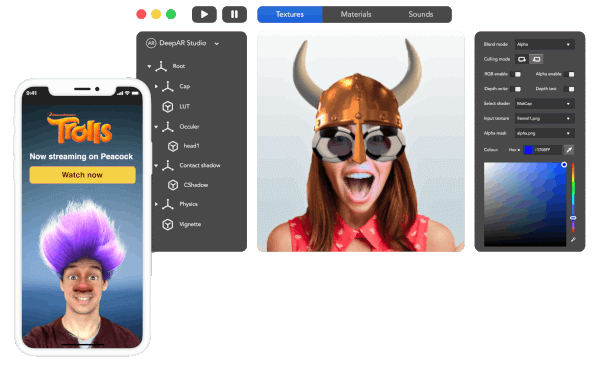
Um plugin Flutter para gravação de vídeo e foto com realidade aumentada da câmera.
95Curtidas 13Downloads em 30 dias120Pontos Pub
AndroidiOS
mtellect/CameraDeepAR open-source repository details.
Texto original em inglês. Visite o GitHub para a versão atual.
A new Flutter plugin for Camera video and Photo Augmented reality recording. This plug-in requires Android SDK 19+ and iOS 10+
Please follow the example on the dev channel https://github.com/mtellect/CameraDeepAR/tree/dev as the dev channel has the recent code updates
Get your ApiKeys from DeepAr a link

import 'package:camera_deep_ar/camera_deep_ar.dart';

class MyApp extends StatefulWidget {
  @override
  _MyAppState createState() => _MyAppState();
}

class _MyAppState extends State<MyApp> {
  String _platformVersion = 'Unknown';
  CameraDeepArController cameraDeepArController;
  int currentPage = 0;
  final vp = PageController(viewportFraction: .24);
  Effects currentEffect = Effects.none;
  Filters currentFilter = Filters.none;
  Masks currentMask = Masks.none;
  bool isRecording = false;

  @override
  void initState() {
    super.initState();
  }

  @override
  Widget build(BuildContext context) {
    return MaterialApp(
      home: Scaffold(
        backgroundColor: Colors.black,
        appBar: AppBar(
          title: const Text('DeepAR Camera Example'),
        ),
        body: Stack(
          children: [
            CameraDeepAr(
                onCameraReady: (isReady) {
                  _platformVersion = "Camera status $isReady";
                  setState(() {});
                },
                onImageCaptured: (path) {
                  _platformVersion = "Image Taken @ $path";
                  setState(() {});
                },
                onVideoRecorded: (path) {
                  _platformVersion = "Video Recorded @ $path";
                  isRecording = false;
                  setState(() {});
                },
                androidLicenceKey:
                    "3b58c448bd650192e7c53d965cfe5dc1c341d2568b663a3962b7517c4ac6eeed0ba1fb2afe491a4b",
                iosLicenceKey:
                    "53618212114fc16bbd7499c0c04c2ca11a4eed188dc20ed62a7f7eec02b41cb34d638e72945a6bf6",
                cameraDeepArCallback: (c) async {
                  cameraDeepArController = c;
                  setState(() {});
                }),
            Align(
              alignment: Alignment.bottomCenter,
              child: Container(
                padding: EdgeInsets.all(20),
                //height: 250,
                child: Column(
                  mainAxisSize: MainAxisSize.min,
                  mainAxisAlignment: MainAxisAlignment.end,
                  children: [
                    Text(
                      'Response >>> : $_platformVersion\n',
                      textAlign: TextAlign.center,
                      style: TextStyle(fontSize: 14, color: Colors.white),
                    ),
                    SizedBox(
                      height: 20,
                    ),
                    Row(
                      children: [
                        Expanded(
                          child: FlatButton(
                            onPressed: () {
                              if (null == cameraDeepArController) return;
                              if (isRecording) return;
                              cameraDeepArController.snapPhoto();
                            },
                            child: Icon(Icons.camera_enhance_outlined),
                            color: Colors.white,
                            padding: EdgeInsets.all(15),
                          ),
                        ),
                        if (isRecording)
                          Expanded(
                            child: FlatButton(
                              onPressed: () {
                                if (null == cameraDeepArController) return;
                                cameraDeepArController.stopVideoRecording();
                                isRecording = false;
                                setState(() {});
                              },
                              child: Icon(Icons.videocam_off),
                              color: Colors.red,
                              padding: EdgeInsets.all(15),
                            ),
                          )
                        else
                          Expanded(
                            child: FlatButton(
                              onPressed: () {
                                if (null == cameraDeepArController) return;
                                cameraDeepArController.startVideoRecording();
                                isRecording = true;
                                setState(() {});
                              },
                              child: Icon(Icons.videocam),
                              color: Colors.green,
                              padding: EdgeInsets.all(15),
                            ),
                          ),
                      ],
                    ),
                    SingleChildScrollView(
                      padding: EdgeInsets.all(15),
                      scrollDirection: Axis.horizontal,
                      child: Row(
                        children: List.generate(Masks.values.length, (p) {
                          bool active = currentPage == p;
                          return GestureDetector(
                            onTap: () {
                              currentPage = p;
                              cameraDeepArController.changeMask(p);
                              setState(() {});
                            },
                            child: Container(
                                margin: EdgeInsets.all(5),
                                padding: EdgeInsets.all(12),
                                width: active ? 100 : 80,
                                height: active ? 100 : 80,
                                alignment: Alignment.center,
                                decoration: BoxDecoration(
                                    color:
                                        active ? Colors.orange : Colors.white,
                                    shape: BoxShape.circle),
                                child: Text(
                                  "$p",
                                  textAlign: TextAlign.center,
                                  style: TextStyle(
                                      fontSize: active ? 16 : 14,
                                      color: Colors.black),
                                )),
                          );
                        }),
                      ),
                    )
                  ],
                ),
              ),
            )
          ],
        ),
      ),
    );
  }
}
cameraDeepArController.snapPhoto();
cameraDeepArController.startVideoRecording();
cameraDeepArController.stopVideoRecording();
cameraDeepArController.stopVideoRecording();
cameraDeepArController.changeMask(p);
More to come....
You can use Permission_handler, a permissions plugin for Flutter. Require and add the following permissions in your manifest:
Add this to the proguard-rules.pro
-keepclassmembers class ai.deepar.ar.DeepAR { *; }
for release mode modify and add to your BuildType in your build.gradle
    buildTypes {
        release {
            // TODO: Add your own signing config for the release build.
            // Signing with the debug keys for now, so `flutter run --release` works.
            signingConfig signingConfigs.debug
            proguardFiles getDefaultProguardFile('proguard-android.txt'), 'proguard-rules.pro'
        }
    }
    <uses-permission android:name="android.permission.FLASHLIGHT" />
    <uses-permission android:name="android.permission.WAKE_LOCK" />
    <uses-permission android:name="android.permission.READ_EXTERNAL_STORAGE" />
    <uses-permission android:name="android.permission.WRITE_EXTERNAL_STORAGE" />
    <uses-permission android:name="android.permission.ACCESS_COARSE_LOCATION" />
    <uses-permission android:name="android.permission.ACCESS_FINE_LOCATION" />
    <uses-permission android:name="android.permission.RECORD_AUDIO" />
    <uses-permission android:name="android.permission.SYSTEM_ALERT_WINDOW" />
    <uses-permission android:name="android.permission.CAMERA" />
    <uses-feature android:name="android.hardware.camera.front" />
    <uses-feature android:name="android.hardware.microphone" />
    <uses-feature android:name="android.hardware.camera2" />
    <uses-feature
        android:name="android.hardware.camera.autofocus"
        android:required="true" />
    <uses-feature android:name="android.hardware.camera.flash" />
    <uses-permission android:name="android.permission.READ_PHONE_STATE" />
You only need add the permission message on the Info.plist
    <key>NSCameraUsageDescription</key>
    <string>Allows you to capture your best moment</string>
	<key>io.flutter.embedded_views_preview</key>
	<true/>
    <key>NSPhotoLibraryAddUsageDescription</key>
    <string>Allows you to capture your best moment</string>
    <key>NSMicrophoneUsageDescription</key>
    <string>Needs access to your mic to help your record voice notes on chat/message conversations</string>

Lista de dependências 2 itens
{"sdk":"flutter"}{"sdk":"flutter"}Filtre pelo caso de uso, compare a atividade e confira o projeto original antes de adotá-lo.
“A repository is the most basic element of GitHub.”
GitHub Docs — About repositories ↗