
v1.0.0
sliver_calendar
Exiba uma visualização de calendário para o flutter.
22Curtidas 32Downloads em 30 dias40Pontos Pub
Plataformas indisponíveis
Widget de calendário para o Flutter
Texto original em inglês. Visite o GitHub para a versão atual.
Shows a scrolling calendar list of events. This is still relatively basic, it always assumes that the getEvents returns the entire list of calendar events (mostly ignoring the values passed into the source). It does work however :) Optionally, you can use an image as a background for the calendar header and another image for the month header.
The calendar uses slivers to display the widgets in the view and lets you scroll forward and backward through the events. The header widget will drop down and open up the days of the month, letting you select specific days as well as move back and forth between the months. By default it displays a list of events and not a day view, the day view code is all just a stub right now.
Here is how to use the calendar widget itself:
new CalendarWidget(
              initialDate: new TZDateTime.now(local),
              buildItem: buildItem,
              getEvents: getEvents,
            );
How to setup a source for the calendar widget.
...
  List<Game> _listToShow;
  StreamSubscription<UpdateReason> _listening;

  @override
  Widget buildItem(BuildContext context, CalendarEvent event) {
    return new GameCard(_listToShow[event.index]);
  }

  @override
  List<CalendarEvent> getEvents(DateTime start, DateTime end) {
    if (_listToShow == null) {
      _listToShow = UserDatabaseData.instance.games.values.toList();
    }
    if (_listToShow == null) {
      return [];
    }
    List<CalendarEvent> events = new List<CalendarEvent>();
    int pos = 0;
    _listToShow.forEach((Game g) => events.add(new CalendarEvent(
        instant: g.tzTime, instantEnd: g.tzEndTime, index: pos++)));
    return events;
  }
...
Example of the calendar widget in action:
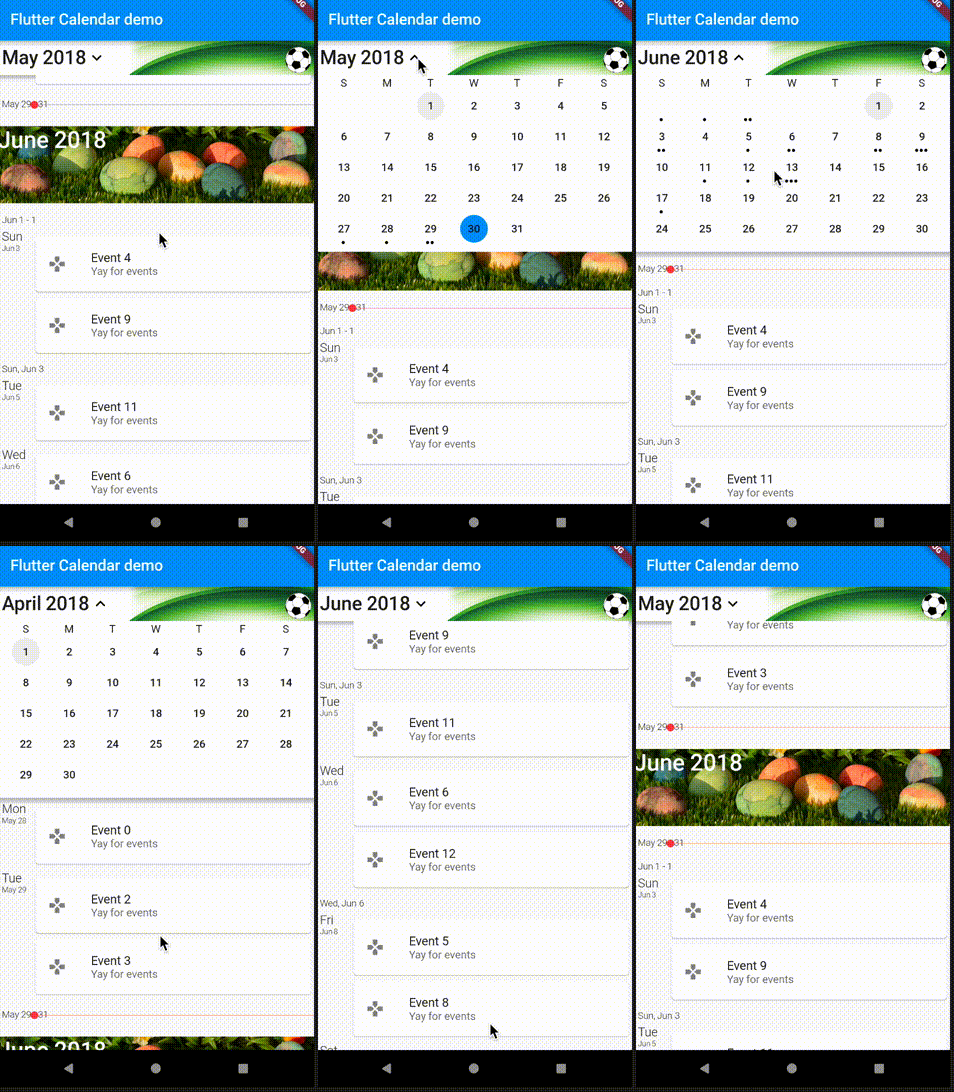
For help getting started with Flutter, view our online documentation.
For help on editing package code, view the documentation.

Filtre pelo caso de uso, compare a atividade e confira o projeto original antes de adotá-lo.
“A repository is the most basic element of GitHub.”
GitHub Docs — About repositories ↗