
Buscar pacotes, repositórios e categorias de apps

Detalhes do pacotev1.0.0

sliver_calendar

Exiba uma visualização de calendário para o flutter.

Downloads em 30 dias
32
Curtidas
22
Pontos Pub
40

Instalar pacote

flutter pub add sliver_calendar

Visão geral do pacote

Orientação gerada a partir de informações públicas. Apenas para referência.

Um pacote Flutter que fornece uma visualização de calendário baseada em sliver para exibir datas em um layout rolável e eficiente. Projetado para uso em visualizações de rolagem personalizadas, oferece rolagem suave e renderização dinâmica de datas. O pacote é ideal para aplicativos que exigem uma interface de calendário limpa e interativa com pouco código boilerplate. Integra-se perfeitamente em projetos existentes do Flutter usando o comando de adição fornecido.

Casos de uso

  • Exibindo eventos diários em um calendário rolagem
  • Construindo interfaces de agendamento de compromissos
  • Integrando seletores de data em formulários roláveis
  • Criando aplicativos baseados em linha do tempo
  • Implementando visualizações de calendário em painéis

Principais recursos

  • Otimização de desempenho baseada em Sliver
  • Estilo personalizável da célula de data
  • Suporte para marcadores de evento
  • Controles de navegação embutidos
  • Renderização eficiente para grandes intervalos de datas

Indicado para

  • Desenvolvedores criando interfaces de calendário roláveis
  • Aplicativos que precisam de componentes de calendário leves
  • Projetos usando CustomScrollView
  • Equipes que priorizam desempenho e escalabilidade
  • Iniciantes do Flutter explorando slivers

Considerações

  • Requer integração dentro de um CustomScrollView
  • Gerenciamento de eventos embutido limitado
  • Sem suporte nativo de localização
  • Pode ser necessário estilos adicionais para temas complexos
  • Depende de gerenciamento externo de estado para dados de evento
README original

Snapshot do README original do repositório-fonte vinculado. Consulte o repositório para o conteúdo mais recente.

Calendar

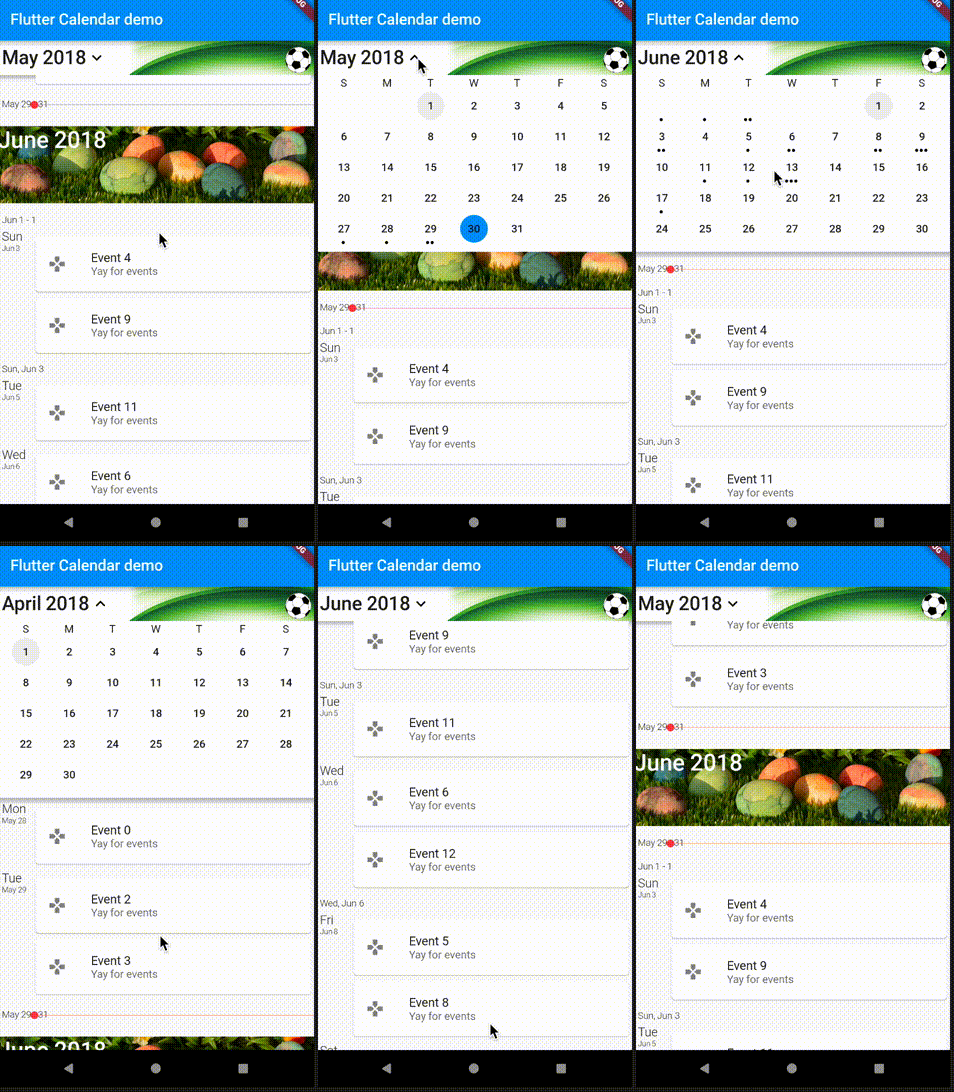
Shows a scrolling calendar list of events. This is still relatively basic, it always assumes that the getEvents returns the entire list of calendar events (mostly ignoring the values passed into the source). It does work however :) Optionally, you can use an image as a background for the calendar header and another image for the month header.

The calendar uses slivers to display the widgets in the view and lets you scroll forward and backward through the events. The header widget will drop down and open up the days of the month, letting you select specific days as well as move back and forth between the months. By default it displays a list of events and not a day view, the day view code is all just a stub right now.

Here is how to use the calendar widget itself:

new CalendarWidget(
              initialDate: new TZDateTime.now(local),
              buildItem: buildItem,
              getEvents: getEvents,
            );

How to setup a source for the calendar widget.

...
  List<Game> _listToShow;
  StreamSubscription<UpdateReason> _listening;

  @override
  Widget buildItem(BuildContext context, CalendarEvent event) {
    return new GameCard(_listToShow[event.index]);
  }

  @override
  List<CalendarEvent> getEvents(DateTime start, DateTime end) {
    if (_listToShow == null) {
      _listToShow = UserDatabaseData.instance.games.values.toList();
    }
    if (_listToShow == null) {
      return [];
    }
    List<CalendarEvent> events = new List<CalendarEvent>();
    int pos = 0;
    _listToShow.forEach((Game g) => events.add(new CalendarEvent(
        instant: g.tzTime, instantEnd: g.tzEndTime, index: pos++)));
    return events;
  }
...

Example of the calendar widget in action:

Getting Started

For help getting started with Flutter, view our online documentation.

For help on editing package code, view the documentation.

Categorias

Dependências

Lista de dependências 3 itens

Repositório-fonte

Projetos que usam este pacote

Ainda não há dados.