detectable_text_field
All Contributors
pub package License: MIT
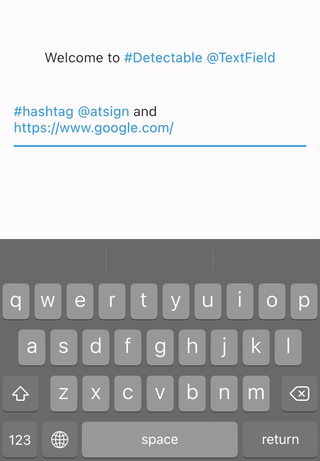
Text widgets with detection features. You can detect hashtags, at sign, url, or anything you want.
Helps you develop Twitter like app.
Refinement of hashtagable.
final
Usage
DetectableTextField
    DetectableTextField(
      detectionRegExp: detectionRegExp(),
      detectedStyle: TextStyle(
        fontSize: 20,
        color: Colors.blue,
      ),
    )
detectionRegExp decides the text to detect.detectedStyle is the textStyle for detected text.
DetectableTextEditingController
DetectableTextEditingController allows you to listen to the typingDetection. Ideal for features
like live hashtag or mention detection.
    final controller = DetectableTextEditingController(
      regExp: detectionRegExp(),
    );

    @override
    void initState() {
      super.initState();
      controller.addListener(() {
        setState(() {});
      });
    }

    @override
    Widget build(BuildContext context) {
      return Column(
        mainAxisSize: MainAxisSize.min,
        mainAxisAlignment: MainAxisAlignment.center,
        children: <Widget>[
          Text(
            'Typing detection: ${controller.typingDetection}',
          ),
          DetectableTextField(
            controller: controller,
          ),
        ],
      );
    }
DetectableTextEditingController extends TextEditingController, so you can use it
with TextField, TextFormField or any other widgets that accept TextEditingController.
If you use flutter_hooks, useDetectableTextEditingController is also available.
DetectableText
If you want to use detection feature in the text only to display, use DetectableText.
    DetectableText(
      text: "#HashTag and @AtSign and https://pub.dev/packages/detectable_text_field",
      detectionRegExp: detectionRegExp(),
      detectedStyle: TextStyle(
        fontSize: 20,
        color: Colors.blue,
      ),
      basicStyle: TextStyle(
        fontSize: 20,
      ),
      onTap: (tappedText){
        print(tappedText);
      },
    )
Usage of the arguments like detectionRegExp are same as the ones in DetectableTextField.
The argument onTap(String) is called when user tapped a detected text.
detectionRegExp()
The widgets and methods in this package is expected to be used with RegExp.
The function detectionRegExp() returns sample regExp depending on the boolean arguments: hashtag
, atSign, and url.They are all true by default.
If you see
the API reference
, you will see the function just returns the sample regular expressions below. You can use them
directly if you want.
| sample regExp |
hashtag |
atSign |
url |
hashTagRegExp |
○ |
× |
× |
atSignRegExp |
× |
○ |
× |
urlRegExp |
× |
× |
○ |
hashTagAtSignRegExp |
○ |
○ |
× |
hashTagUrlRegExp |
○ |
× |
○ |
AtSignUrlRegExp |
× |
○ |
○ |
hashTagAtSignUrlRegExp |
○ |
○ |
○ |
- The detection rules are almost same as X(formally twitter).
- It needs space before
# or @.
- It stops
# and @ detection if there's emoji or symbol.
https://user-images.githubusercontent.com/43510799/93002102-3655f780-f56f-11ea-8193-1753a69e23bc.jpg
- The examples currently support six languages: English, Japanese, Korean, Spanish, Arabic, and
Thai.
Customize with useful functions
- Check if there are detections
  print(isDetected("Hello #World", hashTagRegExp));
// true

  print(isDetected("Hello World", hashTagRegExp));
// false
- Extract detections from text
  final List<String> detections = extractDetections(
    "#Hello World #Flutter Dart #Thank you",
    hashTagRegExp,
  );
  // ["#Hello", "#Flutter", "#Thank"]
If you have any requests or questions, please feel free to ask
on github.
Contributors ✨
Thanks goes to these wonderful people (emoji key):
This project follows the all-contributors
specification. Contributions of any kind welcome!


 v3.0.2