
 v0.3.1
input_slider
Uma entrada personalizável que sincroniza um Slider e um TextField.
25Curtidas 908Downloads em 30 dias150Pontos Pub
AndroidiOSWebmacOSWindowsLinux
Uma entrada personalizável que combina um Slider sincronizado com um TextField.

{"sdk":"flutter"}{"sdk":"flutter"}Texto original em inglês. Visite o GitHub para a versão atual.
While Sliders offer a quick and visual way to change a value, it can be hard to achieve precise inputs with them. Additionally, some users really dislike Sliders, and especially on small devices they can get quite fiddly. One way to use the advantages of having a Slider while minimizing the drawbacks is to add an additional alternativ (text) input field.
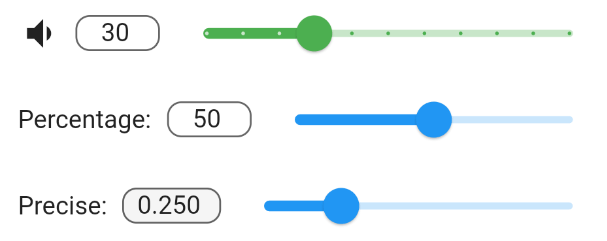
This packages InputSlider combines a TextField with a Slider and synchronizes both of them. They share the same minimum and maximum values and changes made to one also changes the other. Optionally, you can also specify a leading widget, such as a label Text or Icon.
grafik
InputSlider(
  onChange: (value) => print("change: $value"),
  min: 0.0,
  max: 100.0,
  decimalPlaces: 0,
  value: 50.0,
  leading: Text("Percentage:"),
)
You can group multiple InputSlider together using an InputSliderForm. By specifying leadingWeight and sliderWeight it is possible to align them together. They can be also styled together or individually.
InputSliderForm(
    leadingWeight: 1,
    sliderWeight: 20,
    activeSliderColor: Colors.red,
    inactiveSliderColor: Colors.green[100],
    filled: true,
    vertical: true,
    children: [
      InputSlider(
        onChange: (value) {
          print("Setting 1 changed");
        },
        min: 0.0,
        max: 10.0,
        decimalPlaces: 0,
        defaultValue: 5.0,
        leading: Text("Setting 1:"),
      ),
      InputSlider(
        onChange: (value) {
          print("Setting 2 changed");
        },
        min: 0.0,
        max: 1.0,
        decimalPlaces: 3,
        defaultValue: 0.32,
      ),
)
Sliders can be rotated by 90 degrees by setting vertical=true. This can be done to individual InputSliders or to InputSliderForms.
photo_2021-07-10_13-54-59