
 v0.0.1
passwordgrid
Pacote Flutter para gerar uma grade de senha. Este pacote oferece suporte a iOS, Android, MacOS e web.
1Curtidas 8Downloads em 30 dias150Pontos Pub
AndroidiOSWebmacOSWindowsLinux
Pacote Flutter para gerar uma grade de senha. Este pacote oferece suporte a iOS, Android, MacOS e web.

{"sdk":"flutter"}{"sdk":"flutter"}^5.0.0Texto original em inglês. Visite o GitHub para a versão atual.
A Flutter Package to Generate Password Grid. You can use this widget directly in your application UI.
A password grid, also called a "passcode grid," is a table with rows and columns containing unique letters or numbers where you select specific combinations to authenticate, essentially acting as a visual password by choosing specific coordinates on the grid to form your login credentials; to use it, you would typically be presented with a grid, then asked to enter the letters or numbers from specific grid positions (like "A3, B2, C1") to log in, usually requiring you to save or print the grid for future use as it's unique to your account.
While designing a authentication system, you can ask your users to enter the values in the Password grid as a 2FA passcode. The user will be prompted to access your grid, which you should generate and show them. The password grid can be generated at the time of user signin and they should save it for future use. so that the user can use the grid for 2FA authentication.
The system will ask the user to enter the letters or numbers from specific grid positions, usually indicated by a combination of a column letter and row number (e.g., "B2", A8, etc).
The user will enter the values from the requested grid coordinates into the 2FA login field to authenticate.
Since the user selects multiple characters from a grid, it's harder for someone to guess your password compared to a simple text-based password.
Less susceptible to "shoulder surfing" attacks where someone observes your password entry because the grid doesn't reveal the exact password sequence.
Can be easier for people who struggle with remembering complex passwords.
In your application,
import 'package:passwordgrid/main.dart';
then pass grid configuration
GridConfig config = GridConfig(
  numbers: true,
  alphaUpper: true,
  alphaLower: true,
  symbols: false,
  gridSize: 8, // max size is 8 and min size is 5
);
// or Optionally pass GridConfig or use default values
GridConfig? config;

// and invoke this
PasswordGrid passwordGrid = PasswordGrid(config: config);
// sample code
  @override
  Widget build(BuildContext context) {
    // pass grid configuration
    GridConfig config = GridConfig(
      numbers: true,
      alphaUpper: true,
      alphaLower: true,
      symbols: false,
      gridSize: 8, // max size is 8 and min size is 5
    );
    // or Optionally pass GridConfig or use default values
    // GridConfig? config;

    PasswordGrid passwordGrid = PasswordGrid(config: config);
    return Scaffold(
      appBar: AppBar(
        title: Text('Password Grid Example'),
        backgroundColor: Colors.green,
        centerTitle: true,
        titleTextStyle: TextStyle(
          color: Colors.white,
          fontSize: 24,
        ),
      ),
      body: Center(
        child: passwordGrid,
      ),
    );
  }
An example application of how to use this password grid package is included in the example folder.
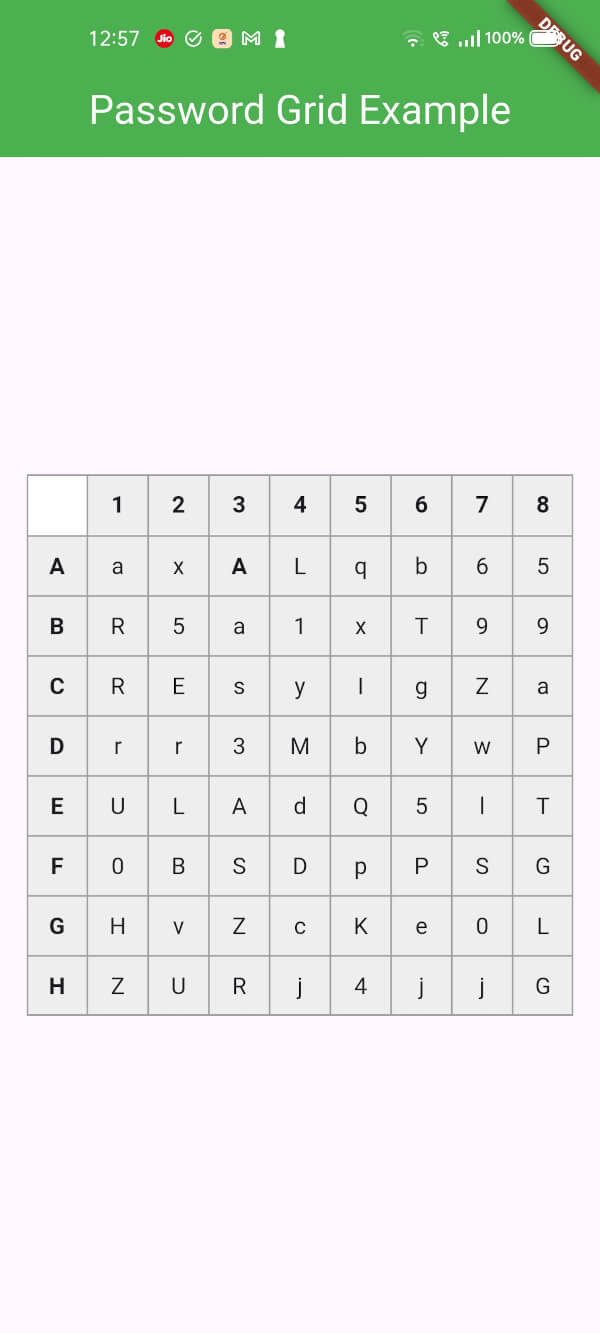
This will generate a password grid similar to
https://raw.githubusercontent.com/sundaramkumar/passwordgrid_flutter_package/HEAD/screenshots/grid.jpgWhile generating grid, you can configure the grid generation parameters.
  GridConfig config = GridConfig(
    numbers: false,
    alphaUpper: true,
    alphaLower: true,
    symbols: false,
    gridSize: 6, // max size is 8 and min size is 5
  );
If everything is set to false as below, then it is invalid, so grid parameters will be set to default. i.e., all falsg will be set to true
  GridConfig config = GridConfig(
    numbers: false,
    alphaUpper: false,
    alphaLower: false,
    symbols: false,
    gridSize: 6,
  );