
 v1.2.0
cote_network_logger
Ferramenta de desenvolvedor do Flutter bonita para monitoramento em tempo real da rede HTTP com painel web
28Curtidas 192Downloads em 30 dias150Pontos Pub
AndroidiOSmacOSWindowsLinux
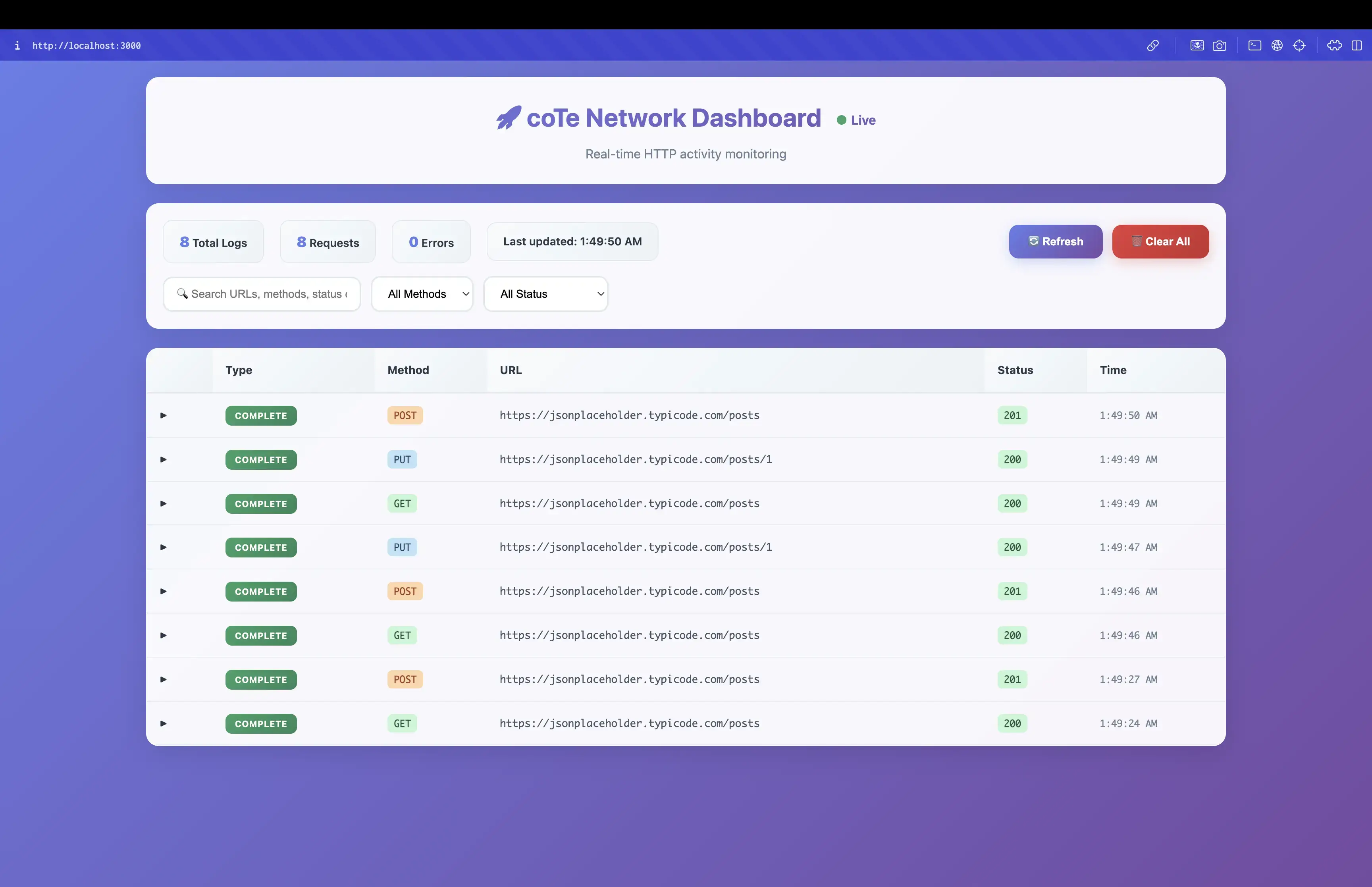
Ferramenta de desenvolvedor do Flutter para monitorar atividades de rede HTTP com um painel da web bonito

{"sdk":"flutter"}^5.4.0^1.4.1^1.1.0{"sdk":"flutter"}^5.0.0Texto original em inglês. Visite o GitHub para a versão atual.
A powerful Flutter package for real-time HTTP network monitoring during development and staging environments.
Add to your pubspec.yaml:
dependencies:
  cote_network_logger: ^1.0.5
Start the server in your main.dart:
import 'package:cote_network_logger/cote_network_logger.dart';

void main() async {
  WidgetsFlutterBinding.ensureInitialized();
  await startNetworkLogServer();
  runApp(MyApp());
}
Add the interceptor to your Dio instance:
import 'package:dio/dio.dart';
import 'package:cote_network_logger/cote_network_logger.dart';

final dio = Dio();
dio.interceptors.add(const CoteNetworkLogger());
Open the dashboard URL in your browser!
The network logger is available in the following environments:
STAGING_ENV=trueNETWORK_LOGGER_ENABLED=trueflutter run
flutter run --dart-define=STAGING_ENV=true
flutter run --release --dart-define=NETWORK_LOGGER_ENABLED=true
For Android:
# Debug flavor
flutter build apk --flavor debug

# Staging flavor
flutter build apk --flavor staging --dart-define=STAGING_ENV=true

# Production flavor
flutter build apk --flavor production
For iOS:
# Debug configuration
flutter build ios --flavor Debug

# Staging configuration
flutter build ios --flavor Staging --dart-define=STAGING_ENV=true

# Release configuration
flutter build ios --flavor Release
// Start the network logger server
Future<bool> startNetworkLogServer()

// Stop the network logger server
Future<void> stopNetworkLogServer()

// Check if server is running
bool isNetworkLogServerRunning()

// Get dashboard URL
String? getNetworkLogDashboardUrl()

// Check platform support
bool isNetworkLoggerSupported()
class NetworkLoggerConfig {
  // Check if logger is enabled
  static bool get isEnabled

  // Get current flavor/environment
  static String get currentFlavor

  // Check if logger is enabled in specific flavor
  static bool isEnabledInFlavor(String flavor)
}
void main() async {
  WidgetsFlutterBinding.ensureInitialized();

  // Start the logger (automatically handles environment)
  await NetworkLogger.start();

  runApp(MyApp());
}
void setupNetworkLogger() {
  // Configure with predefined environments
  NetworkLogger.configure(
    environments: [
      NetworkLoggerEnvironment.debug,
      NetworkLoggerEnvironment.staging,
      NetworkLoggerEnvironment.qa,
    ],
  );
}

// Or use custom environments
NetworkLogger.configure(
  environments: [
    NetworkLoggerEnvironment.custom(
      name: 'uat',
      enableByDefault: true,
      description: 'User Acceptance Testing',
    ),
    NetworkLoggerEnvironment.custom(
      name: 'preprod',
      enableByDefault: true,
      description: 'Pre-Production Environment',
    ),
  ],
);
// Enable logger in release mode for specific environments
NetworkLogger.configure(
  environments: [NetworkLoggerEnvironment.staging],
  enableInRelease: true,
);
// Check if logger is running
if (NetworkLogger.isRunning) {
  // Get dashboard URL
  final url = NetworkLogger.dashboardUrl;
  print('Dashboard available at: $url');
}
// The logger automatically handles different environments:
// - Debug: Always enabled
// - Staging: Enabled by default
// - QA: Enabled by default
// - Beta: Enabled by default
// - Production: Always disabled
// - Custom: Configurable via enableByDefault
void main() async {
  WidgetsFlutterBinding.ensureInitialized();
  await NetworkLogger.start();
  runApp(MyApp());
}
void setupForQATesting() {
  NetworkLogger.configure(
    environments: [NetworkLoggerEnvironment.qa],
    enableInRelease: true,
  );
}
void setupAllEnvironments() {
  NetworkLogger.configure(
    environments: [
      NetworkLoggerEnvironment.debug,
      NetworkLoggerEnvironment.staging,
      NetworkLoggerEnvironment.qa,
      NetworkLoggerEnvironment.beta,
    ],
  );
}
void setupCustomEnvironment() {
  NetworkLogger.configure(
    environments: [
      NetworkLoggerEnvironment.custom(
        name: 'demo',
        enableByDefault: true,
        description: 'Demo Environment',
      ),
    ],
  );
}
The network logger supports custom environment types for flexible configuration:
Add Custom Environments
// Add your custom environments
NetworkLoggerConfig.addCustomEnvironment('qa');
NetworkLoggerConfig.addCustomEnvironment('beta');
NetworkLoggerConfig.addCustomEnvironment('uat');
Run with Custom Environment
# Run with QA environment
flutter run --dart-define=CUSTOM_ENV=qa --dart-define=NETWORK_LOGGER_ENABLED=true

# Run with Beta environment
flutter run --dart-define=CUSTOM_ENV=beta --dart-define=NETWORK_LOGGER_ENABLED=true
Environment-Specific Behavior
The network logger is particularly useful for QA teams testing release builds in staging environment:
Release Mode Testing
# Build release version with staging environment
flutter build apk --release --dart-define=STAGING_ENV=true
Enable Logger in Release
# Enable logger in release mode for staging environment
flutter run --release --dart-define=STAGING_ENV=true --dart-define=NETWORK_LOGGER_ENABLED=true
Benefits for QA Teams
Local Development
Staging Testing
Production Deployment
Check out the example directory for a complete working example.
This project is licensed under the MIT License - see the LICENSE file for details.