Snapshot do README original do repositório-fonte vinculado. Consulte o repositório para o conteúdo mais recente.
🚀 CoteNetworkLogger
A powerful Flutter package for real-time HTTP network monitoring during development and staging environments.
✨ Features
- 🔍 Real-time network monitoring - See HTTP requests as they happen
- 📱 Cross-platform support - Android, iOS, macOS, Windows, Linux
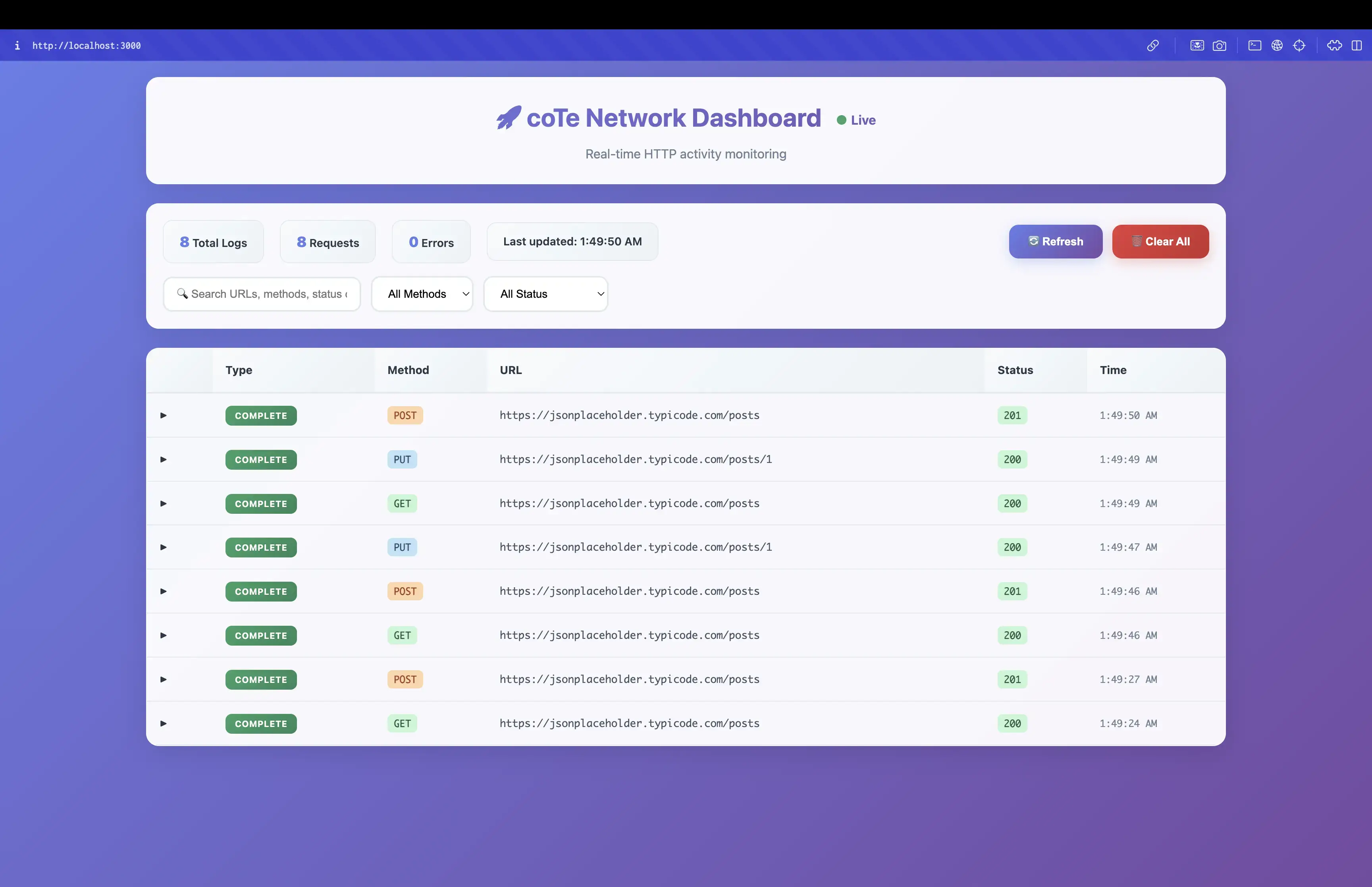
- 🌐 Web dashboard - Beautiful browser-based interface
- 🎨 Material Design 3 - Modern, responsive UI
- 🔄 Auto-refresh - Smart refresh that pauses during user interaction
- 💾 Memory efficient - In-memory storage with auto-cleanup
- 🌍 Environment support - Debug, Staging, and Release modes
🛠️ Quick Start
-
Add to your pubspec.yaml:
dependencies:
  cote_network_logger: ^1.0.5
-
Start the server in your main.dart:
import 'package:cote_network_logger/cote_network_logger.dart';

void main() async {
  WidgetsFlutterBinding.ensureInitialized();
  await startNetworkLogServer();
  runApp(MyApp());
}
-
Add the interceptor to your Dio instance:
import 'package:dio/dio.dart';
import 'package:cote_network_logger/cote_network_logger.dart';

final dio = Dio();
dio.interceptors.add(const CoteNetworkLogger());
-
Open the dashboard URL in your browser!
🌍 Environment Support
The network logger is available in the following environments:
- ✅ Debug Mode: Always enabled during development
- ✅ Staging Environment: Enabled when
STAGING_ENV=true
- ✅ Release Mode: Can be enabled with
NETWORK_LOGGER_ENABLED=true
- ❌ Production Environment: Disabled by default for security
Running in Different Environments
Debug Mode (Default)
flutter run
Staging Environment
flutter run --dart-define=STAGING_ENV=true
Release Mode with Logger
flutter run --release --dart-define=NETWORK_LOGGER_ENABLED=true
Building for Different Flavors
For Android:
flutter build apk --flavor debug
flutter build apk --flavor staging --dart-define=STAGING_ENV=true
flutter build apk --flavor production
For iOS:
flutter build ios --flavor Debug
flutter build ios --flavor Staging --dart-define=STAGING_ENV=true
flutter build ios --flavor Release
📱 Platform Support
iOS Simulator (Best for Mac)
- Run your Flutter app on iOS simulator
- Open browser on your Mac
- Navigate to: http://localhost:3000
Android Emulator
- Run your Flutter app on Android emulator
- Open browser on the emulator itself
- Navigate to: http://localhost:3000
Physical Devices
- Find your device's IP address
- Open browser on any device on the same network
- Navigate to: http://YOUR_DEVICE_IP:3000
🔧 Troubleshooting
Dashboard Not Loading
- Check if server is running (look for console message)
- Verify platform support
- Check environment settings
- Ensure port 3000 is not blocked
iOS Local Network Setup
- Go to iOS Settings → Privacy & Security → Local Network
- Find your app and toggle it ON
- Run your app and try accessing the dashboard
📚 API Reference
Main Functions
Future<bool> startNetworkLogServer()
Future<void> stopNetworkLogServer()
bool isNetworkLogServerRunning()
String? getNetworkLogDashboardUrl()
bool isNetworkLoggerSupported()
Configuration
class NetworkLoggerConfig {
static bool get isEnabled
static String get currentFlavor
static bool isEnabledInFlavor(String flavor)
}
Configuration Examples
Basic Setup
void main() async {
  WidgetsFlutterBinding.ensureInitialized();
  await NetworkLogger.start();
  runApp(MyApp());
}
Environment Configuration
void setupNetworkLogger() {
NetworkLogger.configure(
environments: [
NetworkLoggerEnvironment.debug,
NetworkLoggerEnvironment.staging,
NetworkLoggerEnvironment.qa,
],
);
}
NetworkLogger.configure(
environments: [
NetworkLoggerEnvironment.custom(
name: 'uat',
enableByDefault: true,
description: 'User Acceptance Testing',
),
NetworkLoggerEnvironment.custom(
name: 'preprod',
enableByDefault: true,
description: 'Pre-Production Environment',
),
],
);
Enable in Release Mode
NetworkLogger.configure(
environments: [NetworkLoggerEnvironment.staging],
enableInRelease: true,
);
Check Logger Status
if (NetworkLogger.isRunning) {
final url = NetworkLogger.dashboardUrl;
print('Dashboard available at: $url');
}
Environment-Specific Behavior
🎯 Use Cases
Quick Start
void main() async {
WidgetsFlutterBinding.ensureInitialized();
await NetworkLogger.start();
runApp(MyApp());
}
QA Testing Setup
void setupForQATesting() {
  NetworkLogger.configure(
    environments: [NetworkLoggerEnvironment.qa],
    enableInRelease: true,
  );
}
Multiple Environment Support
void setupAllEnvironments() {
  NetworkLogger.configure(
    environments: [
      NetworkLoggerEnvironment.debug,
      NetworkLoggerEnvironment.staging,
      NetworkLoggerEnvironment.qa,
      NetworkLoggerEnvironment.beta,
    ],
  );
}
Custom Environment
void setupCustomEnvironment() {
  NetworkLogger.configure(
    environments: [
      NetworkLoggerEnvironment.custom(
        name: 'demo',
        enableByDefault: true,
        description: 'Demo Environment',
      ),
    ],
  );
}
Custom Environment Support
The network logger supports custom environment types for flexible configuration:
-
Add Custom Environments
NetworkLoggerConfig.addCustomEnvironment('qa');
NetworkLoggerConfig.addCustomEnvironment('beta');
NetworkLoggerConfig.addCustomEnvironment('uat');
-
Run with Custom Environment
flutter run --dart-define=CUSTOM_ENV=qa --dart-define=NETWORK_LOGGER_ENABLED=true
flutter run --dart-define=CUSTOM_ENV=beta --dart-define=NETWORK_LOGGER_ENABLED=true
-
Environment-Specific Behavior
- Debug: Always enabled
- Staging: Enabled by default
- Custom: Enabled when NETWORK_LOGGER_ENABLED=true
- Production: Always disabled
QA Testing in Release Mode
The network logger is particularly useful for QA teams testing release builds in staging environment:
-
Release Mode Testing
flutter build apk --release --dart-define=STAGING_ENV=true
-
Enable Logger in Release
flutter run --release --dart-define=STAGING_ENV=true --dart-define=NETWORK_LOGGER_ENABLED=true
-
Benefits for QA Teams
- Monitor network requests in release builds
- Debug issues in staging environment
- Test with production-like performance
- Maintain security in production
Development Workflow
-
Local Development
- Debug mode with full logging
- Real-time request monitoring
- Immediate feedback
-
Staging Testing
- Release mode with controlled logging
- QA team access to network logs
- Production-like environment
-
Production Deployment
- Logger automatically disabled
- No performance impact
- Secure by default
🎯 Example
Check out the example directory for a complete working example.
📄 License
This project is licensed under the MIT License - see the LICENSE file for details.