Texto original em inglês. Visite o GitHub para a versão atual.
flutter_dropdown_alert
A dropdown alert package for flutter
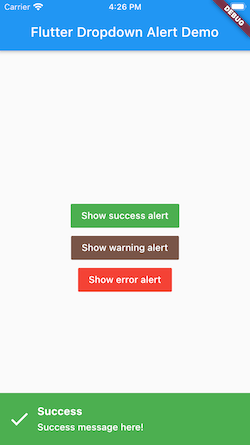
Dropdown alert will help to notify to user when you call api success, error or something like that, such as in app notification. It's will similar with push notification but you can custom more than that. You can show alert at anywhere without widget.
Demo
Top:
Bottom:
How to use it.
dependencies:
flutter:
sdk: flutter
flutter_dropdown_alert: <last-version>
Just create a Stack widget and add DropdownAlert() inside MaterialApp which should be in main.dart like this:
import 'package:flutter_dropdown_alert/dropdown_alert.dart' ;
MaterialApp (
title: 'Dropdown Alert Demo' ,
theme: ThemeData (
visualDensity: VisualDensity .adaptivePlatformDensity,
),
builder: (context, child) => Stack (
children: [
child!,
DropdownAlert ()
],
),
home: MyHomePage (title: 'Flutter Dropdown Alert Demo' ),
);
Full example source code:
https://github.com/vantuan88291/flutter_bloc_modular
Show alert anywhere, even inside bloc without widget:
Next, import 'alert_controller.dart' into your dart code
import 'package:flutter_dropdown_alert/alert_controller.dart' ;
AlertController .show ("Title" , "message here!" , TypeAlert .success, payload);
The payload param is Map<String, dynamic>, this param is optional, should use to give data into the alert and get it when click on alert.
Hide alert:
The alert will automatically hide, but if you use delayDismiss: 0, it will freeze and not auto hide, you have to hide the alert by this code:
AlertController .hide ();
Listener when click on alert:
There are 2 ways to do that:
Using listener of controller, put this code inside initState() of widget:
AlertController .onTabListener ((Map <String , dynamic >? payload, TypeAlert type) {
print ("$payload - $type " );
});
DropdownAlert (onTap: (Map <String , dynamic > payload?, TypeAlert type) {
print ("$payload - $type " );
},)
TypeAlert
Type
description
TypeAlert.success
Type when action success, the background of alert will green
TypeAlert.warning
Type when action warning, the background of alert will brown
TypeAlert.error
Type when action error, the background of alert will red
parameters
parameter
description
default
onTap
Callback when tab to alert, will give: Function(Map<String, dynamic>, TypeAlert)
null
successImage
Image.asset() of success alert, uri of assets image
Icon widget
warningImage
Image.asset() of warning alert, uri of assets image
Icon widget
errorImage
Image.asset() of error alert, uri of assets image
Icon widget
closeImage
Image.asset() of close image, when showCloseButton is true
Icon widget
errorBackground
Color of background when error
Colors.red
successBackground
Colors.green
warningBackground
0xFFCE863D
titleStyle
TextStyle of title
contentStyle
TextStyle of content
maxLinesTitle
null
maxLinesContent
null
duration
duration of animation
300
delayDismiss
delay time when alert auto dismiss, set to 0 if you want to freeze alert
3000
position
show the position of alert, include: AlertPosition.TOP, AlertPosition.BOTTOM
AlertPosition.TOP
showCloseButton
When close button is present, only can click on button close to hide the alert
false
avoidBottomInset
Add optional variable for inset overlap
false
The ideal from react-native-dropdownalert


 v1.0.7