Buscar pacotes, repositórios e categorias de apps

Capa de flutter_dropdown_alert
Detalhes do pacotev1.0.7

flutter_dropdown_alert

Um pacote de alerta de dropdown para Flutter, ajuda o usuário a notificar alertas como notificações push quando a chamada da API for bem-sucedida, falhar ou apresentar aviso.

AndroidiOSWebmacOSWindowsLinux
Downloads em 30 dias
3,2 mil
Curtidas
99
Pontos Pub
140

Instalar pacote

flutter pub add flutter_dropdown_alert

Visão geral do pacote

Orientação gerada a partir de informações públicas. Apenas para referência.

Um pacote Flutter que fornece um sistema de alerta com estilo de menu suspenso para exibir notificações semelhantes a notificações push. Permite aos desenvolvedores exibir mensagens de sucesso, falha ou aviso após chamadas de API, melhorando o feedback do usuário de forma visualmente atraente e não intrusiva. Os alertas deslizam para baixo a partir do topo da tela e podem ser personalizados com diferentes estilos e comportamentos. Projetado para uso em múltiplas plataformas, suporta Android, iOS, Web, macOS, Windows e Linux.

Casos de uso

  • Exibindo resultados da chamada da API
  • Mostrando avisos do usuário
  • Notificando estados de sucesso ou erro
  • Melhorando o feedback do usuário em formulários
  • Fornecendo atualizações de status em tempo real

Principais recursos

  • Animação de notificação deslizando para baixo
  • Tipos de alerta personalizáveis
  • Compatibilidade multiplataforma
  • Integração simples de API
  • Duração e posição configuráveis

Indicado para

  • Aplicativos móveis e web que precisam de feedback visual
  • Desenvolvedores procurando alternativas leves para toast
  • Aplicativos que exigem notificações imediatas do usuário
  • Projetos com interações frequentes da API
  • aplicações focadas em UX

Considerações

  • Personalização limitada em comparação com bibliotecas completas de toast
  • Pode exigir estilos adicionais para designs complexos
  • Não ideal para notificações persistentes
  • Melhor adequado apenas para alertas temporários
  • Depende de gerenciamento de estado adequado para o tempo

README original

Snapshot do README original do repositório-fonte vinculado. Consulte o repositório para o conteúdo mais recente.

pub package

flutter_dropdown_alert

A dropdown alert package for flutter

Dropdown alert will help to notify to user when you call api success, error or something like that, such as in app notification. It's will similar with push notification but you can custom more than that. You can show alert at anywhere without widget.

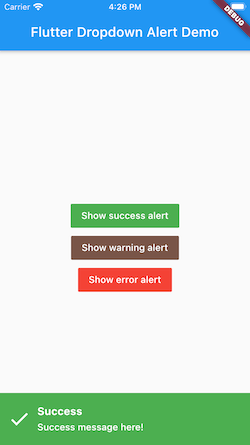
Demo

Top:

Bottom:

How to use it.

# pubspec.yaml

dependencies:
  flutter:
    sdk: flutter
  flutter_dropdown_alert: <last-version>

Just create a Stack widget and add DropdownAlert() inside MaterialApp which should be in main.dart like this:

import 'package:flutter_dropdown_alert/dropdown_alert.dart';
 MaterialApp(
       title: 'Dropdown Alert Demo',
       theme: ThemeData(
         visualDensity: VisualDensity.adaptivePlatformDensity,
       ),
       builder: (context, child) => Stack(
         children: [
            child!,
            DropdownAlert()
         ],
       ),
       home: MyHomePage(title: 'Flutter Dropdown Alert Demo'),
     );

Full example source code:

https://github.com/vantuan88291/flutter_bloc_modular

Show alert anywhere, even inside bloc without widget:

Next, import 'alert_controller.dart' into your dart code

import 'package:flutter_dropdown_alert/alert_controller.dart';
   AlertController.show("Title", "message here!", TypeAlert.success, payload);

The payload param is Map<String, dynamic>, this param is optional, should use to give data into the alert and get it when click on alert.

Hide alert:

The alert will automatically hide, but if you use delayDismiss: 0, it will freeze and not auto hide, you have to hide the alert by this code:

   AlertController.hide();

Listener when click on alert:

There are 2 ways to do that:

  • Using listener of controller, put this code inside initState() of widget:
   AlertController.onTabListener((Map<String, dynamic>? payload, TypeAlert type) {
         print("$payload - $type");
       });
  • Using param onTap:
   DropdownAlert(onTap: (Map<String, dynamic> payload?, TypeAlert type) {
                print("$payload - $type");
             },)

TypeAlert

Type description
TypeAlert.success Type when action success, the background of alert will green
TypeAlert.warning Type when action warning, the background of alert will brown
TypeAlert.error Type when action error, the background of alert will red

parameters

parameter description default
onTap Callback when tab to alert, will give: Function(Map<String, dynamic>, TypeAlert) null
successImage Image.asset() of success alert, uri of assets image Icon widget
warningImage Image.asset() of warning alert, uri of assets image Icon widget
errorImage Image.asset() of error alert, uri of assets image Icon widget
closeImage Image.asset() of close image, when showCloseButton is true Icon widget
errorBackground Color of background when error Colors.red
successBackground Colors.green
warningBackground 0xFFCE863D
titleStyle TextStyle of title
contentStyle TextStyle of content
maxLinesTitle null
maxLinesContent null
duration duration of animation 300
delayDismiss delay time when alert auto dismiss, set to 0 if you want to freeze alert 3000
position show the position of alert, include: AlertPosition.TOP, AlertPosition.BOTTOM AlertPosition.TOP
showCloseButton When close button is present, only can click on button close to hide the alert false
avoidBottomInset Add optional variable for inset overlap false

The ideal from react-native-dropdownalert

Categorias

Repositório-fonte

Projetos que usam este pacote