

 v0.0.3
rough_notation
使用 Flutter 的 CustomPainter 在元件上建立動畫的手繪風格註解。靈感來自 Rough Notation JS 庫。
5喜歡 68近 30 天下載160Pub 分數
AndroidiOSWebmacOSWindowsLinux
使用 Flutter 的 CustomPainter 在元件上建立動畫的手繪風格註解。靈感來自 Rough Notation JS 庫。

以下為英文專案原文快照,最新內容請造訪 GitHub。
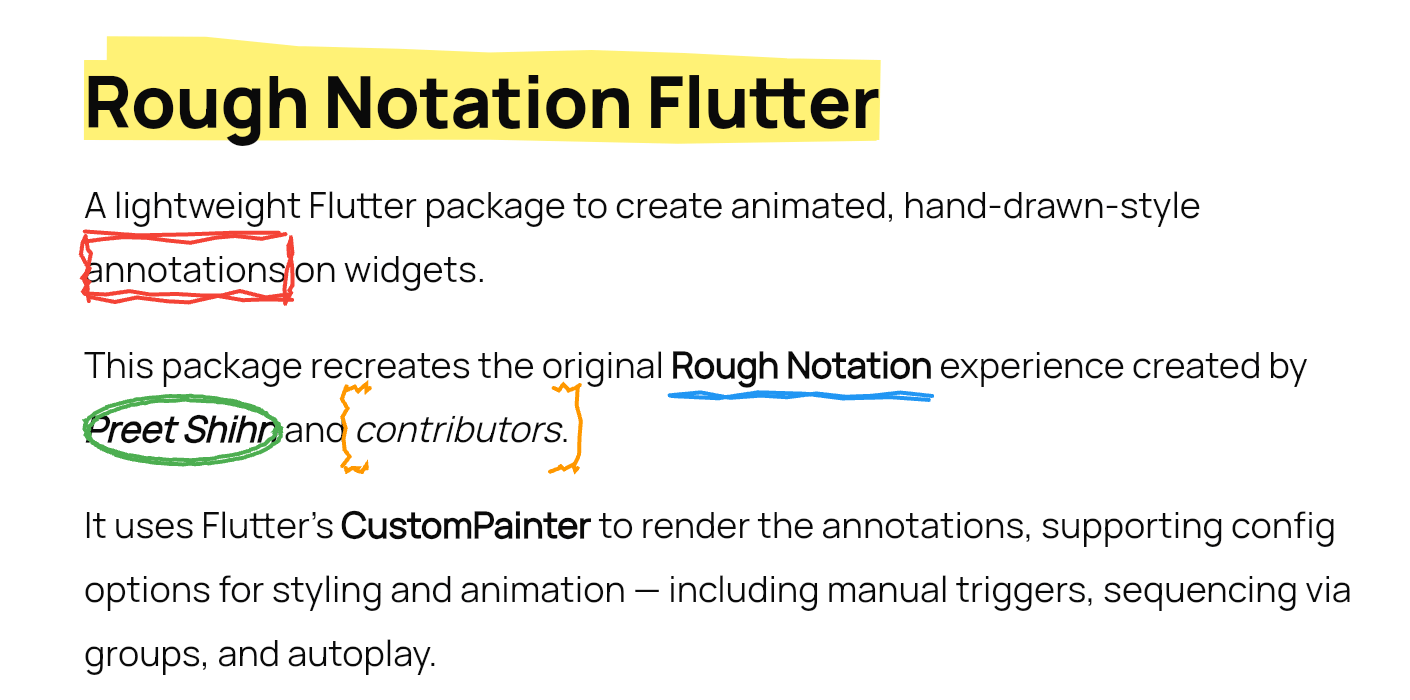
A lightweight Flutter package to create animated, hand-drawn-style annotations on widgets.
This package recreates the original Rough Notation experience created by Preet Shihn and the contributors.
It uses Flutter’s CustomPainter to render the annotations, supporting config options for styling and animation — including manual triggers, sequencing via groups, and autoplay.

See the landing page which has the complete showcase: 👉 roughnotation-flutter.web.app
It showcases all use cases, animation types, groupings, styling controls, and more — all built with Flutter Web.
Explore source in the playground/ folder.
WidgetSpan for rich text use
38: - iterations for sketchier multi-stroke effectflutter pub add rough_notation
RoughUnderlineAnnotation(
  child: Text('Flutter is fun!'),
  iterations: 3, // Optional: default is 2
)
final controller = RoughAnnotationController();

RoughBoxAnnotation(
  controller: controller,
  child: Text('Boxed text'),
);

// Manually trigger
controller.show();
WidgetSpanSelectableText.rich(
TextSpan(
text: 'Create a ',
children: [
WidgetSpan(
alignment: PlaceholderAlignment.baseline,
baseline: TextBaseline.alphabetic,
child: RoughUnderlineAnnotation(
child: Text('underline'),
),
),
TextSpan(text: ' on a span.'),
],
),
);
Use group and sequence to define a group and control animation order.
RoughUnderlineAnnotation(
  group: 'intro',
  sequence: 1,
  child: Text('Step 1'),
);

RoughBoxAnnotation(
  group: 'intro',
  sequence: 2,
  child: Text('Step 2'),
);

// Trigger animation
RoughAnnotationRegistry.showGroup('intro');
@override
void initState() {
  super.initState();
  RoughAnnotationRegistry.markGroupForAutoStart('groupName');
}
ListView.builder) won’t throw errors but will skip animations until built.Optional:
RoughAnnotationRegistry.showGroup(
  'intro',
  delayBetween: Duration(milliseconds: 300),
);
delay values on individual annotations if part of a group.RoughAnnotationController(autoPlay: true), ensure the widget is built first. Internally, we use addPostFrameCallback to delay the trigger.ListView.builder or similar builders that are not yet mounted will not animate. No crash, but no effect either.We’re aiming to improve:
lib/src/painters)lib/src/annotations)lib/src/controllers)The original JS library uses roughjs. Although there's a Flutter version (
rough), it’s outdated and Dart 3 incompatible.
We’re considering reviving or reimplementing it in parts. All contributions are welcome!
If you're looking to contribute, ideal places to start are:
lib/src/painters/lib/src/annotations/This Flutter package is heavily inspired by the original Rough Notation JS library.
We acknowledge the original creators and contributors of the JS library — including design, animation logic, and documentation.
We are grateful for the coder’s community and the support of open-source enthusiasts everywhere.
MIT
Pull requests are welcome. Let’s make annotations ✏️ in Flutter fun and beautiful.
依賴清單 3 項
{"sdk":"flutter"}{"sdk":"flutter"}^5.0.0先依使用情境篩選,再比較專案活躍情況,最後到原始儲存庫確認使用要求。
“A repository is the most basic element of GitHub.”
GitHub Docs — About repositories ↗