搜尋套件、儲存庫與 APP 分類

rough_notation 封面
套件詳情v0.0.3

rough_notation

使用 Flutter 的 CustomPainter 在元件上建立動畫的手繪風格註解。靈感來自 Rough Notation JS 庫。

AndroidiOSWebmacOSWindowsLinux
近 30 天下載
68
喜歡數
5
Pub 分數
160

安裝套件

flutter pub add rough_notation

套件介紹

根據套件公開資料產生的選型評估,僅供參考。

Rough Notation 是一個 Flutter 套件,讓開發者可以使用 CustomPainter 向組件添加動畫的手繪風格註解。受到 Rough Notation JavaScript 庫的啟發,為文字和 UI 元素帶來一種草圖般的、富有表現力的外觀。非常適合用動態、風格化的線條和形狀來強調內容的重要部分。支援多個平台,包括 Android、iOS、Web、macOS、Windows 和 Linux,適用於跨平台應用。該套件可與豐富文字、Markdown 和 HTML 編輯器順暢整合。

適用情境

  • 在教育類應用程式中強調重要文字
  • 在互動式教程中添加表達性註釋
  • 透過手繪風格效果增強使用者介面
  • 在儀表板中可視化數據點
  • 創造引人入勝的入門體驗
  • 使用動態標記樣式化 Markdown 內容

主要特色

  • 動畫手繪風格線條
  • 可自定的描邊和填滿屬性
  • 支援多種註釋類型(底線、方框、圓形)
  • 與 CustomPainter 的內建整合
  • 跨平台相容性
  • 透過 pub add 命令輕鬆設定

適合對象

  • 教育和學習應用程式
  • 具有視覺反饋的互動式介面
  • 尋求富有表現力的使用者介面元素的設計人員
  • 開發富文本編輯器的開發者
  • 需要有趣或藝術性註釋的應用程式

使用建議

  • 可能影響大量註釋的效能
  • 需要了解 CustomPainter 的基本知識
  • 限制為2D畫布渲染
  • 不適合高性能量化動畫
  • 最適合靜態或低頻更新

原始 README

以下為關聯原始碼儲存庫的 README 原文快照,最新內容請造訪原始碼儲存庫。

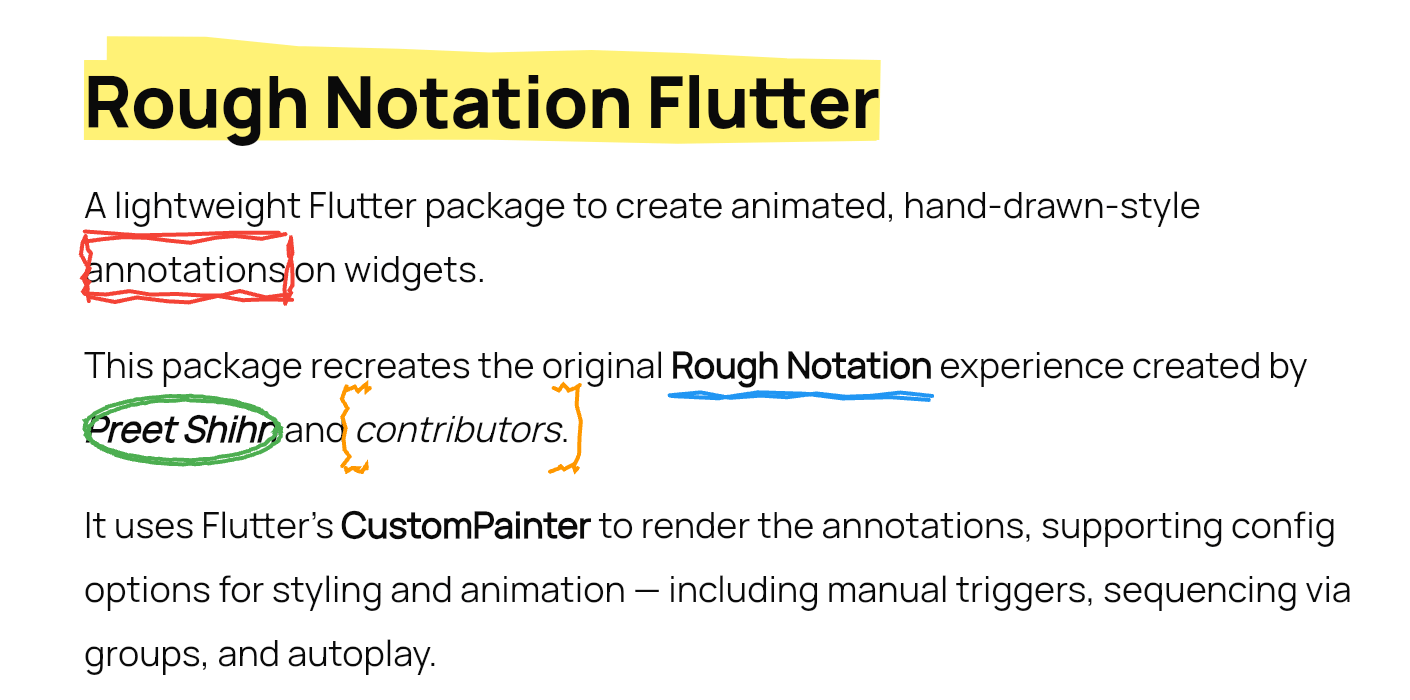
RoughNotation Flutter

A lightweight Flutter package to create animated, hand-drawn-style annotations on widgets.

This package recreates the original Rough Notation experience created by Preet Shihn and the contributors.

It uses Flutter’s CustomPainter to render the annotations, supporting config options for styling and animation — including manual triggers, sequencing via groups, and autoplay.

demo-gif


🌐 Playground

See the landing page which has the complete showcase: 👉 roughnotation-flutter.web.app

It showcases all use cases, animation types, groupings, styling controls, and more — all built with Flutter Web.

Explore source in the playground/ folder.


✨ Features

  • Hand-drawn-style annotations
  • Built-in styles:
    • Underline
    • Box
    • Circle
    • Highlight
    • Strike-through
    • Crossed-off
    • Bracket
  • Supports:
    • Autoplay animation
    • Manual triggers
    • Group-based sequencing
    • WidgetSpan for rich text use 38: - iterations for sketchier multi-stroke effect

📦 Installation

flutter pub add rough_notation

🚀 Usage

Basic Annotation
RoughUnderlineAnnotation(
  child: Text('Flutter is fun!'),
  iterations: 3, // Optional: default is 2
)
With Controller (Manual Trigger)
final controller = RoughAnnotationController();

RoughBoxAnnotation(
  controller: controller,
  child: Text('Boxed text'),
);

// Manually trigger
controller.show();

🧹 RichText with WidgetSpan

SelectableText.rich(
  TextSpan(
    text: 'Create a ',
    children: [
      WidgetSpan(
        alignment: PlaceholderAlignment.baseline,
        baseline: TextBaseline.alphabetic,
        child: RoughUnderlineAnnotation(
          child: Text('underline'),
        ),
      ),
      TextSpan(text: ' on a span.'),
    ],
  ),
);

🔄 Grouped Annotations

Use group and sequence to define a group and control animation order.

RoughUnderlineAnnotation(
  group: 'intro',
  sequence: 1,
  child: Text('Step 1'),
);

RoughBoxAnnotation(
  group: 'intro',
  sequence: 2,
  child: Text('Step 2'),
);

// Trigger animation
RoughAnnotationRegistry.showGroup('intro');
Autoplay a Group on Widget Init
@override
void initState() {
  super.initState();
  RoughAnnotationRegistry.markGroupForAutoStart('groupName');
}
✅ Note:
  • It doesn't matter where widgets are in the widget tree — grouped annotations can live inside deeply nested widgets or even different build scopes. The registry handles sequencing regardless of position.
  • From Flutter 3.16+, deferred or conditionally built widgets (e.g., in a ListView.builder) won’t throw errors but will skip animations until built.

Optional:

RoughAnnotationRegistry.showGroup(
  'intro',
  delayBetween: Duration(milliseconds: 300),
);

⚠️ Potential Pitfalls & Edge Cases

  • Delays & Durations: Group sequencing introduces its own delays between elements. Avoid adding large delay values on individual annotations if part of a group.
  • Controllers & Autoplay: If using RoughAnnotationController(autoPlay: true), ensure the widget is built first. Internally, we use addPostFrameCallback to delay the trigger.
  • Multiple Controllers: You can reuse the same controller for multiple widgets, but only one annotation may render if others haven't mounted yet.
  • Lazy Lists / Builders: Widgets in a ListView.builder or similar builders that are not yet mounted will not animate. No crash, but no effect either.
  • Visual Misalignments: Styling mismatches may occur across platforms. Future updates will improve drawing precision and painter logic.

🧠 What's Next

We’re aiming to improve:

  • Core painter logic for smoother lines and curves (lib/src/painters)
  • Extend features and stability of annotation widgets (lib/src/annotations)
  • Also the controllers & grouped behaviour (lib/src/controllers)

The original JS library uses roughjs. Although there's a Flutter version (rough), it’s outdated and Dart 3 incompatible.

We’re considering reviving or reimplementing it in parts. All contributions are welcome!

If you're looking to contribute, ideal places to start are:

  • lib/src/painters/
  • lib/src/annotations/

🙏❤️ Acknowledgements

This Flutter package is heavily inspired by the original Rough Notation JS library.

We acknowledge the original creators and contributors of the JS library — including design, animation logic, and documentation.

We are grateful for the coder’s community and the support of open-source enthusiasts everywhere.


📄 License

MIT


🤝 Contributions

Pull requests are welcome. Let’s make annotations ✏️ in Flutter fun and beautiful.

所屬分類

原始碼儲存庫

使用此套件的專案

暫無相關資料。