

 v0.0.2
flutter_animated_reaction
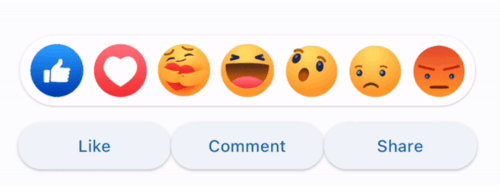
Flutter 動畫反應是一個動畫反應覆蓋層(例如,Facebook、LinkedIn),可使用您自己的反應圖示(圖片/GIF)進行自訂。
34喜歡 36近 30 天下載130Pub 分數
AndroidiOSWebmacOSWindowsLinux
Ajoy-1704001/flutter_animated_reaction open-source repository details.

以下為英文專案原文快照,最新內容請造訪 GitHub。
Flutter Animated Reaction is an animated reaction overlay(Example: Facebook, LinkedIn) which can be customized using your own reaction icons(images/gifs). Wherever your reaction button is on the screen, this package helps you to pop up an animated reaction overlay at the right location on the screen with your preferred reactions icon.
import 'package:flutter_animated_reaction/flutter_animated_reaction.dart';
For better understanding, you can see example application.
AnimatedFlutterReaction().showOverlay(context: context,
                                      key: key,
                                      onReaction: (val){
                                         print(val);
                                      });
| Parameter | Description |
|---|---|
| Key | Global Key used in the reaction button . It is used to find the renderBox and measure it's position. |
| reactions | List of all reaction icons which you want to show in the overlay.(Image/Gifs path) |
| onReaction(int) | It is triggered when any of the reaction is tapped |
| backgroundColor | It describes overlay background color |
| overlaySize | It specifies overlay width |
| iconSize | It can set the size of reaction icons. Default size is (45,45) |
依賴清單 4 項
{"sdk":"flutter"}^4.1.0{"sdk":"flutter"}^2.0.0先依使用情境篩選,再比較專案活躍情況,最後到原始儲存庫確認使用要求。
“A repository is the most basic element of GitHub.”
GitHub Docs — About repositories ↗