
 v6.0.0
flutter_linkify
將文字中的 URL 和電子郵件轉換為 Flutter 中的可點擊內聯連結。
775喜歡 27.1萬近 30 天下載150Pub 分數
AndroidiOSWebmacOSWindowsLinux
將文字中的網址和電子郵件轉換為 Flutter 中的可點擊內聯連結

{"sdk":"flutter"}^5.0.0^1.0.0{"sdk":"flutter"}^2.0.1以下為英文專案原文快照,最新內容請造訪 GitHub。
flutter_linkify pub packageTurns text URLs and emails into clickable inline links in text for Flutter.
Required Dart >=2.17 (has null-safety support).
Install by adding this package to your pubspec.yaml:
dependencies:
  flutter_linkify: ^6.0.0
It is highly recommend that you also add a dependency on url_launcher to open links in the browser/OS.
Basic:
import 'package:flutter_linkify/flutter_linkify.dart';

Linkify(
  onOpen: (link) => print("Clicked ${link.url}!"),
  text: "Made by https://cretezy.com",
);
Add a style to non-links (yellow) or links (red), and open in browser using url_launcher:
import 'package:flutter_linkify/flutter_linkify.dart';
import 'package:url_launcher/url_launcher.dart';

Linkify(
  onOpen: (link) async {
    if (!await launchUrl(Uri.parse(link.url))) {
      throw Exception('Could not launch ${link.url}');
    }
  },
  text: "Made by https://cretezy.com",
  style: TextStyle(color: Colors.yellow),
  linkStyle: TextStyle(color: Colors.red),
);
All RichText options are available for use.
By default, humanization (removal of http:// or https:// from the start of the URL) is enabled. You may disable it by passing options:
Linkify(
  text: "Made by https://cretezy.com",
  options: LinkifyOptions(humanize: false),
);
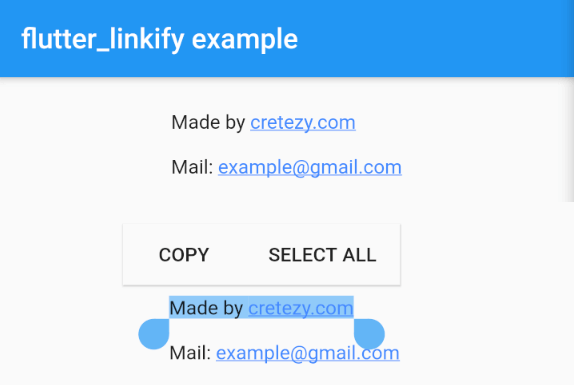
Use the SelectableLinkify widget to create selectable text. All SelectableText options are available for use.
SelectableLinkify(
  text: "Made by https://cretezy.com\n\nMail: example@gmail.com",
);
In the onOpen callback, a LinkableElement is passed in.
You can check if it is a UrlElement or EmailElement using is for custom handling.
You can enable parsing of only some link types using the linkifiers option. URL and email are enabled by default.
Full example can be found at example/lib/main.dart.
Example Screenshot