

 v4.0.0
date_count_down
這是一個用 Dart 編寫的 Flutter 倒數計時套件,專為 Flutter 開發人員設計。
40喜歡 812近 30 天下載140Pub 分數
AndroidiOSWebmacOSWindowsLinux
這是一個為Flutter開發者撰寫的用Dart編寫的Flutter倒計時套件

以下為英文專案原文快照,最新內容請造訪 GitHub。
A new Flutter package that provide already made Count down functionality
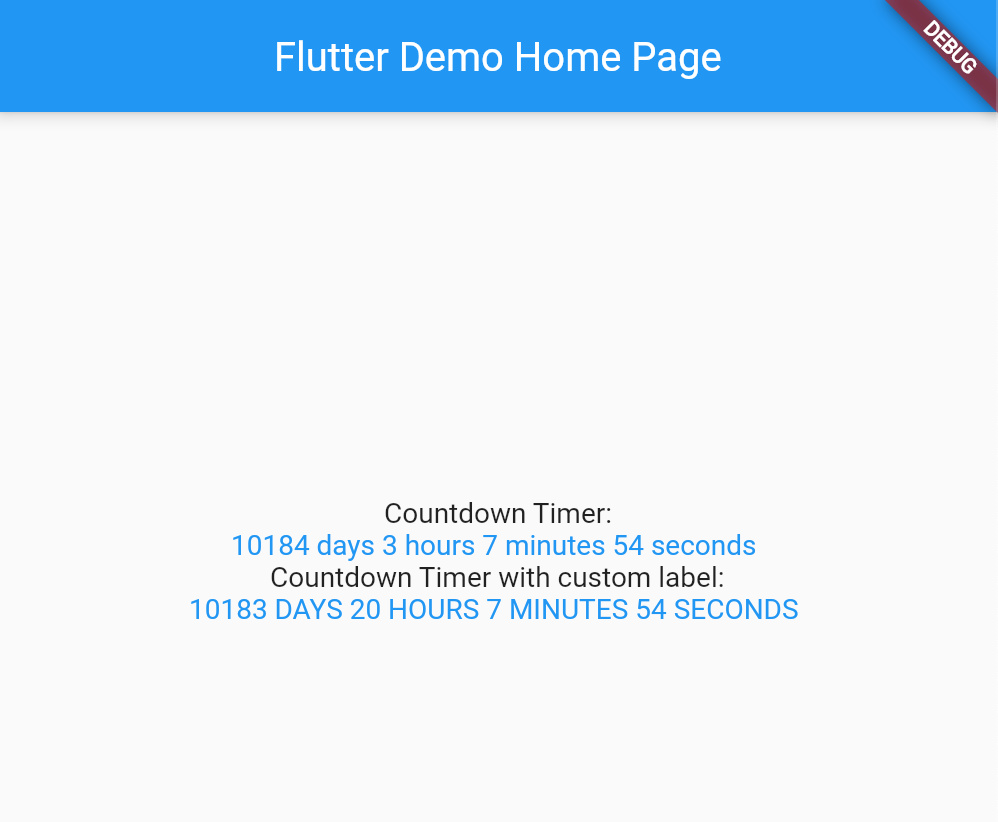
[Example] (https://github.com/Destiny-Ed/date_count_down/blob/main/example/example.dart)
To use this package : *add the dependency to your [pubspec.yaml] file
   dependencies:
        flutter:
            sdk : flutter
        date_count_down:
import 'package:date_count_down/date_count_down.dart';
import 'package:flutter/material.dart';

void main() {
  runApp(MyApp());
}

class MyApp extends StatelessWidget {
  // This widget is the root of your application.
  @override
  Widget build(BuildContext context) {
    return MaterialApp(
      title: 'Flutter Demo',
      theme: ThemeData(
        primarySwatch: Colors.blue,
      ),
      home: MyHomePage(title: 'Flutter Demo Home Page'),
    );
  }
}

class MyHomePage extends StatefulWidget {
  MyHomePage({Key? key, required this.title}) : super(key: key);

  final String title;

  @override
  _MyHomePageState createState() => _MyHomePageState();
}

class _MyHomePageState extends State<MyHomePage> {
  @override
  Widget build(BuildContext context) {
    return Scaffold(
      appBar: AppBar(
        title: Text(widget.title),
      ),
      body: Center(
        child: Column(
          mainAxisAlignment: MainAxisAlignment.center,
          children: <Widget>[
            Text(
              'Countdown Timer:',
            ),
            CountDownText(
              due: DateTime.utc(2050),
              finishedText: "Done",
              showLabel: true,
              longDateName: true,
              style: TextStyle(color: Colors.blue),
            ),
            Text(
              'Countdown Timer with custom label:',
            ),
            CountDownText(
              due: DateTime.parse("2050-01-01 00:00:00"),
              finishedText: "Done",
              showLabel: true,
              longDateName: true,
              daysTextLong: " DAYS ",
              hoursTextLong: " HOURS ",
              minutesTextLong: " MINUTES ",
              secondsTextLong: " SECONDS ",
              style: TextStyle(color: Colors.blue),
            )
          ],
        ),
      ),
    );
  }
}
Special thanks to ekhiw to adding the custom values to the package
[Github] (https://github.com/Destiny-Ed)
[Twitter] (https://twitter.com/DestinyEd8)
[Linkedin] (linkedin.com/in/destiny-ed)
[Youtube] (https://www.youtube.com/channel/UCFEtn_pdpZPT9vMxovgTp0A)
依賴清單 2 項
{"sdk":"flutter"}{"sdk":"flutter"}先依使用情境篩選,再比較專案活躍情況,最後到原始儲存庫確認使用要求。
“A repository is the most basic element of GitHub.”
GitHub Docs — About repositories ↗