
 v0.0.2+1
custom_map_markers
一個將執行時小部件轉換為地圖標記圖示或位元組陣列影像的套件。
86喜歡 8近 30 天下載140Pub 分數
AndroidiOSWeb
IbrahimTabba/custom_map_markers open-source repository details.

{"sdk":"flutter"}^2.0.11^3.0.0^1.15.0{"sdk":"flutter"}^1.0.0以下為英文專案原文快照,最新內容請造訪 GitHub。
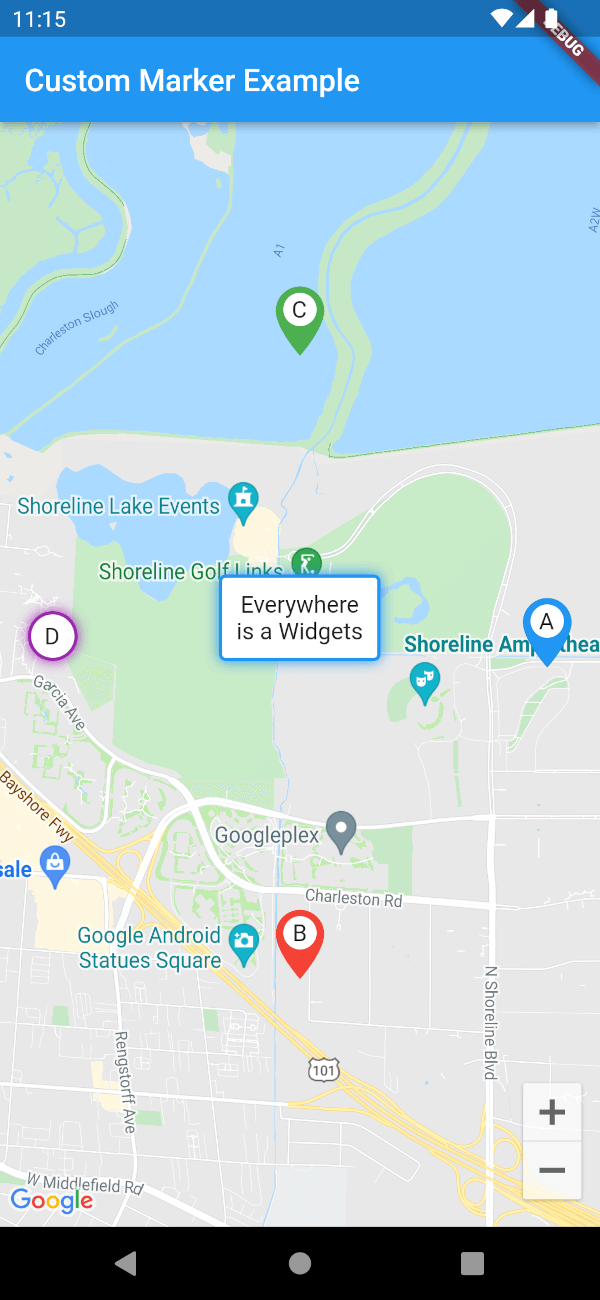
Not only "Everything is a widget" also "Everywhere is a widget".
custom_map_marker is a package that turns runtime widgets into map marker icons.
this package providers the following features:
First, add custom_map_markers as a dependency in your pubspec.yaml file.
dependencies:
  custom_map_markers: ^0.0.1
GoogleMaps widget with CustomGoogleMapMarkerBuilder.customMarkersSet<Marer> in builder function.final locations = const [
LatLng(37.42796133580664, -122.085749655962),
LatLng(37.41796133580664, -122.085749655962),
];
CustomGoogleMapMarkerBuilder(
customMarkers: [
MarkerData(
marker: Marker( markerId: const MarkerId('id-1'), position: locations[0]),
child: _customMarker('A', Colors.black)),
MarkerData(
marker: Marker( markerId: const MarkerId('id-2'), position: locations[1]),
child: _customMarker('B', Colors.red)),
],
builder: (BuildContext context, Set<Marker>? markers) {
if (markers == null) {
return const Center(child: CircularProgressIndicator());
}
return GoogleMap(
initialCameraPosition: const CameraPosition(
target: LatLng(37.42796133580664, -122.085749655962),
zoom: 14.4746,
),
markers: markers,
onMapCreated: (GoogleMapController controller) { },
);
},
)
Not a google map user?
if you are not willing to use google maps you can use
CustomMapMarkerBuilderthat takesList<widgets>instead ofList<MarkerData>and returnsList<Uint8List>instead ofSet<Marker>so you are free to use captured png images as you need.
Image.network you can use screenshotDelay parameter to daley the capture process making sure that your widget is rendered properly before capturing it.Please feel free to: