搜尋套件、儲存庫與 APP 分類

custom_map_markers 封面
套件詳情v0.0.2+1

custom_map_markers

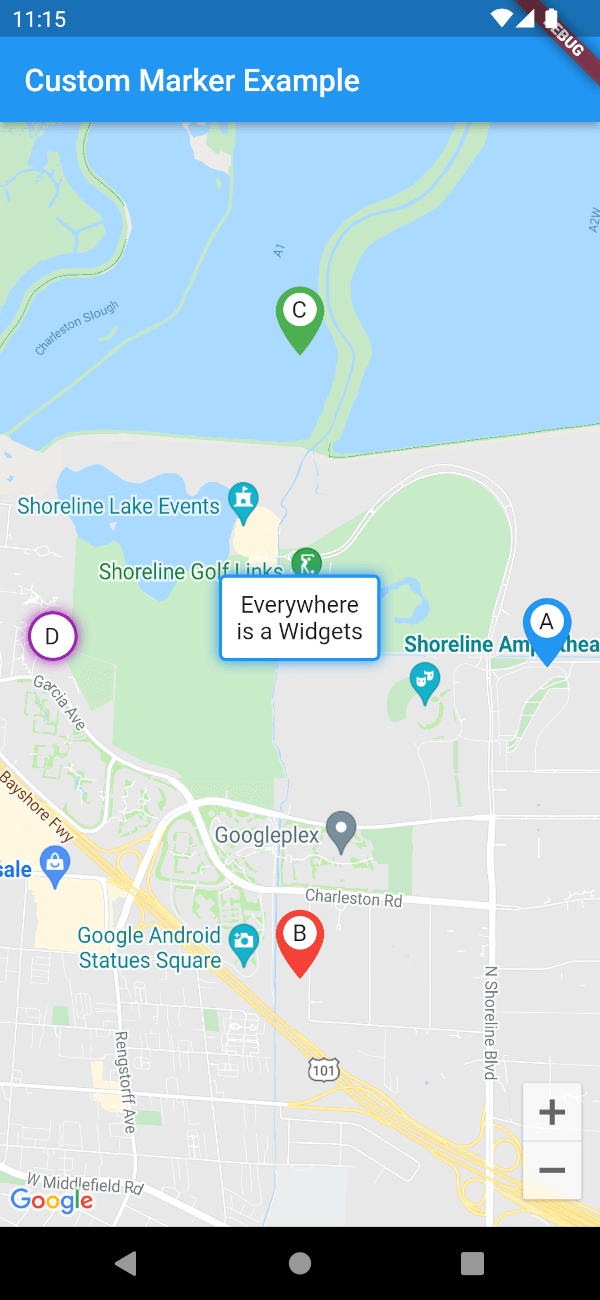
一個將執行時小部件轉換為地圖標記圖示或位元組陣列影像的套件。

AndroidiOSWeb
近 30 天下載
15
喜歡數
86
Pub 分數
140

安裝套件

flutter pub add custom_map_markers

套件介紹

根據套件公開資料產生的選型評估,僅供參考。

一個 Flutter 套件,讓開發者能夠在執行階段使用小部件作為自訂地圖標記圖示,或將其轉換為位元組陣列影像以在地圖上使用。它透過允許直接將 Flutter 小部件整合至跨 Android、iOS 及 Web 平台的地圖檢視中,簡化了建立動態、互動式標記的過程。適用於需要根據即時資料產生個人化或動畫標記之應用程式。

適用情境

  • 基於用戶數據的動態標記圖示
  • 動畫或狀態地圖標記
  • 地圖上的自定義 UI 元素
  • 即時位置可視化
  • 互動式地圖覆蓋

主要特色

  • 將小部件轉換為地圖標記
  • 支援位元組陣列輸出
  • 跨平台相容性
  • 與地圖外掛輕鬆整合
  • 執行時間標記自訂

適合對象

  • 開發互動地圖的開發者
  • 具有即時位置追蹤的應用程式
  • UI密集型的地點定位功能
  • 可自訂的地圖介面
  • 網頁和移動地圖應用

使用建議

  • 複雜組件帶來的效能影響
  • 需要相容的地圖外掛
  • 僅限支援的平台
  • 頻繁更新時的記憶體使用
  • 網頁上的潛在渲染不一致

原始 README

以下為關聯原始碼儲存庫的 README 原文快照,最新內容請造訪原始碼儲存庫。

Custom Map Markers

Not only "Everything is a widget" also "Everywhere is a widget".
custom_map_marker is a package that turns runtime widgets into map marker icons.

Features

this package providers the following features:

  • Ability to create runtime map markers using flutter widgets.
  • Capture Images of any list of widgets.

Getting started

First, add custom_map_markers as a dependency in your pubspec.yaml file.

dependencies:
  custom_map_markers: ^0.0.1

Usage

  1. Wrap your GoogleMaps widget with CustomGoogleMapMarkerBuilder.
  2. Define each marker and its custom widget in customMarkers
  3. Once custom markers are ready they will be passed as Set<Marer> in builder function.
final locations = const [  
  LatLng(37.42796133580664, -122.085749655962),  
  LatLng(37.41796133580664, -122.085749655962),  
];  

CustomGoogleMapMarkerBuilder(  
  customMarkers: [  
  MarkerData(  
        marker: Marker(  markerId: const MarkerId('id-1'), position: locations[0]),  
		child: _customMarker('A', Colors.black)),  
  MarkerData(  
        marker: Marker(  markerId: const MarkerId('id-2'), position: locations[1]),  
		child: _customMarker('B', Colors.red)),    
  ],  
  builder: (BuildContext context, Set<Marker>? markers) {  
    if (markers == null) {  
      return const Center(child: CircularProgressIndicator());  
  }  
    return GoogleMap(  
      initialCameraPosition: const CameraPosition(  
        target: LatLng(37.42796133580664, -122.085749655962),  
  zoom: 14.4746,  
  ),  
  markers: markers,  
  onMapCreated: (GoogleMapController controller) { },  
  );  
  },  
)

Not a google map user?

if you are not willing to use google maps you can use CustomMapMarkerBuilder that takes List<widgets> instead of List<MarkerData> and returns List<Uint8List> instead of Set<Marker> so you are free to use captured png images as you need.

Notes:
  1. Make sure your marker widget has boundaries.
  2. This package capture a png image of widget markers once they render, if your widget would take more time to render like Image.network you can use screenshotDelay parameter to daley the capture process making sure that your widget is rendered properly before capturing it.
  3. to run project example you have to add a valid google maps key to android/ios directories.

Features and bugs

Please feel free to:

所屬分類

依賴

依賴清單 3 項

原始碼儲存庫

使用此套件的專案

暫無相關資料。