

 v0.0.4
pick_color
一個 Flutter 套件,可讓您透過簡單觸控從影像中提取顏色和十六進位碼。
29喜歡 35近 30 天下載140Pub 分數
AndroidiOSWebmacOSWindowsLinux
Oauth-Celestial/image_color_picker open-source repository details.

以下為英文專案原文快照,最新內容請造訪 GitHub。
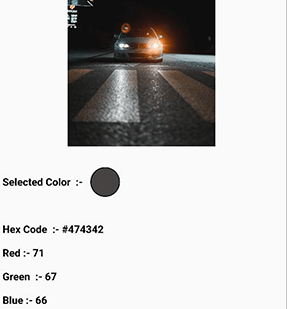
Pick_Color allows you to sample specific colors from an image and obtain their hex color code by just dragging over the image area.

pick_color : any
 Image image = Image.asset("assets/b.jpg");
 ColorPicker(
    child: image, # Your Image widget
    onChanged: (response) {
        String hexcode = response.hexCode;
        // Get Selected Color
        Color color = response.selectionColor;
        // Get Red Channel Color
        int redValue = response.redScale;
        // Get Blue Channel Color
        int blueValue = response.blueScale;
        // Get Green Channel Color
        int greenValue = response.greenScale;

});
That's all it takes 😃
Feel Free to contribute or file an issue happy coding.
依賴清單 3 項
{"sdk":"flutter"}^3.0.1{"sdk":"flutter"}先依使用情境篩選,再比較專案活躍情況,最後到原始儲存庫確認使用要求。
“A repository is the most basic element of GitHub.”
GitHub Docs — About repositories ↗