搜尋套件、儲存庫與 APP 分類

pick_color 封面
套件詳情v0.0.4

pick_color

一個 Flutter 套件,可讓您透過簡單觸控從影像中提取顏色和十六進位碼。

AndroidiOSWebmacOSWindowsLinux
近 30 天下載
35
喜歡數
29
Pub 分數
140

安裝套件

flutter pub add pick_color

套件介紹

根據套件公開資料產生的選型評估,僅供參考。

Pick Color 是一個 Flutter 套件,讓使用者能透過簡單的觸控互動從影像中擷取主要顏色及其十六進位代碼。它利用影像處理技術分析像素資料,並回傳精確的顏色表示,非常適合設計工具、主題產生器或需要動態顏色擷取的應用程式。此套件支援多個平台,包括 Android、iOS、Web、macOS、Windows 與 Linux,確保廣泛的相容性。透過 pub add 進行最少設定,開發者可輕鬆將顏色選擇功能整合至其應用程式中。

適用情境

  • 設計工具顏色採樣
  • 基於圖像的主題產生器
  • 調色板建立
  • 基於圖像的UI自定義
  • 互動藝術應用

主要特色

  • 基於觸控的顏色提取
  • 十六進制代碼輸出
  • 跨平台支援
  • 簡單整合
  • 即時色彩分析
  • 圖像像素分析

適合對象

  • UI/UX 設計師
  • 行動應用開發者
  • 創意應用建構器
  • 顏色主題產生器
  • 原型設計工具

使用建議

  • 需要圖像輸入以提取顏色
  • 性能可能因大圖像而異
  • 每張圖片限於主色調
  • 無顏色歷史持久化
  • 依賴於平台特定的影像渲染

原始 README

以下為關聯原始碼儲存庫的 README 原文快照,最新內容請造訪原始碼儲存庫。

Pick_Color

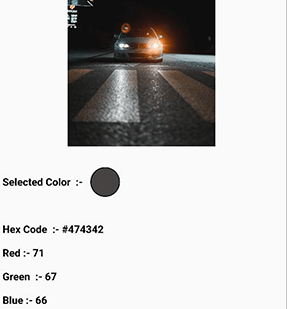
Pick_Color allows you to sample specific colors from an image and obtain their hex color code by just dragging over the image area.

pick_color

Add Dependency

pick_color : any

Usage

 Image image = Image.asset("assets/b.jpg");
 ColorPicker(
    child: image, # Your Image widget
    onChanged: (response) {
        String hexcode = response.hexCode;
        // Get Selected Color
        Color color = response.selectionColor;
        // Get Red Channel Color
        int redValue = response.redScale;
        // Get Blue Channel Color
        int blueValue = response.blueScale;
        // Get Green Channel Color
        int greenValue = response.greenScale;  
                  
});    

That's all it takes 😃

Feel Free to contribute or file an issue happy coding.

所屬分類

依賴

依賴清單 1 項

原始碼儲存庫

使用此套件的專案

暫無相關資料。