

 v0.0.8
external_path_ios_mac
一個用於在 iOS 和 macOS 設備上檢索目錄路徑的 Flutter 套件,確保跨平台的檔案存取與管理。
3喜歡 271近 30 天下載160Pub 分數
iOSmacOS
SwanFlutter/external_path_ios_mac open-source repository details.

以下為英文專案原文快照,最新內容請造訪 GitHub。
A Flutter package for retrieving directory paths on iOS and macOS devices, ensuring file access and management across platforms.
Platform support: iOS ✓ | macOS ✓
Add the dependency to your pubspec.yaml file:
dependencies:
  external_path_ios_mac: ^0.0.8
Alternatively, you can use the Git repository:
dependencies:
  external_path_ios_mac:
    git:
      url: https://github.com/SwanFlutter/external_path_ios_mac.git
Import the package in your Dart file:
import 'package:external_path_ios_mac/external_path_ios_mac.dart';
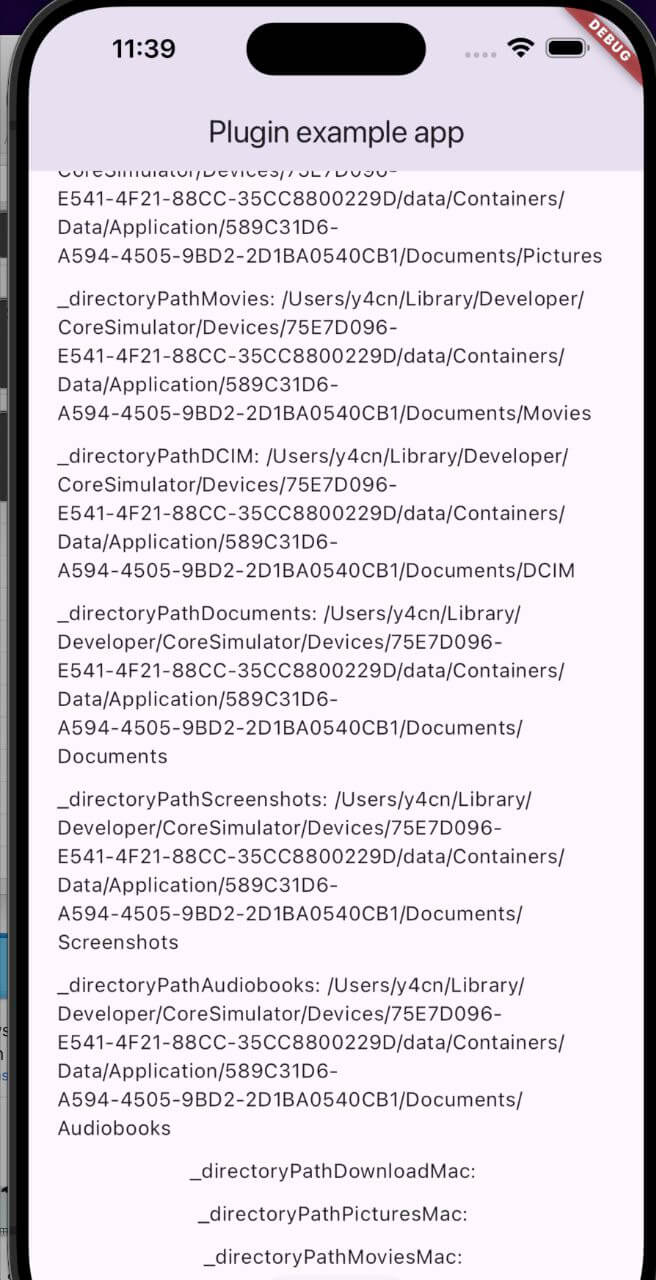
| Directory Type | Description |
|---|---|
DirectoryType.downloads |
Path to the Downloads directory. |
DirectoryType.music |
Path to the Music directory. |
DirectoryType.podcasts |
Path to the Podcasts directory. |
DirectoryType.ringtones |
Path to the Ringtones directory. |
DirectoryType.alarms |
Path to the Alarms directory. |
DirectoryType.notifications |
Path to the Notifications directory. |
DirectoryType.pictures |
Path to the Pictures directory. |
DirectoryType.movies |
Path to the Movies directory. |
DirectoryType.dcim |
Path to the DCIM directory. |
DirectoryType.documents |
Path to the Documents directory. |
DirectoryType.screenshots |
Path to the Screenshots directory. |
DirectoryType.audiobooks |
Path to the Audiobooks directory. |
| Directory Type | Description |
|---|---|
MacDirectoryType.downloads |
Path to the Downloads directory. |
MacDirectoryType.pictures |
Path to the Pictures directory. |
MacDirectoryType.movies |
Path to the Movies directory. |
final externalPath = ExternalPathIosMac();

// Downloads directory
final downloadsPath = await externalPath.getDirectoryPath(
  directory: DirectoryType.downloads,
);

// Music directory
final musicPath = await externalPath.getDirectoryPath(
  directory: DirectoryType.music,
);

// Documents directory
final documentsPath = await externalPath.getDirectoryPath(
  directory: DirectoryType.documents,
);

// DCIM directory
final dcimPath = await externalPath.getDirectoryPath(
  directory: DirectoryType.dcim,
);
final externalPath = ExternalPathIosMac();

// Downloads directory
final downloadsPathMac = await externalPath.getDirectoryPathMacOs(
  directory: MacDirectoryType.downloads,
);

// Pictures directory
final picturesPathMac = await externalPath.getDirectoryPathMacOs(
  directory: MacDirectoryType.pictures,
);

// Movies directory
final moviesPathMac = await externalPath.getDirectoryPathMacOs(
  directory: MacDirectoryType.movies,
);
final platformVersion = await externalPath.getPlatformVersion();
print('Platform Version: $platformVersion');
final externalPath = ExternalPathIosMac();

try {
  final rootPath = await externalPath.getRootInstallationPath();
  print('Root installation path: $rootPath');
} catch (e) {
  print('Error: $e');
}
On iOS, returns the main bundle path. On macOS, returns the application's installation directory.
import 'package:flutter/material.dart';
import 'dart:io';
import 'package:external_path_ios_mac/external_path_ios_mac.dart';

class MyApp extends StatefulWidget {
  const MyApp({super.key});

  @override
  State<MyApp> createState() => _MyAppState();
}

class _MyAppState extends State<MyApp> {
  final _externalPath = ExternalPathIosMac();

  String _platformVersion = '';
  String _downloadsPath = '';
  String _musicPath = '';
  String _documentsPath = '';
  String _downloadsPathMac = '';
  String _picturesPathMac = '';

  @override
  void initState() {
    super.initState();
    _initPlatformState();
  }

  Future<void> _initPlatformState() async {
    final platformVersion = await _externalPath.getPlatformVersion();

    // iOS paths
    final downloadsPath = await _externalPath.getDirectoryPath(
      directory: DirectoryType.downloads,
    );
    final musicPath = await _externalPath.getDirectoryPath(
      directory: DirectoryType.music,
    );
    final documentsPath = await _externalPath.getDirectoryPath(
      directory: DirectoryType.documents,
    );

    // macOS paths
    final downloadsPathMac = await _externalPath.getDirectoryPathMacOs(
      directory: MacDirectoryType.downloads,
    );
    final picturesPathMac = await _externalPath.getDirectoryPathMacOs(
      directory: MacDirectoryType.pictures,
    );

    setState(() {
      _platformVersion = platformVersion ?? 'Unknown';
      _downloadsPath = downloadsPath ?? 'Unknown';
      _musicPath = musicPath ?? 'Unknown';
      _documentsPath = documentsPath ?? 'Unknown';
      _downloadsPathMac = downloadsPathMac ?? 'Unknown';
      _picturesPathMac = picturesPathMac ?? 'Unknown';
    });
  }

  Future<void> _saveFile(String path, String fileName) async {
    if (path != 'Unknown') {
      final file = File('$path/$fileName');
      await file.writeAsString('Sample content');
      print('File saved to $path/$fileName');
    }
  }

  @override
  Widget build(BuildContext context) {
    return MaterialApp(
      home: Scaffold(
        appBar: AppBar(title: const Text('Directory Paths Example')),
        body: Center(
          child: Column(
            mainAxisAlignment: MainAxisAlignment.center,
            children: [
              Text('Platform: $_platformVersion'),
              const SizedBox(height: 16),
              Text('iOS Downloads: $_downloadsPath'),
              Text('iOS Music: $_musicPath'),
              Text('iOS Documents: $_documentsPath'),
              const SizedBox(height: 16),
              Text('macOS Downloads: $_downloadsPathMac'),
              Text('macOS Pictures: $_picturesPathMac'),
              const SizedBox(height: 16),
              ElevatedButton(
                onPressed: () => _saveFile(_downloadsPath, 'example.txt'),
                child: const Text('Save File to Downloads'),
              ),
            ],
          ),
        ),
      ),
    );
  }
}
Add the following keys to your Info.plist if your app accesses photos or camera:
<key>NSPhotoLibraryUsageDescription</key>
<string>We need access to your photo library.</string>
<key>NSCameraUsageDescription</key>
<string>We need access to your camera.</string>
Add the following entitlement to macos/Runner/DebugProfile.entitlements and macos/Runner/Release.entitlements:
<key>com.apple.security.files.user-selected.read-only</key>
<true/>
This package supports Swift Package Manager (SPM) for both iOS and macOS, compatible with Flutter 3.44+. CocoaPods is also supported for backwards compatibility.
For issues, questions, or suggestions, contact us at [swan.dev1993@gmail.com](mailto:swan.dev1993@gmail.com) or visit our GitHub repository.
依賴清單 4 項
{"sdk":"flutter"}^2.1.8{"sdk":"flutter"}^6.0.0先依使用情境篩選,再比較專案活躍情況,最後到原始儲存庫確認使用要求。
“A repository is the most basic element of GitHub.”
GitHub Docs — About repositories ↗