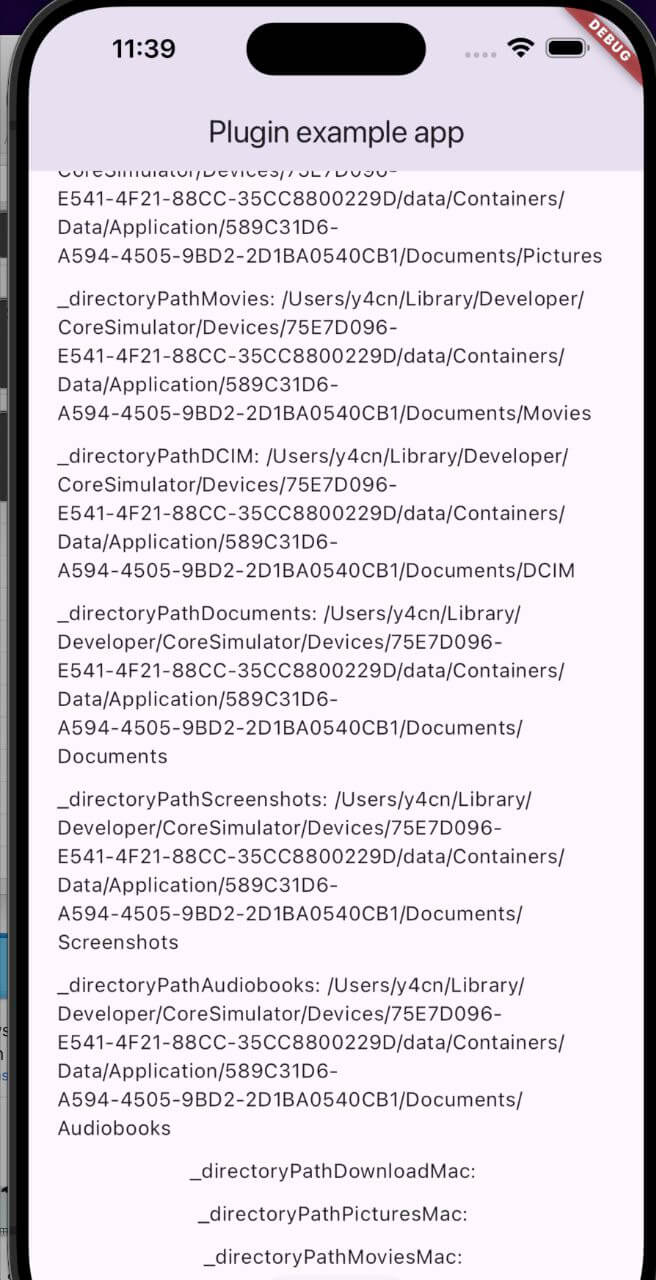
external_path_ios_mac
A Flutter package for retrieving directory paths on iOS and macOS devices, ensuring file access and management across platforms.
Platform support: iOS ✓ | macOS ✓
Getting Started
Add the dependency to your pubspec.yaml file:
dependencies:
  external_path_ios_mac: ^0.0.8
Alternatively, you can use the Git repository:
dependencies:
  external_path_ios_mac:
    git:
      url: https://github.com/SwanFlutter/external_path_ios_mac.git
How to Use
Import the package in your Dart file:
import 'package:external_path_ios_mac/external_path_ios_mac.dart' ;
Supported Directories
iOS Directories
Directory Type
Description
DirectoryType.downloadsPath to the Downloads directory.
DirectoryType.musicPath to the Music directory.
DirectoryType.podcastsPath to the Podcasts directory.
DirectoryType.ringtonesPath to the Ringtones directory.
DirectoryType.alarmsPath to the Alarms directory.
DirectoryType.notificationsPath to the Notifications directory.
DirectoryType.picturesPath to the Pictures directory.
DirectoryType.moviesPath to the Movies directory.
DirectoryType.dcimPath to the DCIM directory.
DirectoryType.documentsPath to the Documents directory.
DirectoryType.screenshotsPath to the Screenshots directory.
DirectoryType.audiobooksPath to the Audiobooks directory.
macOS Directories
Directory Type
Description
MacDirectoryType.downloadsPath to the Downloads directory.
MacDirectoryType.picturesPath to the Pictures directory.
MacDirectoryType.moviesPath to the Movies directory.
Example Usage
Retrieving Directory Paths on iOS
final externalPath = ExternalPathIosMac ();
final downloadsPath = await externalPath.getDirectoryPath (
directory: DirectoryType .downloads,
);
final musicPath = await externalPath.getDirectoryPath (
directory: DirectoryType .music,
);
final documentsPath = await externalPath.getDirectoryPath (
directory: DirectoryType .documents,
);
final dcimPath = await externalPath.getDirectoryPath (
directory: DirectoryType .dcim,
);
Retrieving Directory Paths on macOS
final externalPath = ExternalPathIosMac ();
final downloadsPathMac = await externalPath.getDirectoryPathMacOs (
directory: MacDirectoryType .downloads,
);
final picturesPathMac = await externalPath.getDirectoryPathMacOs (
directory: MacDirectoryType .pictures,
);
final moviesPathMac = await externalPath.getDirectoryPathMacOs (
directory: MacDirectoryType .movies,
);
Retrieving Platform Version
final platformVersion = await externalPath.getPlatformVersion ();
print ('Platform Version: $platformVersion ' );
Retrieving Root Installation Path
final externalPath = ExternalPathIosMac ();
try {
final rootPath = await externalPath.getRootInstallationPath ();
print ('Root installation path: $rootPath ' );
} catch (e) {
print ('Error: $e ' );
}
On iOS, returns the main bundle path. On macOS, returns the application's installation directory.
Full Example
import 'package:flutter/material.dart' ;
import 'dart:io' ;
import 'package:external_path_ios_mac/external_path_ios_mac.dart' ;
class MyApp extends StatefulWidget const MyApp ({super .key});
@override
State <MyApp > createState () => _MyAppState ();
}
class _MyAppState extends State <MyApp > final _externalPath = ExternalPathIosMac ();
String _platformVersion = '' ;
String _downloadsPath = '' ;
String _musicPath = '' ;
String _documentsPath = '' ;
String _downloadsPathMac = '' ;
String _picturesPathMac = '' ;
@override
void initState () {
super .initState ();
_initPlatformState ();
}
Future <void > _initPlatformState () async {
final platformVersion = await _externalPath.getPlatformVersion ();
final downloadsPath = await _externalPath.getDirectoryPath (
directory: DirectoryType .downloads,
);
final musicPath = await _externalPath.getDirectoryPath (
directory: DirectoryType .music,
);
final documentsPath = await _externalPath.getDirectoryPath (
directory: DirectoryType .documents,
);
final downloadsPathMac = await _externalPath.getDirectoryPathMacOs (
directory: MacDirectoryType .downloads,
);
final picturesPathMac = await _externalPath.getDirectoryPathMacOs (
directory: MacDirectoryType .pictures,
);
setState (() {
_platformVersion = platformVersion ?? 'Unknown' ;
_downloadsPath = downloadsPath ?? 'Unknown' ;
_musicPath = musicPath ?? 'Unknown' ;
_documentsPath = documentsPath ?? 'Unknown' ;
_downloadsPathMac = downloadsPathMac ?? 'Unknown' ;
_picturesPathMac = picturesPathMac ?? 'Unknown' ;
});
}
Future <void > _saveFile (String path, String fileName) async {
if (path != 'Unknown' ) {
final file = File ('$path /$fileName ' );
await file.writeAsString ('Sample content' );
print ('File saved to $path /$fileName ' );
}
}
@override
Widget build (BuildContext context) {
return MaterialApp (
home: Scaffold (
appBar: AppBar (title: const Text ('Directory Paths Example' )),
body: Center (
child: Column (
mainAxisAlignment: MainAxisAlignment .center,
children: [
Text ('Platform: $_platformVersion ' ),
const SizedBox (height: 16 ),
Text ('iOS Downloads: $_downloadsPath ' ),
Text ('iOS Music: $_musicPath ' ),
Text ('iOS Documents: $_documentsPath ' ),
const SizedBox (height: 16 ),
Text ('macOS Downloads: $_downloadsPathMac ' ),
Text ('macOS Pictures: $_picturesPathMac ' ),
const SizedBox (height: 16 ),
ElevatedButton (
onPressed: () => _saveFile (_downloadsPath, 'example.txt' ),
child: const Text ('Save File to Downloads' ),
),
],
),
),
),
);
}
}
Platform-Specific Setup
iOS
Add the following keys to your Info.plist if your app accesses photos or camera:
<key > NSPhotoLibraryUsageDescription</key >
<string > We need access to your photo library.</string >
<key > NSCameraUsageDescription</key >
<string > We need access to your camera.</string >
macOS
Add the following entitlement to macos/Runner/DebugProfile.entitlements and macos/Runner/Release.entitlements:
<key > com.apple.security.files.user-selected.read-only</key >
<true />
Swift Package Manager
This package supports Swift Package Manager (SPM) for both iOS and macOS, compatible with Flutter 3.44+. CocoaPods is also supported for backwards compatibility.
Additional Information
For issues, questions, or suggestions, contact us at [swan.dev1993@gmail.com](mailto:swan.dev1993@gmail.com) or visit our GitHub repository .