


 v0.0.7
live_text
一個 Flutter 套件,提供最簡單的方式來更新 UI 中的文字元件。
26喜歡 19近 30 天下載140Pub 分數
AndroidiOSWebmacOSWindowsLinux
在 UI 中更新文字變得輕鬆

以下為英文專案原文快照,最新內容請造訪 GitHub。

Have you stumble upon a situations where you simply need to update UI text without dealing with state management techniques? If so, this package is a perfect fit for you.
Add live_text to your pubspec.yaml file and start making your text live.
Just add live_text as a dependency in your pubspec.yaml file.
dependencies:
  live_text: <Latest Version>
import 'package:live_text/live_text.dart';

LiveTextController counterLiveTextController = LiveTextController(initialValue: "0");
 LiveText(
            style: Theme.of(context).textTheme.headlineMedium,
            liveTextController: counterLiveTextController,
          ),
  void _incrementCounter() {
counterLiveTextController.setValue =
    (int.parse(counterLiveTextController.getValue) + 1).toString();
}

 void _decrementCounter() {
  counterLiveTextController.setValue =
      (int.parse(counterLiveTextController.getValue) - 1).toString();
}

import 'dart:async';

import 'package:flutter/material.dart';
import 'package:live_text/live_text.dart';

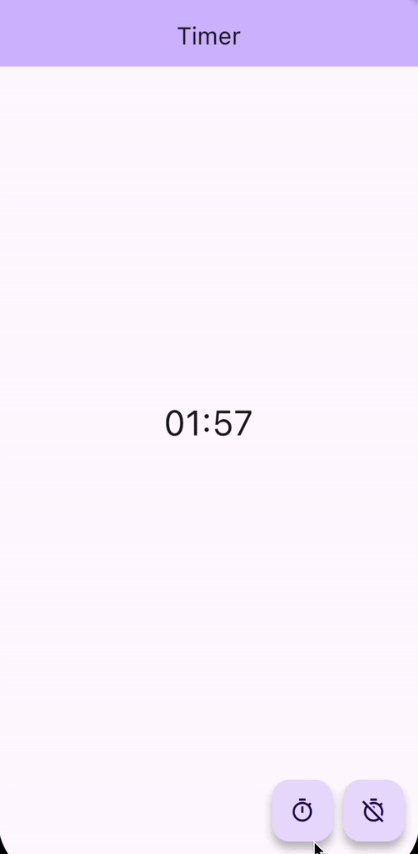
class TimerExample extends StatelessWidget {
  TimerExample({super.key});

  late LiveTextController timerLiveTextController = LiveTextController(
      initialValue: "00:00",
      onValueChanged: (String oldValue, String newValue) {
        print("Timer");

        print("Old Value $oldValue");
        print("New Value $newValue");
      });

  Timer? timer;

  void _toggleTimer() {
    if (timer == null) {
      DateTime futureTime = DateTime.now().add(const Duration(seconds: 120));

      timer ??= Timer.periodic(const Duration(milliseconds: 100), (_) {
        DateTime latestTime = DateTime.now();
        if (latestTime.isBefore(futureTime)) {
          timerLiveTextController.setValue =
              formatHHMMSS(futureTime.difference(latestTime).inSeconds);
        } else {
          _clearTimer();
        }
      });
    } else {
      _clearTimer();
    }
  }

  void _clearTimer() {
    timer?.cancel();
    timer = null;
    timerLiveTextController.resetValue();
  }

  String formatHHMMSS(int seconds) {
    final hours = (seconds / 3600).truncate();
    seconds = (seconds % 3600).truncate();
    final minutes = (seconds / 60).truncate();

    final hoursStr = (hours).toString().padLeft(2, '0');
    final minutesStr = (minutes).toString().padLeft(2, '0');
    final secondsStr = (seconds % 60).toString().padLeft(2, '0');

    if (hours == 0) {
      return '$minutesStr:$secondsStr';
    }

    return '$hoursStr:$minutesStr:$secondsStr';
  }

  @override
  Widget build(BuildContext context) {
    return Scaffold(
      appBar: AppBar(
        backgroundColor: Theme.of(context).colorScheme.inversePrimary,
        title: const Text("Timer"),
      ),
      body: SafeArea(
        child: Center(
          child: Column(
            children: <Widget>[
              const Spacer(),
              LiveText(
                style: Theme.of(context).textTheme.headlineLarge,
                liveTextController: timerLiveTextController,
              ),
              const Spacer(),
              Padding(
                padding: const EdgeInsets.symmetric(horizontal: 16.0),
                child: Row(
                  children: [
                    const Spacer(),
                    FloatingActionButton(
                      onPressed: _toggleTimer,
                      tooltip: 'Start Timer',
                      child: const Icon(Icons.timer_outlined),
                    ),
                    const SizedBox(width: 10),
                    FloatingActionButton(
                      onPressed: _clearTimer,
                      tooltip: 'Start Timer',
                      child: const Icon(Icons.timer_off_outlined),
                    ),
                  ],
                ),
              ),
            ],
          ),
        ),
      ),
    );
  }
}
We will be more than happy for your contributions.
Please contribute to live_text this github repo.
依賴清單 3 項
{"sdk":"flutter"}{"sdk":"flutter"}^2.0.0先依使用情境篩選,再比較專案活躍情況,最後到原始儲存庫確認使用要求。
“A repository is the most basic element of GitHub.”
GitHub Docs — About repositories ↗