

 v0.3.2
social_embed_webview
提供一個 Widget,可輕鬆使用平台的 Web 嵌入功能在 Flutter 中嵌入社群媒體貼文。
43喜歡 27近 30 天下載120Pub 分數
AndroidiOS
提供一個 widget,可輕鬆使用平台的網頁嵌入功能在 Flutter 中嵌入社群媒體貼文。

以下為英文專案原文快照,最新內容請造訪 GitHub。
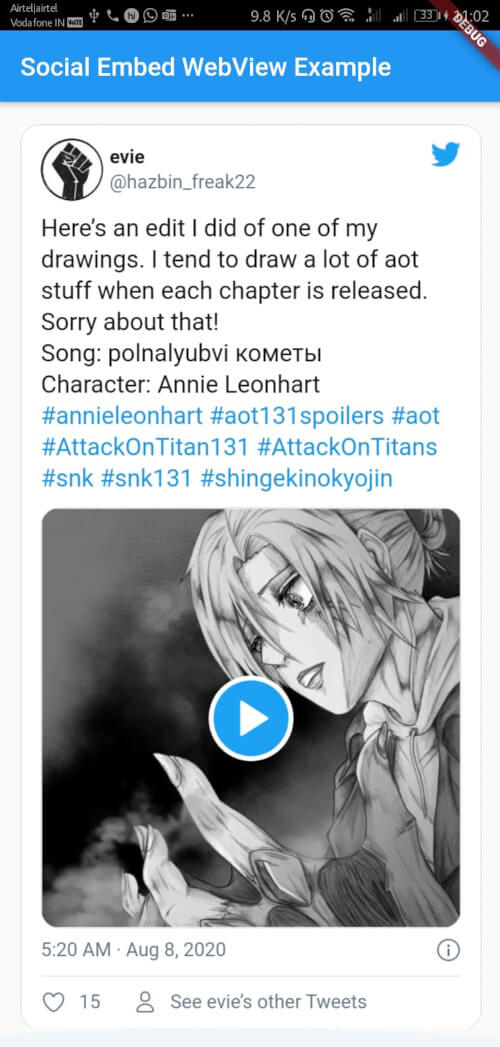
Currently non of the major social media platform provides support to embed their post in a flutter app. This flutter package provides widgets to embed posts of various social media platforms using webview_flutter in the background.
Please note
They are not many solutions in the community to solve this problem. All the packages use the same webview_flutter in the background but have a major issue of a predefined height. While this package adjusts the heights of the webview automatically according to the size of the embedded post.
1: Add this to your package's pubspec.yaml file:
dependencies:
  social_embed_webview: 0.3.1
2: You can install packages from the command line:
$ flutter packages get
Alternatively, your editor might support flutter packages get. Check the docs for your editor to learn more.
3: Please visit webview_flutter and follow the steps required for implementations in Android and iOS respectively.
Please make sure to remove <script>...</script> added by the platform with other embed code.
Please visit examples for more detailed examples corresponding to each platform
import 'package:flutter/material.dart';
import 'package:social_embed_webview/platforms/twitter.dart';
import 'package:social_embed_webview/social_embed_webview.dart';
/// <srcipts>...</scripts> tag has been removed
String tweetContent = r"""
<blockquote class="twitter-tweet"><p lang="en" dir="ltr">Here’s an edit I did of one of my drawings. I tend to draw a lot of aot stuff when each chapter is released. Sorry about that!<br>Song: polnalyubvi кометы<br>Character: Annie Leonhart <a href="https://twitter.com/hashtag/annieleonhart?src=hash&ref_src=twsrc%5Etfw">#annieleonhart</a> <a href="https://twitter.com/hashtag/aot131spoilers?src=hash&ref_src=twsrc%5Etfw">#aot131spoilers</a> <a href="https://twitter.com/hashtag/aot?src=hash&ref_src=twsrc%5Etfw">#aot</a> <a href="https://twitter.com/hashtag/AttackOnTitan131?src=hash&ref_src=twsrc%5Etfw">#AttackOnTitan131</a> <a href="https://twitter.com/hashtag/AttackOnTitans?src=hash&ref_src=twsrc%5Etfw">#AttackOnTitans</a> <a href="https://twitter.com/hashtag/snk?src=hash&ref_src=twsrc%5Etfw">#snk</a> <a href="https://twitter.com/hashtag/snk131?src=hash&ref_src=twsrc%5Etfw">#snk131</a> <a href="https://twitter.com/hashtag/shingekinokyojin?src=hash&ref_src=twsrc%5Etfw">#shingekinokyojin</a> <a href="https://t.co/b4z48ruCoD">pic.twitter.com/b4z48ruCoD</a></p>— evie (@hazbin_freak22) <a href="https://twitter.com/hazbin_freak22/status/1291884358870142976?ref_src=twsrc%5Etfw">August 7, 2020</a></blockquote> """;
void main() {
runApp(MyApp());
}
class MyApp extends StatelessWidget {
const MyApp({super.key});
// This widget is the root of your application.
@override
Widget build(BuildContext context) {
return MaterialApp(
title: 'Flutter Demo',
theme: ThemeData(
primarySwatch: Colors.blue,
visualDensity: VisualDensity.adaptivePlatformDensity,
),
home: SafeArea(
child: Scaffold(
appBar: AppBar(
title: const Text('Social Embed WebView Example'),
),
body: SingleChildScrollView(
child: Padding(
padding: const EdgeInsets.all(8.0),
child: Column(
children: [
SocialEmbed(
socialMediaObj:
TwitterEmbedData(embedHtml: tweetContent)),
],
),
),
),
),
),
);
}
}
依賴清單 6 項
{"sdk":"flutter"}^2.0.4^6.0.3^4.0.0+1^0.13.2{"sdk":"flutter"}先依使用情境篩選,再比較專案活躍情況,最後到原始儲存庫確認使用要求。
“A repository is the most basic element of GitHub.”
GitHub Docs — About repositories ↗