Social Embed WebView (Developers Preview)
Currently non of the major social media platform provides support to embed their post in a flutter app. This flutter package provides widgets to embed posts of various social media platforms using webview_flutter in the background.
Please note
- version < 0.3.0 is not backward compatiable from this version. So please go through examples before upgrading
Content
Why Us
They are not many solutions in the community to solve this problem. All the packages use the same webview_flutter in the background but have a major issue of a predefined height. While this package adjusts the heights of the webview automatically according to the size of the embedded post.
Supported Platforms:
How to use?
1: Add this to your package's pubspec.yaml file:
dependencies:
  social_embed_webview: 0.3.1
2: You can install packages from the command line:
$ flutter packages get
Alternatively, your editor might support flutter packages get. Check the docs for your editor to learn more.
3: Please visit webview_flutter and follow the steps required for implementations in Android and iOS respectively.
Example
Please make sure to remove <script>...</script> added by the platform with other embed code.
Please visit examples for more detailed examples corresponding to each platform
import 'package:flutter/material.dart';
import 'package:social_embed_webview/platforms/twitter.dart';
import 'package:social_embed_webview/social_embed_webview.dart';
String tweetContent = r"""
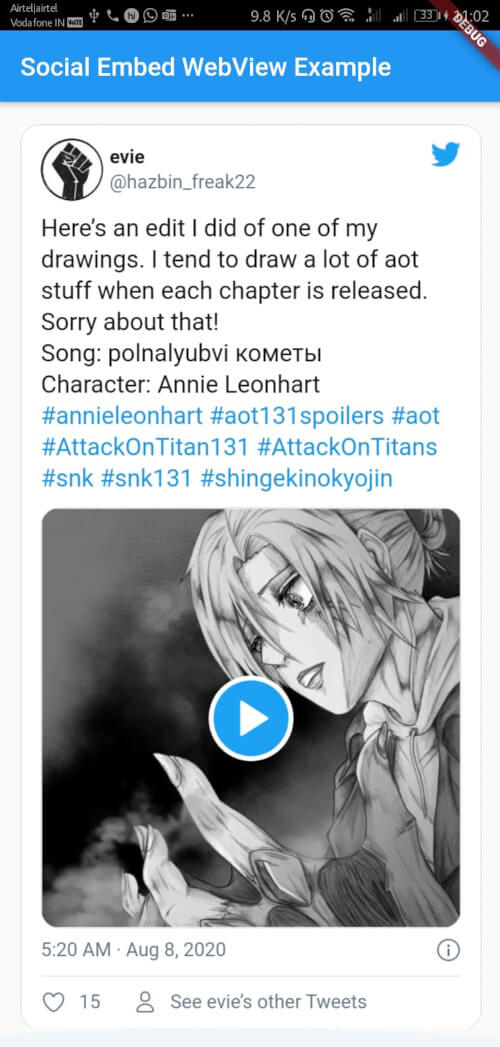
<blockquote class="twitter-tweet"><p lang="en" dir="ltr">Here’s an edit I did of one of my drawings. I tend to draw a lot of aot stuff when each chapter is released. Sorry about that!<br>Song: polnalyubvi кометы<br>Character: Annie Leonhart <a href="https://twitter.com/hashtag/annieleonhart?src=hash&ref_src=twsrc%5Etfw">#annieleonhart</a> <a href="https://twitter.com/hashtag/aot131spoilers?src=hash&ref_src=twsrc%5Etfw">#aot131spoilers</a> <a href="https://twitter.com/hashtag/aot?src=hash&ref_src=twsrc%5Etfw">#aot</a> <a href="https://twitter.com/hashtag/AttackOnTitan131?src=hash&ref_src=twsrc%5Etfw">#AttackOnTitan131</a> <a href="https://twitter.com/hashtag/AttackOnTitans?src=hash&ref_src=twsrc%5Etfw">#AttackOnTitans</a> <a href="https://twitter.com/hashtag/snk?src=hash&ref_src=twsrc%5Etfw">#snk</a> <a href="https://twitter.com/hashtag/snk131?src=hash&ref_src=twsrc%5Etfw">#snk131</a> <a href="https://twitter.com/hashtag/shingekinokyojin?src=hash&ref_src=twsrc%5Etfw">#shingekinokyojin</a> <a href="https://t.co/b4z48ruCoD">pic.twitter.com/b4z48ruCoD</a></p>— evie (@hazbin_freak22) <a href="https://twitter.com/hazbin_freak22/status/1291884358870142976?ref_src=twsrc%5Etfw">August 7, 2020</a></blockquote> """;
void main() {
runApp(MyApp());
}
class MyApp extends StatelessWidget {
const MyApp({super.key});
@override
Widget build(BuildContext context) {
return MaterialApp(
title: 'Flutter Demo',
theme: ThemeData(
primarySwatch: Colors.blue,
visualDensity: VisualDensity.adaptivePlatformDensity,
),
home: SafeArea(
child: Scaffold(
appBar: AppBar(
title: const Text('Social Embed WebView Example'),
),
body: SingleChildScrollView(
child: Padding(
padding: const EdgeInsets.all(8.0),
child: Column(
children: [
SocialEmbed(
socialMediaObj:
TwitterEmbedData(embedHtml: tweetContent)),
],
),
),
),
),
),
);
}
}
Output
Known Bugs
- Media playback continuous incase of router.push() for all platform
- Media playback continuous incase of app going in background for all platform except Youtube