


 v1.1.0
finger_painter
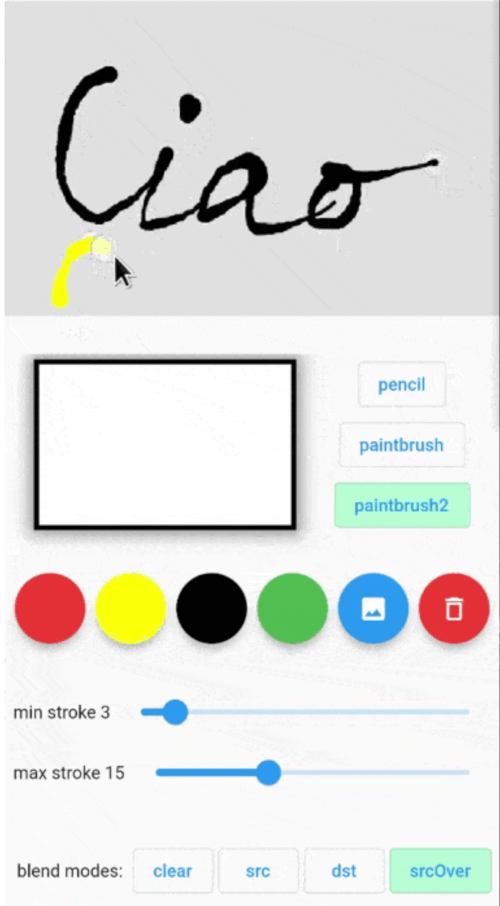
一個繪畫套件,可使用不同的筆刷和混合模式進行手指繪畫。結果可讀取為位圖或點列表,例如用於地圖。
45喜歡 59近 30 天下載130Pub 分數
AndroidiOSWebmacOSWindowsLinux
一個繪畫套件,可使用不同的筆刷和混合模式進行手指繪畫。結果可讀取為位圖或點列表,例如用於地圖。

以下為英文專案原文快照,最新內容請造訪 GitHub。
Painting package that let you finger paint with different brushes and different blend modes. The result can be read as a bitmap or list of Points to be used ie on a Map.


The usage is simple: put the Painter() widget into your widget tree then use PainterController() to control its parameters and to get current painting image and/or drawn points.
initialize the painter controller ie in the initState():
@override
void initState() {
  super.initState();
  painterController = PainterController()
    ..setPenType(PenType.pencil)
    ..setStrokeColor(Colors.black)
    ..setMinStrokeWidth(3)
    ..setMaxStrokeWidth(10)
    ..setBlurSigma(0.0)
    ..setBlendMode(ui.BlendMode.srcOver);
}
insert Painter() widget somewhere in your widget tree:
Painter(
  controller: painterController,
  backgroundColor: Colors.green.withOpacity(0.4),
  size: const Size(300, 300),
  child: Image.asset(...),
  onDrawingEnded: (Uint8List bytes) async{
    ...
  },
  // the child could be ie a Google Map
  // PS: the [backgroundColor] and child are not rendered in the resulting image
  child: Image.asset('assets/...'),
),
| Properties | Required | Default | Description |
|---|---|---|---|
| key | false | Widget key. | |
| controller | false | Get and set Painter parameters (see PainterController below). | |
| backgroundColor | false | Colors.transparent | Color of the active painting area. |
| size | false | Size of painting area. If not set it takes the child area. If also the child is not set, it will take the available size from the parent. | |
| child | false | Child Widget to put as the background of the painting area | |
| onDrawingEnded | false | Callbackd that returns the last drawing as Uint8List filled with uncompressed BMP 32 bpp format. Here it's possible to get the drawn point with controller.getPoints() |
| Method | return type | Description |
|---|---|---|
| getState() | PenState? | Get the penType, strokeColor, strokeMinWidth, strokeMaxWidth, blendMode. |
| getImageBytes() | Uint8List? | Get current drawing image as uncompressed 32bit BMP Uint8List. |
| getPoints() | List<Offset>? | Get the point list drawn. |
| clearContent({Color? clearColor}) | Clear current drawings with [clearColor] color. Default is transparent. | |
| setPenType(PenType type) | Set pen type: pencil, paintbrush, paintbrush2. | |
| setBlendMode(ui.BlendMode mode) | Set the painting blending mode. ui.BlendMode.dstOut can be used as an eraser pen. | |
| setStrokeColor(Color color) | Set stroke color. | |
| setMinStrokeWidth(double width) | Set the minimum stroke width. | |
| setMaxStrokeWidth(double width) | Set the maximum stroke width. | |
| setBlurSigma(double sigma) | Set the blur. 0 means no blur. | |
| setBackgroundImage(Uint8List image) | Set the background image. The painting will not modify this image. |
| Method | Default | Description |
|---|---|---|
| penType | PenType.paintbrush | enum with pencil, paintbrush, paintbrush2. pencil: constant stroke width using strokeMinWidth paintBrush: variable stroke width. Near strokeMinWidth when moving slowly, near strokeMaxWidth when moving fast. paintBrush2: variable stroke width. Near strokeMaxWidth when moving slowly, near strokeMinWidth when moving fast. |
| strokeColor | Colors.black | pen color |
| strokeMinWidth | 3 | Pen width when moving slowing. |
| strokeMaxWidth | 10 | Pen width when moving fast. |
| blurSigma | 0 | Blur stroke. |
| blendMode | ui.BlendMode.srcOver | Painting blending mode. See ui.BlendMode |
The html renderer running on Web is not supported and using it will not save the drawing. https://github.com/flutter/flutter/issues/42767
Hence when using this package on web, the canvaskit renderer must be used, ie: flutter run -d chrome --web-renderer canvaskit
依賴清單 3 項
{"sdk":"flutter"}{"sdk":"flutter"}^2.0.1先依使用情境篩選,再比較專案活躍情況,最後到原始儲存庫確認使用要求。
“A repository is the most basic element of GitHub.”
GitHub Docs — About repositories ↗