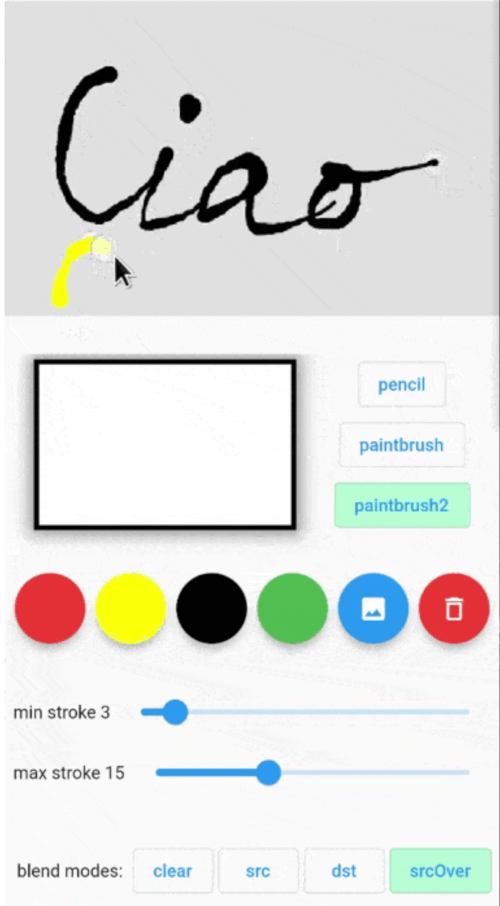
Painting package that let you finger paint with different brushes and different blend modes. The result can be read as a bitmap or list of Points to be used ie on a Map.
Features
Getting started
The usage is simple: put the Painter() widget into your widget tree then use PainterController()
to control its parameters and to get current painting image and/or drawn points.
insert Painter() widget somewhere in your widget tree:
Painter(
controller: painterController,
backgroundColor: Colors.green.withOpacity(0.4),
size: constSize(300, 300),
child: Image.asset(...),
onDrawingEnded: (Uint8List bytes) async{
...
},
// the child could be ie a Google Map// PS: the [backgroundColor] and child are not rendered in the resulting image
child: Image.asset('assets/...'),
),
Get and set Painter parameters (see PainterController below).
backgroundColor
false
Colors.transparent
Color of the active painting area.
size
false
Size of painting area. If not set it takes the child area. If also the child is not set, it will take the available size from the parent.
child
false
Child Widget to put as the background of the painting area
onDrawingEnded
false
Callbackd that returns the last drawing as Uint8List filled with uncompressed BMP 32 bpp format. Here it's possible to get the drawn point with controller.getPoints()
📜 PainterController
Method
return type
Description
getState()
PenState?
Get the penType, strokeColor, strokeMinWidth, strokeMaxWidth, blendMode.
getImageBytes()
Uint8List?
Get current drawing image as uncompressed 32bit BMP Uint8List.
getPoints()
List<Offset>?
Get the point list drawn.
clearContent({Color? clearColor})
Clear current drawings with [clearColor] color. Default is transparent.
setPenType(PenType type)
Set pen type: pencil, paintbrush, paintbrush2.
setBlendMode(ui.BlendMode mode)
Set the painting blending mode. ui.BlendMode.dstOut can be used as an eraser pen.
setStrokeColor(Color color)
Set stroke color.
setMinStrokeWidth(double width)
Set the minimum stroke width.
setMaxStrokeWidth(double width)
Set the maximum stroke width.
setBlurSigma(double sigma)
Set the blur. 0 means no blur.
setBackgroundImage(Uint8List image)
Set the background image. The painting will not modify this image.
📜 PenState
Method
Default
Description
penType
PenType.paintbrush
enum with pencil, paintbrush, paintbrush2. pencil: constant stroke width using strokeMinWidth paintBrush: variable stroke width. Near strokeMinWidth when moving slowly, near strokeMaxWidth when moving fast. paintBrush2: variable stroke width. Near strokeMaxWidth when moving slowly, near strokeMinWidth when moving fast.