v3.3.1
in_app_purchase
一個用於應用內購買的 Flutter 外掛程式。透過 App Store 和 Google Play 暴露應用內購買的 API。
2500喜歡 80.1萬近 30 天下載160Pub 分數
AndroidiOSmacOS
一個適用於 iOS 與 Android 的 Org Mode 應用

以下為英文專案原文快照,最新內容請造訪 GitHub。



An Org Mode app for iOS and Android
https://github.com/amake/orgro/assets/2172537/a3d841a3-84f3-4c34-9381-c73ab4dc9249
Imagine a plain-text markup language like Markdown, but married to an application that is a literate programming environment and life organizer. In Emacs.
I started taking notes in Org Mode at work, then found myself wanting to view
them on my tablet in meetings. By default on iOS you can't open an .org file
at all, as the OS doesn't even know that it's plain text.
Other mobile Org Mode apps seem focused on specific use cases like to-dos or task management; Orgro is instead meant to be a well-rounded and high-fidelity experience for viewing, navigating, and editing Org documents. (In the 5+ years since I started Orgro, I've added additional functionality only when it fits well into the core without compromises.)
I also wanted to try writing a parser with PetitParser; the result powers this application and is available as a separate library, org_parser. Further, the display engine is also available as a separate package for any Flutter app that wants to display Org markup: org_flutter.
<<link targets>>, <<<radio targets>>>, and src block code
references like (foo)org-protocol:// links#+STARTUP:, #+TODO:, #+LANGUAGE: directives, and
some local variablesSee the manual for details.
See here
Orgro is available on the App Store, Google Play, and F-Droid, or you can build and install from source:
flutter run from the repo rootIf you like this app, please show your support by buying a copy, or sponsoring the author ❤️
一個用於應用內購買的 Flutter 外掛程式。透過 App Store 和 Google Play 暴露應用內購買的 API。
用於在主螢幕上建立捷徑的 Flutter 外掛程式,也稱為 iOS 上的快速動作和 Android 上的應用程式捷徑。
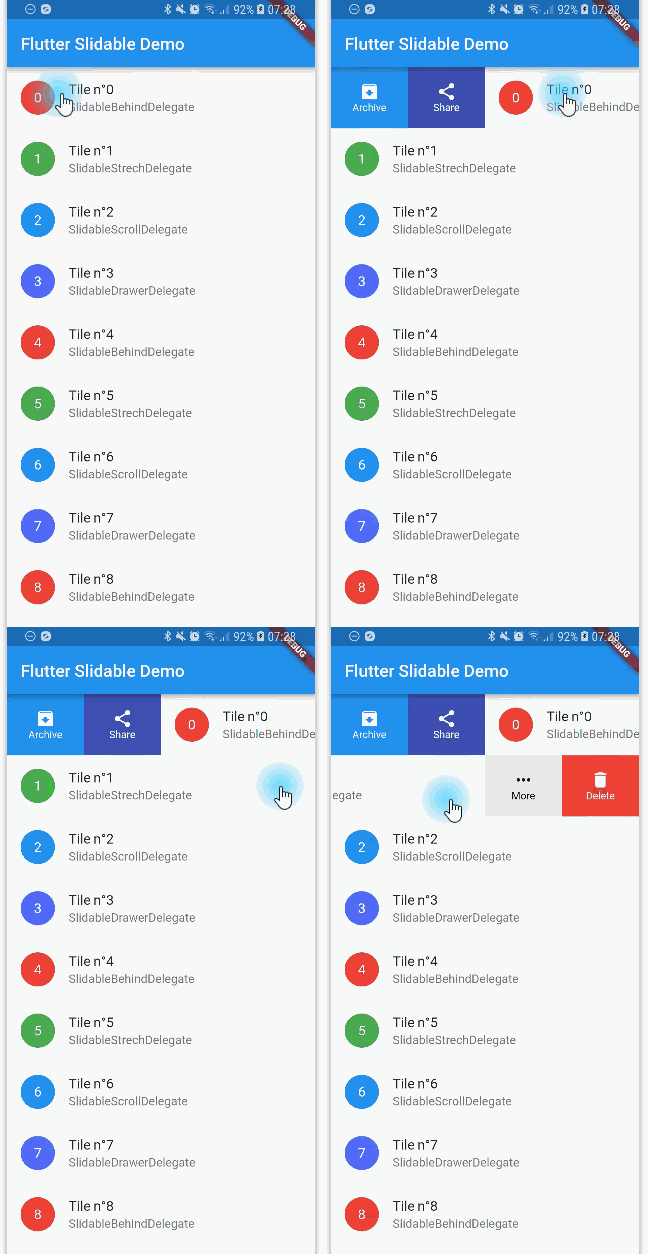
一個帶有方向性滑動操作且可被關閉的可滑動清單項目之 Flutter 實作。
Flutter Workmanager。此外掛程式允許您在 Android 和 iOS 上排程背景工作。
適用於 Flutter 的通用快取管理員。將網頁檔案儲存在裝置的儲存空間中,並使用 sqflite 儲存快取資訊。
一個用於從應用程式中開啟 iOS 和 Android 手機設定的 Flutter 插件。
一個外掛,可在 Flutter 中呼叫原生 APP 開啟檔案並回傳字串結果,支援 iOS(UTI)、Android(Intent)、PC(FFI)與 Web(dart:html)
一個插件,可讓您保持裝置螢幕常亮,也就是防止在 Android、iOS、macOS、Windows、Linux 和 Web 上的螢幕進入睡眠狀態。
支援 Android 和 iOS、macOS、Linux、Windows 和 Web 的 OpenPGP 使用程式庫
用於取得裝置本機時區的 Flutter 插件。
時區資料庫和時區感知的 `DateTime`。
一個用於在您的 Flutter 應用中包含動態網路主機字型的套件。
依賴清單 31 項
^4.0.0^3.0.1{"git":{"url":"https://github.com/amake/file_picker_writable.git","ref":"directory-picker"}}{"sdk":"flutter"}^2.2.0^3.3.0^6.0.0^4.0.0^8.0.0^1.1.0^0.20.2^13.1.0^2.0.9^13.0.0^2.0.0^6.0.0^6.1.2^4.0.03.10.3^1.1.0^22.0.0^5.0.0^0.11.0^0.10.1^9.0.0^1.4.0^3.2.3{"git":{"url":"https://github.com/amake/in_app_purchase_stub.git","ref":"main","path":"in_app_purchase_stub_android"}}^1.0.0^6.0.0{"sdk":"flutter"}先依使用情境篩選,再比較專案活躍情況,最後到原始儲存庫確認使用要求。
“A repository is the most basic element of GitHub.”
GitHub Docs — About repositories ↗