搜尋套件、儲存庫與 APP 分類

套件詳情v2.2.0

file_picker_writable

Flutter 插件,允許使用者開啟可讀取的檔案/文件,並可在稍後時間寫回,以及在外部媒體上建立新檔案。

AndroidiOSmacOS
近 30 天下載
252
喜歡數
14
Pub 分數
160

安裝套件

flutter pub add file_picker_writable

套件介紹

根據套件公開資料產生的選型評估,僅供參考。

一個 Flutter 外掛,可在 Android、iOS 和 macOS 上啟用使用者開啟、讀取和寫入外部儲存空間中的檔案。它支援現有的檔案操作以及建立新檔案,非常適合需要持續性檔案處理的應用程式。此外掛擴充標準的檔案選擇功能,加入寫入功能,確保資料在修改後可回存。專為與原生檔案系統無縫整合而設計,提供跨平台的一致體驗。

適用情境

  • 離線編輯文件
  • 儲存使用者產生的內容
  • 在應用程式中管理專案檔案
  • 從應用程式匯出資料到裝置
  • 儲存設定檔
  • 在創意應用中處理媒體檔案

主要特色

  • 讀取和寫入檔案存取
  • 在外部儲存空間建立新檔案
  • 跨平台支援(Android、iOS、macOS)
  • 安全的檔案處理
  • 與原生檔案選擇器整合
  • 持久化檔案儲存

適合對象

  • 生產力應用
  • 文件編輯器
  • 媒體管理工具
  • 資料匯出/匯入功能
  • 創意應用
  • 基於檔案的設定系統

使用建議

  • 需要適當的平台權限
  • 可能需要執行時權限請求
  • 檔案路徑是平台相關的
  • 僅限外部儲存存取
  • 不適用於內部應用資料
  • 使用者必須授予檔案系統存取權限

原始 README

以下為關聯原始碼儲存庫的 README 原文快照,最新內容請造訪原始碼儲存庫。

Pub Version

file_picker_writable

Flutter plugin to choose files which can be read, referenced and written back at a later time (persistent permissions on android, secure bookmarks on iOS).

It also offers handlers for open intents when the user wants to open associated files from other apps. In the same way it will also handle arbitrary URLs and pass them back to dart.

Requirements

iOS

  • iOS 8 + Swift 5
  • Only tested on iOS 13+, so let me know ;-)
Support for file handlers
  1. Configure an OTI Type: https://developer.apple.com/library/archive/qa/qa1587/_index.html
  2. Add to plist file:
     <key>UISupportsDocumentBrowser</key>
     <false/>
     <key>LSSupportsOpeningDocumentsInPlace</key>
     <true/>
    

Android

Support for file handlers
AndroidManifest.xlm
            <intent-filter>
                <action android:name="android.intent.action.VIEW"  />
                <category android:name="android.intent.category.DEFAULT" />
                <category android:name="android.intent.category.BROWSABLE" />
                <data android:scheme="file" />
                <data android:scheme="content" />
                <data android:host="*"  />
                <data android:mimeType="*/*" />
                <!-- https://stackoverflow.com/a/52384331/109219 ?? -->
                <data android:pathPattern=".*\\.codeux" />
                <data android:pathPattern=".*\\..*\\.codeux" />
                <data android:pathPattern=".*\\..*\\..*\\.codeux" />
                <data android:pathPattern=".*\\..*\\..*\\..*\\.codeux" />
                <data android:pathPattern=".*\\..*\\..*\\..*\\..*\\.codeux" />
                <data android:pathPattern=".*\\..*\\..*\\..*\\.*\\..*\\.codeux" />
            </intent-filter>

MacOS

Is currently not supported. The only thing the plugin will do is listen for URL Events and pass them through to the dart side.

Getting Started

See the example on how to implement it in a simple application.

Future<void> readFile() async {
  final fileInfo = await FilePickerWritable().openFile((fileInfo, file) async {
    _logger.fine('Got picker result: $fileInfo');

    // now do something useful with the selected file...
    _logger.info('Got file contents in temporary file: $file');
    _logger.info('fileName: ${fileInfo.fileName}');
    _logger.info('Identifier which can be persisted for later retrieval:'
        '${fileInfo.identifier}');
    return fileInfo;
  });
  if (fileInfo == null) {
    _logger.info('User canceled.');
    return;
  }
}

The returned fileInfo.identifier can be used later to write or read from the data, even after an app restart.

Future<void> persistChanges(FileInfo fileInfo, Uint8List newContent) async {
  // tell FilePickerWritable plugin to write the new contents over the user selected file
  await FilePickerWritable().writeFile(
      identifier: fileInfo.identifier,
      writer: (file) async {
        // write new content into the temporary file.
        await file.writeBytes(newContent);
      });
}

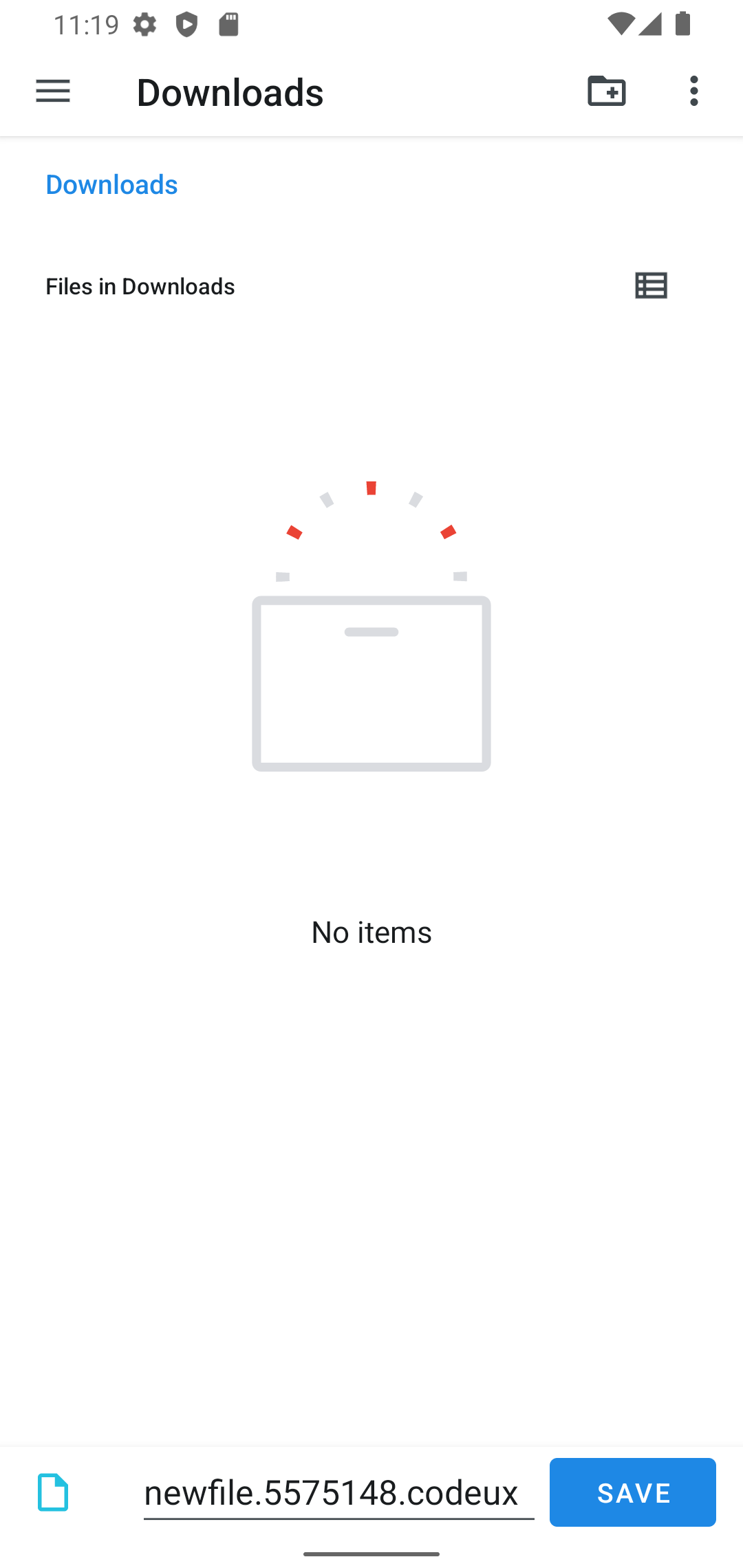
Create a new file by letting the user choose a directory and file name:

final rand = Random().nextInt(10000000);
final fileInfo = await FilePickerWritable().openFileForCreate(
  fileName: 'newfile.$rand.codeux',
  writer: (file) async {
    final content = 'File created at ${DateTime.now()}\n\n';
    await file.writeAsString(content);
  },
);
if (fileInfo == null) {
  _logger.info('User canceled.');
  return;
}
final data = await _appDataBloc.store.load();
await _appDataBloc.store
    .save(data.copyWith(files: data.files + [fileInfo]));
}

This will open the following screen on Android:

create file screenshot

所屬分類

依賴

依賴清單 5 項

原始碼儲存庫

使用此套件的專案