

 v1.0.3
chat_composer
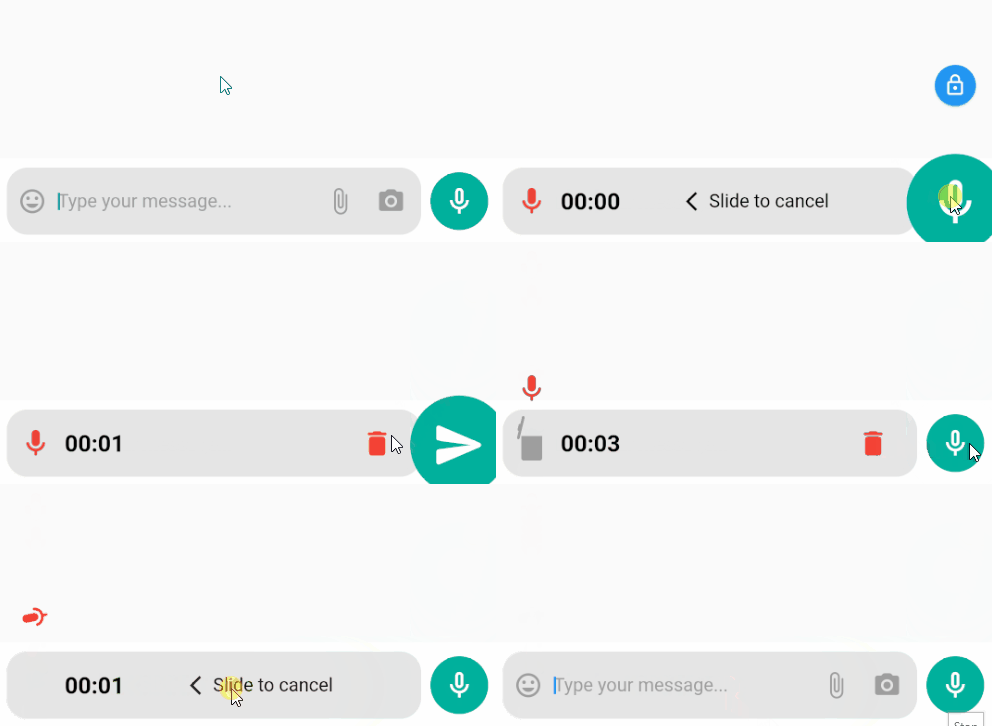
一個用於輕鬆實現聊天輸入框的 Flutter 套件,允許使用者透過文字、音訊和其他媒體進行聊天。
47喜歡 69近 30 天下載130Pub 分數
AndroidiOS
anokabb/chat_composer open-source repository details.

以下為英文專案原文快照,最新內容請造訪 GitHub。
A Flutter package for easy implementation of chat composer allows users to chat with Text, Audio, and Other Media.
Permissions
    ...
    <uses-permission android:name="android.permission.WRITE_EXTERNAL_STORAGE" />
    <uses-permission android:name="android.permission.READ_EXTERNAL_STORAGE" />
    <uses-permission android:name="android.permission.RECORD_AUDIO" />
    ...
   <application
AndroidX
android.useAndroidX=true
android.enableJetifier=true
compileSdkVersion in your "android/app/build.gradle" file to 33 or higher:android {
compileSdkVersion 33
...
}
minSdkVersion in your "android/app/build.gradle" file to 18 or higher:defaultConfig {
minSdkVersion 18
...
}
android. dependencies to their AndroidX counterparts (a full list can be found here: https://developer.android.com/jetpack/androidx/migrate ).I'm working on the iOS version until then you can support me by buying me a cup of coffee 🙂
dependencies:
  chat_composer: ^1.0.2 #latest version
import 'package:chat_composer/chat_composer.dart';
ChatComposer(
    onReceiveText: (str) {
    print('TEXT : ' + str!);
    },
    onRecordEnd: (path) {
    print('AUDIO PATH : ' + path!);
    },
)
leading: A widget to display before the [TextField].
actions: A list of Widgets to display in a row after the [TextField] widget.
onReceiveText: A callback when submit Text Message.
onRecordStart: A callback when start recording.
onRecordEnd: A callback when end recording, return the recorder audio path.
onRecordCancel: A callback when cancel recording.
onPanCancel: A callback when the user does not lock the recording or does not hold.
maxRecordLength: Audio max duration should record then return recorder audio path.

依賴清單 10 項
{"sdk":"flutter"}^8.0.3^8.0.1^8.0.9^2.0.11^8.5.0^10.0.0^2.1.2{"sdk":"flutter"}^2.0.0先依使用情境篩選,再比較專案活躍情況,最後到原始儲存庫確認使用要求。
“A repository is the most basic element of GitHub.”
GitHub Docs — About repositories ↗