
 v0.0.10
interactive_maps_marker
易於使用的動畫地圖標記,附帶詳細卡片。可用於商店或任何地點定位。
57喜歡 35近 30 天下載60Pub 分數
平台暫無資料
易於使用的動畫地圖標記,搭配詳細卡片。可用於商店或任何位置定位。

{"sdk":"flutter"}^2.2.5{"sdk":"flutter"}以下為英文專案原文快照,最新內容請造訪 GitHub。
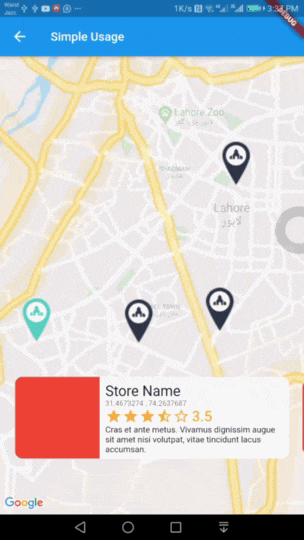
Easy to use Animated Maps Markers with detail card. Use it for store or any place locator.
https://raw.githubusercontent.com/atiqsamtia/interactive_maps_marker_flutter/HEAD/demo/simple-demo.gif
Add this package to your pubspec.yaml in dependencies: section
dependencies:
  interactive_maps_marker: ^0.0.2
This package depends upon google_maps_flutter so first setup this by following This Guide
Update dependencies
flutter pub get
You can now add a InteractiveMapsMarker widget to your widget tree.
In your widget import the package and use InteractiveMapsMarker Widget
Example
import 'package:flutter/material.dart';
import 'package:google_maps_flutter/google_maps_flutter.dart';
import 'package:interactive_maps_marker/interactive_maps_marker.dart';

class ExplorePage extends StatelessWidget {
  @override
  Widget build(BuildContext context) {

    return InteractiveMapsMarker(
      items: <MarkerItem>[
        MarkerItem(id: 1, latitude: 31.4673274, longitude: 74.2637687),
        MarkerItem(id: 2, latitude: 31.4718461, longitude: 74.3531591),
      ],
      center: LatLng(31.4906504, 74.319872),
      itemContent: (context, index) {
        return Text("Current Item $index");
      },
    );

  }
}
Coming Soon
Use this widget inside a stateful widget and update the markers list state with new data. An example can be found in stateful_example.dart file in example project.
You can customise it by passing various parameter values. Details about all parameters is as follows.
| Parameter | Type | Default Value | Description |
|---|---|---|---|
| items | List<MarkerItem> |
none | List of Markers with type of MarkerItem. This parameter is required and cannot be null. |
| itemContent | IndexedWidgetBuilder |
none | This is builder function which will receive context and index. You must return a Widget which will show on a pre designed container. This is exactly like you use ListView Builder. Not applicable when using itemBuilder |
| center | LatLng |
LatLng(0.0, 0.0) |
Center point for initial map display. |
| zoom | double |
12.0 | Default zoom value for initial map screen. |
| itemHeight | double |
116.0 | Height of your detail item. Not applicable when using itemBuilder |
| itemPadding | EdgeInsetsGeometry |
EdgeInsets.only(bottom: 80.0) |
Padding for item detail card. Mainly used for bottom padding. |
| itemPadding | Alignment |
Alignment.bottomCenter |
Alignment for content slider. |
| itemBuilder | IndexedWidgetBuilder |
null | If you don't want default container and want to build the bottom widget yourself, you can use this builder instead of itemContent and have full control over UI. This is builder function which will receive context and index. You must return a Widget. |
| controller | InteractiveMapsController |
null | A controller if you want to add the markers later and then call rebuild() or change the index of marker to animate with your action via setCurrentIndex(int index). |
Atiq Samtia– @AtiqSamtia – me@atiqsamtia.com
Distributed under the MIT license.
https://github.com/atiqsamtia/interactive_maps_marker_flutter
Inspired by amazing work from Mohamed Douzane
git checkout -b feature/fooBar)git commit -am 'Add some fooBar')git push origin feature/fooBar)