搜尋套件、儲存庫與 APP 分類

interactive_maps_marker 封面
套件詳情v0.0.10

interactive_maps_marker

易於使用的動畫地圖標記,附帶詳細卡片。可用於商店或任何地點定位。

近 30 天下載
55
喜歡數
57
Pub 分數
60

安裝套件

flutter pub add interactive_maps_marker

套件介紹

根據套件公開資料產生的選型評估,僅供參考。

Interactive Maps Marker 是一個 Flutter 套件,提供帶有互動式詳細資訊卡的動畫地圖標記。設計簡單,讓開發者能輕鬆整合位置相關功能,例如商店定位器或興趣點顯示。標記在點擊時會動畫呈現,揭露一個可自訂的卡片以提供額外資訊。非常適合需要直觀地理定位視覺化與使用者參與度的應用程式。支援順暢過渡與響應式設計,無需複雜設定即可提升使用者體驗。

適用情境

  • 商店定位應用
  • 興趣點突出顯示
  • 活動場地尋找者
  • 旅遊和旅行指南
  • 即時位置追蹤介面

主要特色

  • 動畫標記過渡
  • 可自定義的詳細資訊卡片
  • 與 Google 地圖的簡單整合
  • 輕觸顯示互動
  • 響應式 UI 組件
  • 輕便且容易設定

適合對象

  • 開發基於位置的應用程式之開發者
  • 需要快速實現地圖功能的初創企業
  • 專注於使用者友善導航的應用程式
  • 專案需要最少的程式碼來實現地圖互動
  • Flutter 初學者探索地理定位

使用建議

  • 需要 Google Maps API 金鑰才能實現完整功能
  • 僅限 Android 和 iOS(未提及網頁支援)
  • 自定樣式可能需要額外的 Dart 知識
  • 依賴外部地圖渲染函數庫
  • 未針對高密度標記聚類進行優化

原始 README

以下為關聯原始碼儲存庫的 README 原文快照,最新內容請造訪原始碼儲存庫。

interactive_maps_marker for Flutter

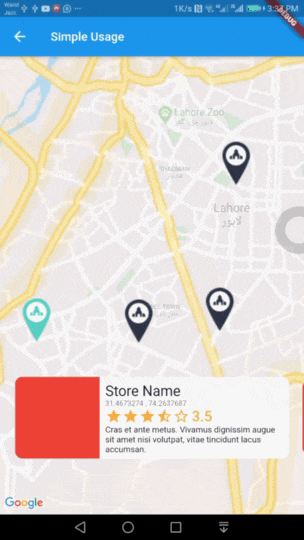
Easy to use Animated Maps Markers with detail card. Use it for store or any place locator.

Demo

Usage

Add this package to your pubspec.yaml in dependencies: section

dependencies: 
  interactive_maps_marker: ^0.0.2

This package depends upon google_maps_flutter so first setup this by following This Guide

Update dependencies

flutter pub get

You can now add a InteractiveMapsMarker widget to your widget tree.

Simple Usage

In your widget import the package and use InteractiveMapsMarker Widget

Example

import 'package:flutter/material.dart';
import 'package:google_maps_flutter/google_maps_flutter.dart';
import 'package:interactive_maps_marker/interactive_maps_marker.dart';

class ExplorePage extends StatelessWidget {
  @override
  Widget build(BuildContext context) {

    return InteractiveMapsMarker(
      items: <MarkerItem>[
        MarkerItem(id: 1, latitude: 31.4673274, longitude: 74.2637687),
        MarkerItem(id: 2, latitude: 31.4718461, longitude: 74.3531591),
      ],
      center: LatLng(31.4906504, 74.319872),
      itemContent: (context, index) {
        return Text("Current Item $index");
      },
    );

  }
}
Advanced Usage

Coming Soon

Markers data from a remote server?

Use this widget inside a stateful widget and update the markers list state with new data. An example can be found in stateful_example.dart file in example project.

Customise with parameters

You can customise it by passing various parameter values. Details about all parameters is as follows.

Parameter Type Default Value Description
items List<MarkerItem> none List of Markers with type of MarkerItem. This parameter is required and cannot be null.
itemContent IndexedWidgetBuilder none This is builder function which will receive context and index. You must return a Widget which will show on a pre designed container. This is exactly like you use ListView Builder. Not applicable when using itemBuilder
center LatLng LatLng(0.0, 0.0) Center point for initial map display.
zoom double 12.0 Default zoom value for initial map screen.
itemHeight double 116.0 Height of your detail item. Not applicable when using itemBuilder
itemPadding EdgeInsetsGeometry EdgeInsets.only(bottom: 80.0) Padding for item detail card. Mainly used for bottom padding.
itemPadding Alignment Alignment.bottomCenter Alignment for content slider.
itemBuilder IndexedWidgetBuilder null If you don't want default container and want to build the bottom widget yourself, you can use this builder instead of itemContent and have full control over UI. This is builder function which will receive context and index. You must return a Widget.
controller InteractiveMapsController null A controller if you want to add the markers later and then call rebuild() or change the index of marker to animate with your action via setCurrentIndex(int index).

Meta

Atiq Samtia– @AtiqSamtia – me@atiqsamtia.com

Distributed under the MIT license.

https://github.com/atiqsamtia/interactive_maps_marker_flutter

Credits

Inspired by amazing work from Mohamed Douzane

Github Repo

Medium Post

Contributing

  1. Fork it (https://github.com/atiqsamtia/interactive_maps_marker_flutter/fork)
  2. Create your feature branch (git checkout -b feature/fooBar)
  3. Commit your changes (git commit -am 'Add some fooBar')
  4. Push to the branch (git push origin feature/fooBar)
  5. Create a new Pull Request

所屬分類

依賴

依賴清單 1 項

原始碼儲存庫

使用此套件的專案

暫無相關資料。