
FlClash
一個基於 ClashMeta 的跨平台代理客戶端,簡單易用,開源且無廣告。

- 星標
- 5.3萬
- 分支
- 3318
- 最近推送(UTC)
- 2026年9月17日
- 專案狀態
- 未封存
原始 README
以下為英文專案原文快照,最新內容請造訪 GitHub。
FlClash




A multi-platform proxy client based on ClashMeta, simple and easy to use, open-source and ad-free.
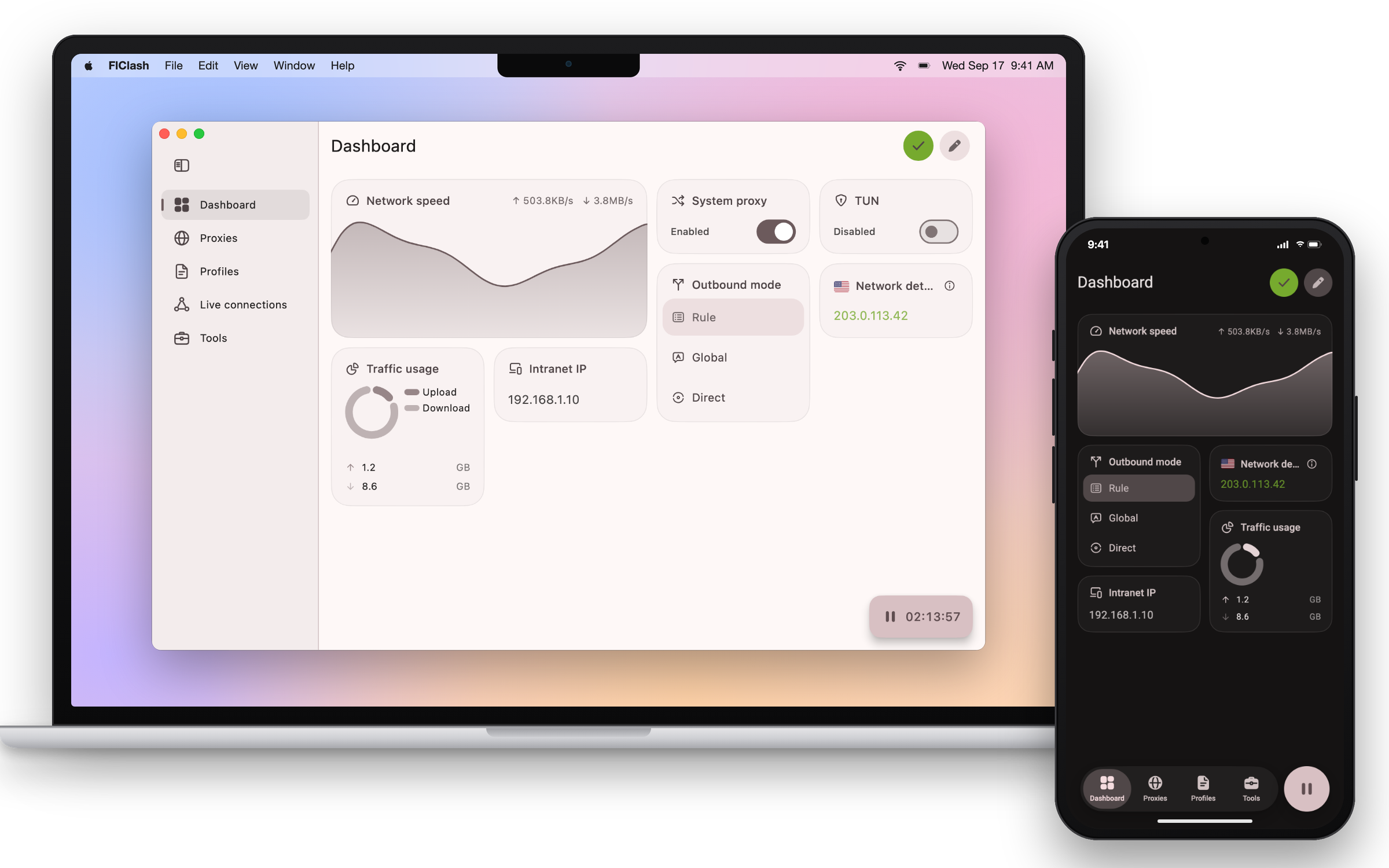
Features
✈️ Multi-platform: Android, Windows, macOS and Linux
💻 Adaptive multiple screen sizes, Multiple color themes available
💡 Based on Material You Design, Surfboard-like UI
☁️ Supports data sync via WebDAV
✨ Support subscription link, Dark mode
Use
Linux
⚠️ Make sure to install the following dependencies before using them
sudo apt-get install libayatana-appindicator3-dev
Android
Support the following actions
 com.follow.clash.action.START

 com.follow.clash.action.STOP

 com.follow.clash.action.TOGGLE
Download


Homebrew
brew tap chen08209/tap
brew install --cask flclash
Build
-
Update submodules
git submodule update --init --recursive -
Install
FlutterandGolangenvironment -
Build Application
-
android
-
Install
Android SDK,Android NDK -
Set
ANDROID_NDKenvironment variable -
Run build script
dart setup.dart android
-
-
windows
-
Requires a Windows client
-
Install
GCC,Inno Setup -
Run build script
dart setup.dart windows
-
-
linux
-
Requires a Linux client
-
Dependencies are auto-installed by setup script, or manually:
sudo apt-get install -y libayatana-appindicator3-dev -
Run build script
dart setup.dart linux
-
-
macOS
-
Requires a macOS client
-
Run build script
dart setup.dart macos
-
-
Star
The easiest way to support developers is to click on the star (⭐) at the top of the page.

chen08209 ↗
分類
使用的依賴
依賴清單 67 項
- flutter
{"sdk":"flutter"} - material_ui
^1.0.1 - intl
any - path_provider
^2.1.5 - path
^1.9.0 - shared_preferences
^2.5.3 - window_manager
{"git":{"url":"https://github.com/chen08209/window_manager","ref":"v0.5.1-flclash.3","path":"packages/window_manager"}} - dynamic_color
^2.1.0 - proxy
{"path":"plugins/proxy"} - launch_at_startup
{"git":{"url":"https://github.com/chen08209/launch_at_startup.git","ref":"e930ce65c5804343103447e01d39fccabedc8681"}} - json_annotation
^4.12.0 - file_picker
^12.0.0 - mobile_scanner
^7.4.0 - app_links
^7.1.2 - win32_registry
^3.0.3 - tray
{"path":"plugins/tray"} - wifi_ssid
{"path":"plugins/wifi_ssid"} - collection
^1.19.1 - animations
^3.0.0 - package_info_plus
^10.2.1 - url_launcher
^6.3.2 - freezed_annotation
^3.1.0 - image_picker
^1.2.0 - ffi
^2.1.4 - dio
^5.8.0+1 - win32
^6.4.0 - re_editor
^0.10.0 - re_highlight
^0.0.3 - archive
^4.0.7 - emoji_regex
^0.0.5 - uni_platform
^0.1.3 - device_info_plus
^13.2.0 - connectivity_plus
7.2.0 - screen_retriever
^0.2.1 - defer_pointer
^0.0.2 - flutter_riverpod
^3.4.2 - riverpod_annotation
^4.0.6 - riverpod
^3.4.2 - material_color_utilities
^0.13.0 - material_new_shapes
^1.0.0 - flutter_svg
^2.1.0 - flutter_cache_manager
^3.4.1 - crypto
^3.0.3 - yaml_writer
{"git":{"url":"https://github.com/chen08209/yaml_writer","ref":"79c78a44ec9c2f5f5f97da1a65610c6fb2ead8b3"}} - super_sliver_list
^0.4.1 - drift
^2.34.3 - drift_flutter
^0.3.1 - fractional_indexing
^1.0.0 - navigator_resizable
^3.1.0 - flutter_staggered_grid_view
^0.7.0 - rust_api
{"path":"plugins/rust_api"} - setup
{"path":"plugins/setup"} - flutter_test開發依賴
{"sdk":"flutter"} - flutter_lints開發依賴
^6.0.0 - json_serializable開發依賴
^6.14.1 - build_runner開發依賴
^2.15.1 - args開發依賴
^2.4.2 - freezed開發依賴
^4.0.1 - riverpod_generator開發依賴
^4.0.8 - drift_dev開發依賴
^2.34.0 - intl_utils開發依賴
^2.8.15 - test開發依賴
^1.31.0 - sqlite3開發依賴
^3.5.1 - cross_file開發依賴
^0.3.4+2 - mocktail開發依賴
^1.0.4 - yaml開發依賴
^3.1.3 - path_provider_platform_interface開發依賴
^2.1.3
所在榜單
如何選擇適合專案的儲存庫?
先依使用情境篩選,再比較專案活躍情況,最後到原始儲存庫確認使用要求。
- 透過儲存庫名稱、作者或描述搜尋,再依技術分類縮小範圍。
- 綜合星標、分支與最近推送比較專案;星標反映社群關注,不保證品質。
- 使用前在 GitHub 確認 README、授權條款與 Issues。
來源與維護
“A repository is the most basic element of GitHub.”
GitHub Docs — About repositories ↗