搜尋套件、儲存庫與 APP 分類

flutter_staggered_grid_view 封面
套件詳情v0.7.0

flutter_staggered_grid_view

提供一組 Flutter 網格佈局(錯落、馬賽克、拼花、編織等)。

AndroidiOSWebmacOSWindowsLinux
近 30 天下載
151萬
喜歡數
4780
Pub 分數
140

安裝套件

flutter pub add flutter_staggered_grid_view

套件介紹

根據套件公開資料產生的選型評估,僅供參考。

一個 Flutter 套件,提供多種可自訂的網格佈局,包含錯落、馬賽克、拼布與編織設計。它擴展標準 GridView 功能,支援不規則項目大小與動態排列,非常適合建立視覺上吸引人的內容展示,例如相片畫廊或產品清單。此套件輕巧、文件完整,並在所有主要平台相容。

適用情境

  • 照片畫廊介面
  • 產品列表佈局
  • 動態內容網格
  • 創意UI設計
  • 社群媒體訊息流版面

主要特色

  • 支援交錯與網格佈局
  • 可自訂的項目尺寸
  • 平滑捲動效能
  • 跨平台相容性
  • 靈活的網格配置
  • 內建動畫支援

適合對象

  • 開發視覺密集型應用的開發者
  • 尋求獨特網格圖案的設計師
  • 需要響應式內容佈局的應用程式
  • 具有可變大小項目的項目
  • 注重使用者介面打磨的團隊

使用建議

  • 可能需要在小螢幕上進行仔細的版面測試
  • 性能在非常大的數據集上可能會下降
  • 有限的內建項目間距控制
  • 不適合簡單的均勻網格
  • 需要理解自定佈局原則

原始 README

以下為關聯原始碼儲存庫的 README 原文快照,最新內容請造訪原始碼儲存庫。

Pub BuyMeACoffee

flutter_staggered_grid_view

Provides a collection of Flutter grids layouts.

Getting started

In the pubspec.yaml of your flutter project, add the following dependency:

dependencies:
  ...
  flutter_staggered_grid_view: <latest_version>

In your library add the following import:

import 'package:flutter_staggered_grid_view/flutter_staggered_grid_view.dart';

For help getting started with Flutter, view the online documentation.

Layouts

This package contains various grid layouts. In the following section, you'll discover each one of them. The explanation of the layout will always considered a top-to-bottom and left-to-right directions to simplify the description. However it is possible to change these directions in the code.

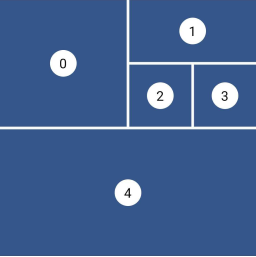
Staggered

Staggered Grid Layout

This layout is intended for a small number of items. I didn't find, for the moment, a performant algorithm which would work in a Sliver context, that's why this is not a GridView and therefore there are no SliverStaggeredGrid.

Grid properties
  • Evenly divided in n columns
  • Small number of items
  • Not scrollable
Tile properties
  • Must occupy 1 to n columns
Placement algorithm
  • Top-most and then left-most
Example

Below you'll find the code to create this grid layout:

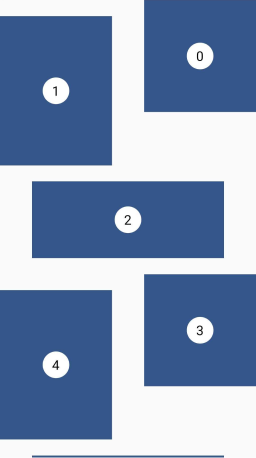
Staggered example

StaggeredGrid.count(
  crossAxisCount: 4,
  mainAxisSpacing: 4,
  crossAxisSpacing: 4,
  children: const [
    StaggeredGridTile.count(
      crossAxisCellCount: 2,
      mainAxisCellCount: 2,
      child: Tile(index: 0),
    ),
    StaggeredGridTile.count(
      crossAxisCellCount: 2,
      mainAxisCellCount: 1,
      child: Tile(index: 1),
    ),
    StaggeredGridTile.count(
      crossAxisCellCount: 1,
      mainAxisCellCount: 1,
      child: Tile(index: 2),
    ),
    StaggeredGridTile.count(
      crossAxisCellCount: 1,
      mainAxisCellCount: 1,
      child: Tile(index: 3),
    ),
    StaggeredGridTile.count(
      crossAxisCellCount: 4,
      mainAxisCellCount: 2,
      child: Tile(index: 4),
    ),
  ],
);
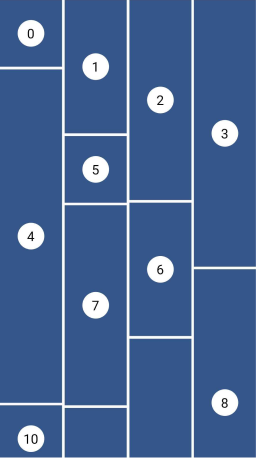
Masonry

Masonry Grid Layout

This layout facilitates the browsing of uncropped peer content. Container heights are sized based on the widget size.

This is a complete separate grid and not a SliverGridDelegate for performance reasons. The SliverGrid is great but it needs to have a layout which does not depends on the size of its children. Otherwise we have to compute the size to all children before the end of the cache, which is really not performant for a masonry layout.

Grid properties
  • Evenly divided in n columns
Tile properties
  • Must occupy 1 column only
Placement algorithm
  • Top-most and then left-most
Example

Below you'll find the code to create this grid layout:

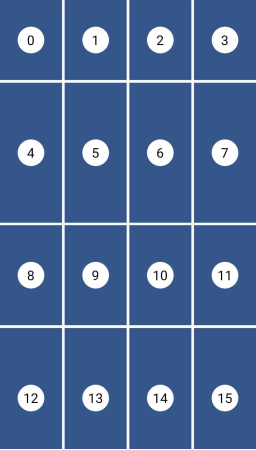
Masonry example

MasonryGridView.count(
  crossAxisCount: 4,
  mainAxisSpacing: 4,
  crossAxisSpacing: 4,
  itemBuilder: (context, index) {
    return Tile(
      index: index,
      extent: (index % 5 + 1) * 100,
    );
  },
);
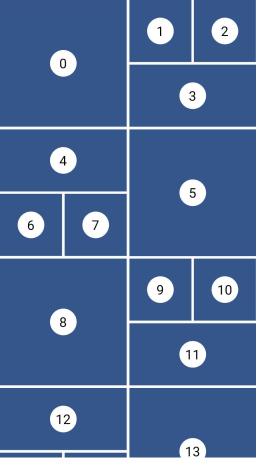
Quilted

Quilted Grid Layout

This layout emphasizes certain items over others in a collection. It creates hierarchy using varied container sizes and ratios.

This is a specific delegate for the built-in GridView (or SliverGrid) widget. That's why the example below will create such a layout with a GridView.

Grid properties
  • Evenly divided in n columns
  • The height of each row is equal to the width of each column
  • A pattern defines the size of the tiles and different mode of repetition are possible
Tile properties
  • Must occupy 1 to n columns
  • Must occupy 1 or more entire rows
Placement algorithm
  • Top-most and then left-most
Example

Below you'll find the code to create this grid layout:

Quilted example

GridView.custom(
  gridDelegate: SliverQuiltedGridDelegate(
    crossAxisCount: 4,
    mainAxisSpacing: 4,
    crossAxisSpacing: 4,
    repeatPattern: QuiltedGridRepeatPattern.inverted,
    pattern: [
      QuiltedGridTile(2, 2),
      QuiltedGridTile(1, 1),
      QuiltedGridTile(1, 1),
      QuiltedGridTile(1, 2),
    ],
  ),
  childrenDelegate: SliverChildBuilderDelegate(
    (context, index) => Tile(index: index),
  ),
);
Woven

Woven Grid Layout

This layout facilitates the browsing of peer content. The items are displayed in containers of varying ratios to create a rhythmic layout.

This is a specific delegate for the built-in GridView (or SliverGrid) widget. That's why the example below will create such a layout with a GridView.

Grid properties
  • Evenly divided in n columns
  • The height the rows is the maximum height of the tiles
  • A pattern defines the size of the tiles
  • The size of the tiles follows the pattern in a 'z' sequence.
Tile properties
  • The height is defined by an aspectRatio (width/height)
  • The width is defined by a crossAxisRatio (width/column's width) between 0 (exclusive) and 1 (inclusive)
  • Each tile can define how it is aligned within the available space
Placement algorithm
  • Top-most and then left-most
Example

Below you'll find the code to create this grid layout:

Woven example

GridView.custom(
  gridDelegate: SliverWovenGridDelegate.count(
    crossAxisCount: 2,
    mainAxisSpacing: 8,
    crossAxisSpacing: 8,
    pattern: [
      WovenGridTile(1),
      WovenGridTile(
        5 / 7,
        crossAxisRatio: 0.9,
        alignment: AlignmentDirectional.centerEnd,
      ),
    ],
  ),
  childrenDelegate: SliverChildBuilderDelegate(
    (context, index) => Tile(index: index),
  ),
);
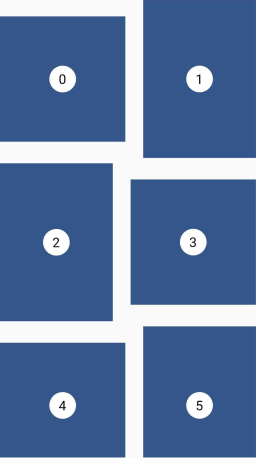
Staired

Staired Grid Layout

This layout uses alternating container sizes and ratios to create a rhythmic effect. It's another kind of woven grid layout.

This is a specific delegate for the built-in GridView (or SliverGrid) widget. That's why the example below will create such a layout with a GridView.

Grid properties
  • A pattern defines the size of the tiles
  • Each tile is shifted from the previous one by a margin in both axis
  • The placement follows a 'z' sequence
Tile properties
  • The height is defined by an aspectRatio (width/height)
  • The width is defined by a crossAxisRatio (width/available horizontal space) between 0 (exclusive) and 1 (inclusive)
Placement algorithm
  • In a 'z' sequence
Example

Below you'll find the code to create this grid layout:

Staired example

GridView.custom(
  gridDelegate: SliverStairedGridDelegate(
    crossAxisSpacing: 48,
    mainAxisSpacing: 24,
    startCrossAxisDirectionReversed: true,
    pattern: [
      StairedGridTile(0.5, 1),
      StairedGridTile(0.5, 3 / 4),
      StairedGridTile(1.0, 10 / 4),
    ],
  ),
  childrenDelegate: SliverChildBuilderDelegate(
    (context, index) => Tile(index: index),
  ),
);
Aligned

Aligned Grid Layout

This layout is also called CSS Grid. This is a common grid layout on the web, where each item within a track has the maximum cross axis extent of its siblings.

Grid properties
  • Evenly divided in n columns
  • The rows can have differents heights
Tile properties
  • Must occupy 1 column only
  • Each tile has the same height as the tallest one of the row.
Placement algorithm
  • Top-most and then left-most
Example

Below you'll find the code to create this grid layout:

Aligned example

AlignedGridView.count(
  crossAxisCount: 4,
  mainAxisSpacing: 4,
  crossAxisSpacing: 4,
  itemBuilder: (context, index) {
    return Tile(
      index: index,
      extent: (index % 7 + 1) * 30,
    );
  },
);

Sponsoring

I'm working on my packages on my free-time, but I don't have as much time as I would. If this package or any other package I created is helping you, please consider to sponsor me so that I can take time to read the issues, fix bugs, merge pull requests and add features to these packages.

Sponsors

I want to thank Tommy for sponsoring this package. Thanks to him, I took the time to investigate in the previous performance issues and refactor this library to make it how is it today.


Tom3652

Contributions

Feel free to contribute to this project.

If you find a bug or want a feature, but don't know how to fix/implement it, please fill an issue.
If you fixed a bug or implemented a feature, please send a pull request.

所屬分類

原始碼儲存庫

使用此套件的專案