

 v1.5.0
optimal_wrap_text
一個 Flutter Text 的替代品,可將短的多行文字包裝在視覺上大小相似的行中,以獲得更好的視覺平衡。
25喜歡 825近 30 天下載160Pub 分數
AndroidiOSWebmacOSWindowsLinux
一個 Flutter Text 的替代品,可將短的多行文字包裝在視覺上大小相似的行中,以獲得更好的視覺平衡。

以下為英文專案原文快照,最新內容請造訪 GitHub。
A Flutter Text replacement that wraps short multi-line text over similarly sized lines for better visual balance.
Instead of awkward standard line breaks like these:
My slightly longer text that will span 2 or
3 lines

My slightly longer text that will span 2 or
                  3 lines
You get cleaner, balanced output like these:
My slightly longer text that
will span 2 or 3 lines

        My slightly longer text that
           will span 2 or 3 lines
Perfect for small, informative footnotes or short multi-line messages that deserve to look good.
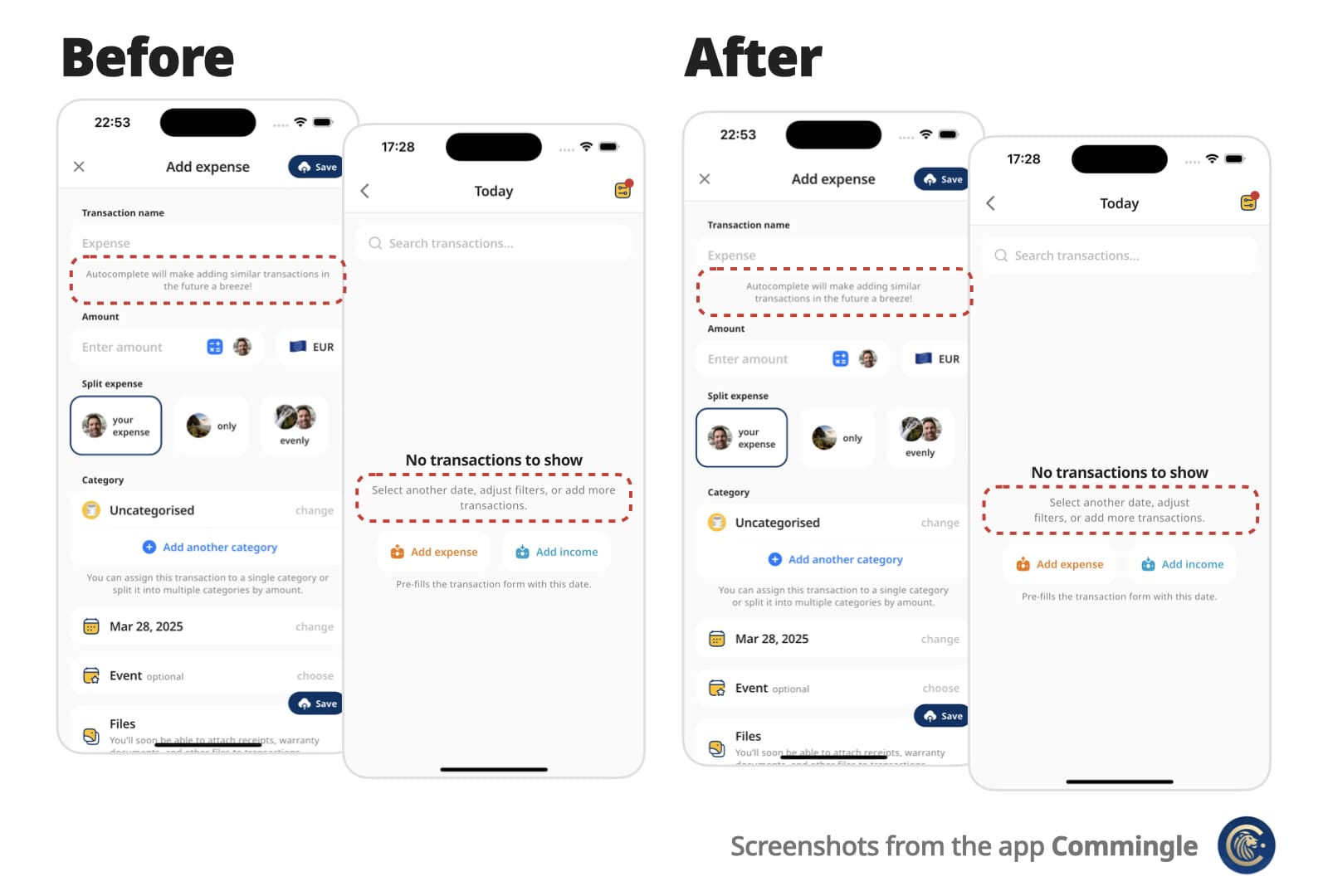
Text widgetText attributes, including style, textDirection (RTL), textHeightBehavior…OptimalWrapRichText, including WidgetSpan (icons and other inline widgets)\nminLines to wrap onto at least that many lines when there are enough wordsAdd optimal_wrap_text to your pubspec.yaml:
dependencies:
  ...
  optimal_wrap_text: 1.5.0
  ...
Then import it:
import 'package:optimal_wrap_text/optimal_wrap_text.dart';
Use it just like the Text widget:
OptimalWrapText(
  'My slightly longer text that will span 2 or 3 lines',
)
For rich text, use OptimalWrapRichText the same way you would use
Text.rich:
OptimalWrapRichText(
  TextSpan(
    children: [
      TextSpan(text: 'My slightly '),
      TextSpan(
        text: 'longer',
        style: TextStyle(fontWeight: FontWeight.bold),
      ),
      TextSpan(text: ' rich text that will span 2 or 3 lines'),
    ],
  ),
)
WidgetSpans (for example icons) are supported too:
OptimalWrapRichText(
  TextSpan(
    children: [
      WidgetSpan(
        alignment: PlaceholderAlignment.middle,
        child: Icon(Icons.info_outline, size: 16),
      ),
      TextSpan(text: ' My slightly longer text that will span 2 or 3 lines'),
    ],
  ),
)
With all supported properties:
OptimalWrapText(
  'My slightly longer text that will span 2 or 3 lines',
  key: ...
  style: Theme.of(context).textTheme.bodyLarge,
  textAlign: TextAlign.center,
  strutStyle: ...,
  textDirection: ...,
  locale: ...,
  softWrap: ...,
  overflow: ...,
  textScaler: ...,
  minLines: ...,
  maxLines: ...,
  semanticsLabel: ...,
  textWidthBasis: ...,
  textHeightBehavior: ...,
  selectionColor: ...,
)
📌 For centered or right-aligned text, you may still want to wrap it in a Center, Align, or Row, just like with a regular Text widget.
Use minLines to wrap onto at least that many lines when the text has enough
words. A single unbreakable word is never forced to break.
OptimalWrapText(
  'Hello there friend',
  minLines: 2,
  textAlign: TextAlign.center,
)
Use shrinkWrap: true when the parent should hug the optimally wrapped width
(for example a chip or speech bubble). By default the widgets expand to the
available width via Align, matching typical full-width text layout.
OptimalWrapRichText(
  textSpan,
  shrinkWrap: true,
  textAlign: TextAlign.center,
)
For custom rich-text children, wrap them with the exported OptimalWrapChild
primitive instead.
Optimal Wrap Text uses TextPainter to determine how many lines your text will take at full available width in the given widget tree.
It runs a binary search to find the narrowest width that still fits in the same number of lines — ensuring optimal wrapping. With minLines, that target is raised so the text wraps onto at least that many lines when there are enough words.
e.g.
300px → 2 lines (width from the current BuildContext)
150px → 4 lines ❌
225px → 2 lines ✅
188px → 3 lines ❌
206px → 2 lines ✅
... and so on
Worst-case scenario for mobile screen widths (e.g. iPhone) is about 9 iterations, but typical cases resolve in 6 attempts.
It wraps the final Text in a SizedBox constrained to that optimal width.
It uses LayoutBuilder to get width in the given widget tree, which doesn’t work inside some slivers, such as SliverFillRemaining, which rely on intrinsic sizing.
For OptimalWrapRichText with WidgetSpans, prefer intrinsically sized inline children (icons, small badges, fixed-size boxes). Same as Flutter’s Text.rich, each inline widget is constrained by the paragraph’s max width — very wide or full-bleed children can prevent meaningful narrowing.
💡 You can work around this by passing a manual width:
CustomScrollView(
  slivers: [
    ...,
    SliverFillRemaining(
      child: Padding(
        padding: EdgeInsets.only(left: 15, right: 30),
        child: OptimalWrapText(
          'My slightly longer text that will span 2 or 3 lines',
          width: MediaQuery.sizeOf(context).width - 15 - 30
        ),
      )
    ),
  ]
)
Optimal Wrap Text is maintained by Chris Rutkowski as part of the Commingle app, and open-sourced under the MIT License.
依賴清單 3 項
{"sdk":"flutter"}^5.0.0{"sdk":"flutter"}先依使用情境篩選,再比較專案活躍情況,最後到原始儲存庫確認使用要求。
“A repository is the most basic element of GitHub.”
GitHub Docs — About repositories ↗