搜尋套件、儲存庫與 APP 分類

optimal_wrap_text 封面
套件詳情v1.5.0

optimal_wrap_text

一個 Flutter Text 的替代品,可將短的多行文字包裝在視覺上大小相似的行中,以獲得更好的視覺平衡。

AndroidiOSWebmacOSWindowsLinux
近 30 天下載
825
喜歡數
25
Pub 分數
160

安裝套件

flutter pub add optimal_wrap_text

套件介紹

根據套件公開資料產生的選型評估,僅供參考。

OptimalWrapText 是一個 Flutter 小部件,透過智慧地將多行文字換行,創造出長度相近的視覺平衡行,以增強文字佈局。與標準的 Text 小部件不同,它能最大程度減少不均勻的換行,進而提升短段落或標籤的 UI 可讀性和美學吸引力。它非常適合對排版和諧性有要求的介面,例如儀表板、卡片或表單。此套件支援所有主要平台,並可輕鬆整合至現有的 Flutter 專案中。

適用情境

  • 改善文字密集型使用者介面的視覺平衡
  • 在緊湊版面中提升可讀性
  • 在標籤和卡片中創建一致的行長度
  • 優化響應式設計中的文字顯示
  • 在儀表板和資料摘要中使用

主要特色

  • 智慧型平衡行長度
  • 減少不自然的換行
  • 支援所有 Flutter 平台
  • 與現有 Text 小部件的簡單整合
  • 保留原始文字內容和樣式

適合對象

  • 重視排版和諧的設計師
  • 開發響應式 UI 的開發者
  • 包含密集文字內容的應用程式
  • 需要精緻文字呈現的專案
  • 專注於使用者體驗的團隊細節

使用建議

  • 可能會稍微增加渲染複雜性
  • 由於效能原因,不適合非常長的文字
  • 超出平衡線以外的客製化有限
  • 需要在不同螢幕尺寸上進行仔細測試
  • 最適合與短至中等長度的文本塊一起使用

原始 README

以下為關聯原始碼儲存庫的 README 原文快照,最新內容請造訪原始碼儲存庫。

Optimal Wrap Text

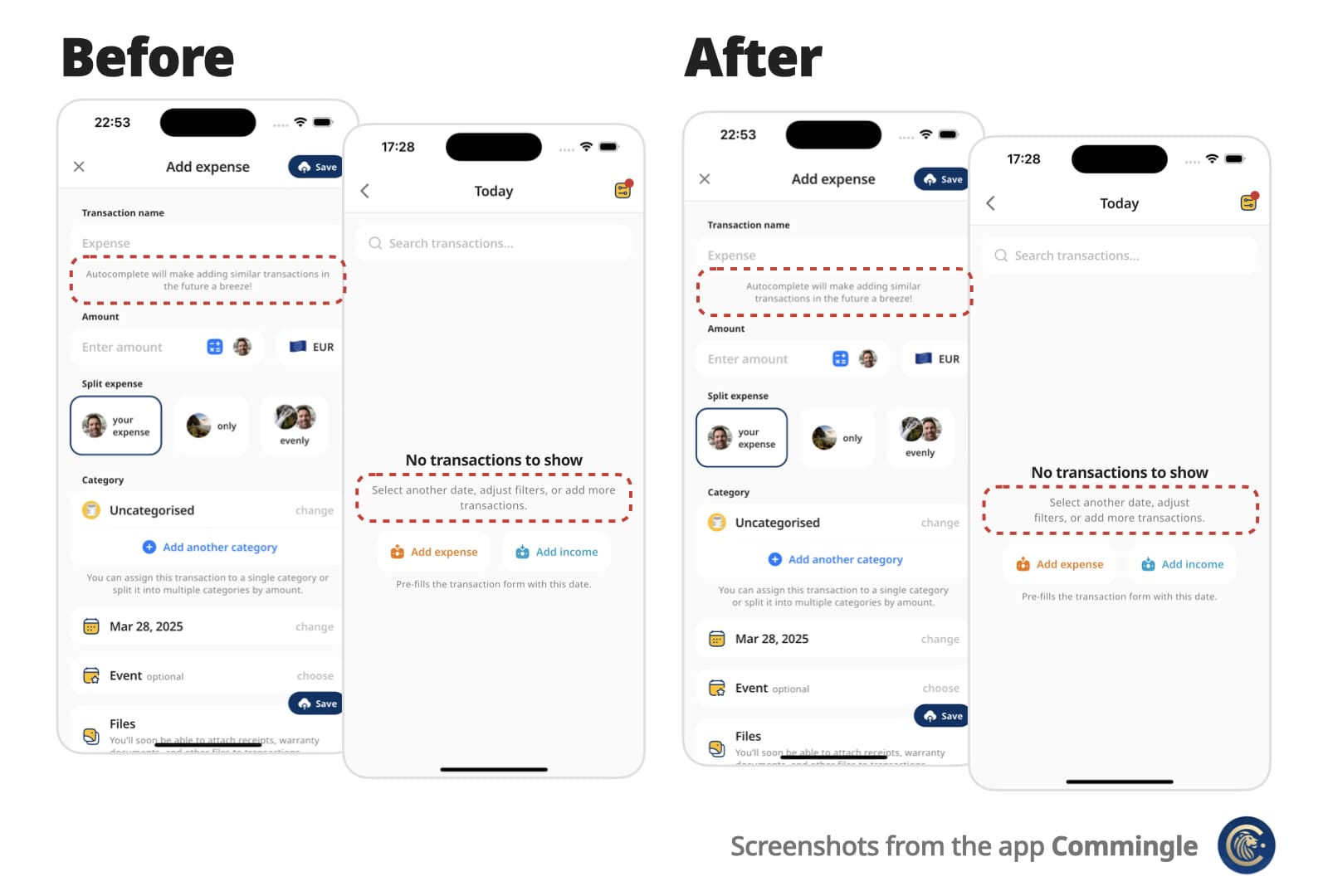
A Flutter Text replacement that wraps short multi-line text over similarly sized lines for better visual balance.

Instead of awkward standard line breaks like these:

My slightly longer text that will span 2 or
3 lines

My slightly longer text that will span 2 or
                  3 lines

You get cleaner, balanced output like these:

My slightly longer text that 
will span 2 or 3 lines

        My slightly longer text that       
           will span 2 or 3 lines

Perfect for small, informative footnotes or short multi-line messages that deserve to look good.

Before and After Comparison

✨ Features

  • Drop-in replacement for the Text widget
  • Supports all Text attributes, including style, textDirection (RTL), textHeightBehavior…
  • Rich text via OptimalWrapRichText, including WidgetSpan (icons and other inline widgets)
  • Automatically finds optimal line breaks — no more manual \n
  • Optional minLines to wrap onto at least that many lines when there are enough words
  • Adjusts to different screen sizes and text scaling

🚀 Getting started

Add optimal_wrap_text to your pubspec.yaml:

dependencies:
  ...
  optimal_wrap_text: 1.5.0
  ...

Then import it:

import 'package:optimal_wrap_text/optimal_wrap_text.dart';

Use it just like the Text widget:

OptimalWrapText(
  'My slightly longer text that will span 2 or 3 lines',
)

For rich text, use OptimalWrapRichText the same way you would use Text.rich:

OptimalWrapRichText(
  TextSpan(
    children: [
      TextSpan(text: 'My slightly '),
      TextSpan(
        text: 'longer',
        style: TextStyle(fontWeight: FontWeight.bold),
      ),
      TextSpan(text: ' rich text that will span 2 or 3 lines'),
    ],
  ),
)

WidgetSpans (for example icons) are supported too:

OptimalWrapRichText(
  TextSpan(
    children: [
      WidgetSpan(
        alignment: PlaceholderAlignment.middle,
        child: Icon(Icons.info_outline, size: 16),
      ),
      TextSpan(text: ' My slightly longer text that will span 2 or 3 lines'),
    ],
  ),
)

With all supported properties:

OptimalWrapText(
  'My slightly longer text that will span 2 or 3 lines',
  key: ...
  style: Theme.of(context).textTheme.bodyLarge,
  textAlign: TextAlign.center,
  strutStyle: ...,
  textDirection: ...,
  locale: ...,
  softWrap: ...,
  overflow: ...,
  textScaler: ...,
  minLines: ...,
  maxLines: ...,
  semanticsLabel: ...,
  textWidthBasis: ...,
  textHeightBehavior: ...,
  selectionColor: ...,
)

📌 For centered or right-aligned text, you may still want to wrap it in a Center, Align, or Row, just like with a regular Text widget.

Use minLines to wrap onto at least that many lines when the text has enough words. A single unbreakable word is never forced to break.

OptimalWrapText(
  'Hello there friend',
  minLines: 2,
  textAlign: TextAlign.center,
)

Use shrinkWrap: true when the parent should hug the optimally wrapped width (for example a chip or speech bubble). By default the widgets expand to the available width via Align, matching typical full-width text layout.

OptimalWrapRichText(
  textSpan,
  shrinkWrap: true,
  textAlign: TextAlign.center,
)

For custom rich-text children, wrap them with the exported OptimalWrapChild primitive instead.

🧠 How does it work?

  1. Optimal Wrap Text uses TextPainter to determine how many lines your text will take at full available width in the given widget tree.

  2. It runs a binary search to find the narrowest width that still fits in the same number of lines — ensuring optimal wrapping. With minLines, that target is raised so the text wraps onto at least that many lines when there are enough words.

    e.g.

    300px → 2 lines (width from the current BuildContext)
    150px → 4 lines ❌
    225px → 2 lines ✅
    188px → 3 lines ❌
    206px → 2 lines ✅
    ... and so on
    

    Worst-case scenario for mobile screen widths (e.g. iPhone) is about 9 iterations, but typical cases resolve in 6 attempts.

  3. It wraps the final Text in a SizedBox constrained to that optimal width.

⚠️ Known Limitations

It uses LayoutBuilder to get width in the given widget tree, which doesn’t work inside some slivers, such as SliverFillRemaining, which rely on intrinsic sizing.

For OptimalWrapRichText with WidgetSpans, prefer intrinsically sized inline children (icons, small badges, fixed-size boxes). Same as Flutter’s Text.rich, each inline widget is constrained by the paragraph’s max width — very wide or full-bleed children can prevent meaningful narrowing.

💡 You can work around this by passing a manual width:

CustomScrollView(
  slivers: [
    ...,
    SliverFillRemaining(
      child: Padding(
        padding: EdgeInsets.only(left: 15, right: 30),
        child: OptimalWrapText(
          'My slightly longer text that will span 2 or 3 lines',
          width: MediaQuery.sizeOf(context).width - 15 - 30
        ),
      )
    ),
  ]
)

📄 Copyright and License

Optimal Wrap Text is maintained by Chris Rutkowski as part of the Commingle app, and open-sourced under the MIT License.

所屬分類

原始碼儲存庫

使用此套件的專案

暫無相關資料。