
 v0.0.8
pagination_flutter
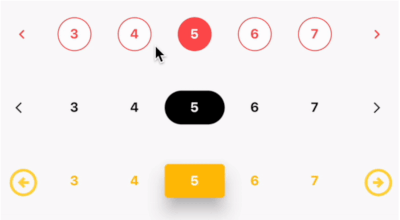
適用於 Flutter 的模組化分頁元件。具備頁面指示器與頁面導航按鈕的分頁元件 - 兼容所有裝置與平台。
35喜歡 1040近 30 天下載145Pub 分數
AndroidiOSWebmacOSWindowsLinux
created-by-varun/flutter_pagination open-source repository details.

{"sdk":"flutter"}{"sdk":"flutter"}^2.0.0以下為英文專案原文快照,最新內容請造訪 GitHub。
dependencies:
  pagination_flutter: ^0.0.8
import 'package:pagination_flutter/pagination_flutter.dart';
https://github.com/created-by-varun/flutter_pagination/blob/master/preview.gif
class _MyHomePageState extends State<MyHomePage> {
  int selectedPage = 1;

  setSelectedPage(int index) {
    setState(() {
      selectedPage = index;
    });
  }

  @override
  Widget build(BuildContext context) {
    return Scaffold(
      appBar: AppBar(
        title: const Text("Flutter Pagination"),
      ),
      body: Center(
        child: Column(
          mainAxisAlignment: MainAxisAlignment.center,
          children: [
            Pagination(
              numOfPages: 10,
              selectedPage: selectedPage,
              pagesVisible: 3,
              onPageChanged: (page) {
                setState(() {
                  selectedPage = page;
                });
              },
              nextIcon: const Icon(
                Icons.arrow_forward_ios,
                color: Colors.blue,
                size: 14,
              ),
              previousIcon: const Icon(
                Icons.arrow_back_ios,
                color: Colors.blue,
                size: 14,
              ),
              activeTextStyle: const TextStyle(
                color: Colors.white,
                fontSize: 14,
                fontWeight: FontWeight.w700,
              ),
              activeBtnStyle: ButtonStyle(
                backgroundColor: MaterialStateProperty.all(Colors.blue),
                shape: MaterialStateProperty.all(
                  RoundedRectangleBorder(
                    borderRadius: BorderRadius.circular(38),
                  ),
                ),
              ),
              inactiveBtnStyle: ButtonStyle(
                shape: MaterialStateProperty.all(RoundedRectangleBorder(
                  borderRadius: BorderRadius.circular(38),
                )),
              ),
              inactiveTextStyle: const TextStyle(
                fontSize: 14,
                fontWeight: FontWeight.w700,
              ),
            ),
          ],
        ),
      ),
    );
  }
}
| Name | Type | Default | Description |
|---|---|---|---|
| numOfPages | int | 0 | Number of pages to be displayed |
| selectedPage | int | 0 | The currently selected page |
| pagesVisible | int | 0 | Number of pages to be visible |
| onPageChanged | Function | null | Function to be called when a page is selected |
| nextIcon | Widget | null | Widget to be displayed as the next icon |
| previousIcon | Widget | null | Widget to be displayed as the previous icon |
| activeTextStyle | TextStyle | null | TextStyle for the active page |
| activeBtnStyle | ButtonStyle | null | ButtonStyle for the active page |
| inactiveBtnStyle | ButtonStyle | null | ButtonStyle for the inactive pages |
| inactiveTextStyle | TextStyle | null | TextStyle for the inactive pages |
| spacing | double | 0 | Spacing between the pages |
MIT
If you find any issues, please report them here