

 v1.1.0
side_menu_animation
可自定義 UI 的動畫側邊菜單。受到 Yalantis 庫(Android/iOS)啟發。
97喜歡 25近 30 天下載150Pub 分數
AndroidiOSWebmacOSWindowsLinux
diegoveloper/flutter_side_menu_animation open-source repository details.

以下為英文專案原文快照,最新內容請造訪 GitHub。

Animated Side Menu with customizable UI. Inspired in Yalantis library (Android/iOS). Original Design: https://dribbble.com/shots/1689922-Side-Menu-Animation
| SIDE MENU ANIMATION | SIDE MENU ANIMATION - DRAG GESTURE |
|---|---|
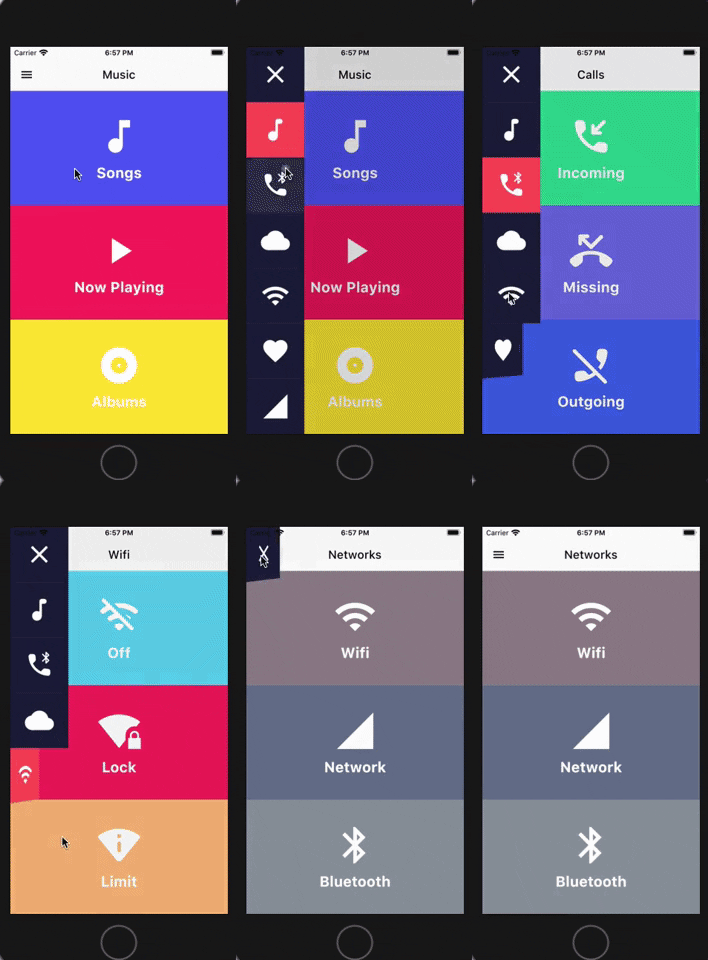 |
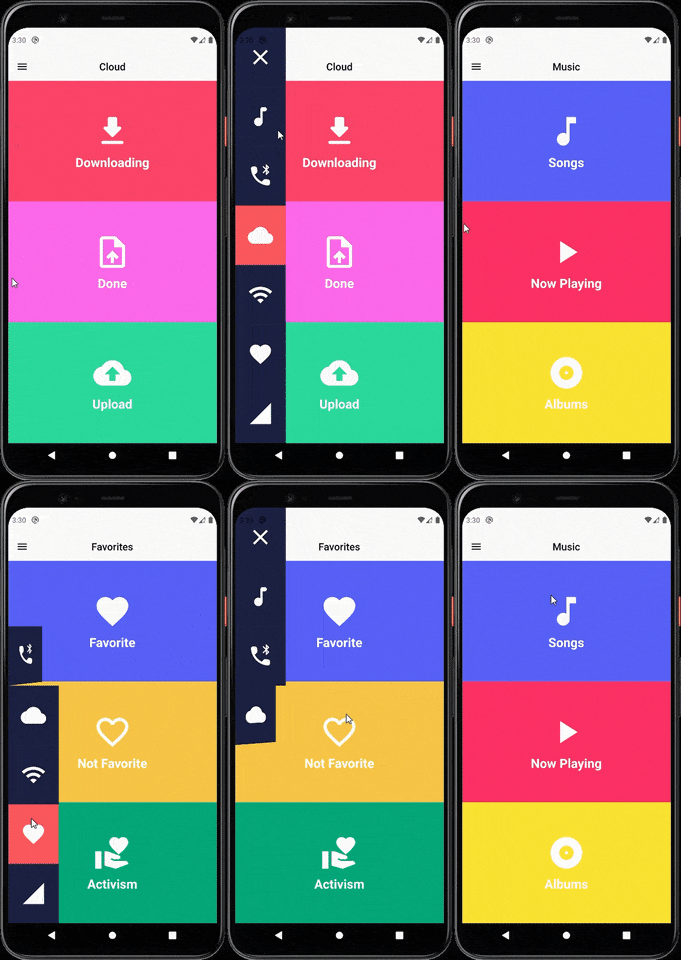 |
(Don't forget to subscribe and like)
You should ensure that you add the router as a dependency in your flutter project.
dependencies:
 side_menu_animation: "^0.0.1"
You should then run flutter packages upgrade or update your packages in IntelliJ.
There is a example project in the example folder. Check it out. Otherwise, keep reading to get up and running.
Need to include the import the package to the dart file where it will be used, use the below command,
import 'package:side_menu_animation/side_menu_animation.dart';
class SideMenuScreen extends StatelessWidget {
  final _index = ValueNotifier<int>(1);

  @override
  Widget build(BuildContext context) {
    return Scaffold(
      body: SideMenuAnimation(
        appBarBuilder: (showMenu) => AppBar(
          leading: IconButton(icon: Icon(Icons.menu, color: Colors.black), onPressed: showMenu),
          backgroundColor: Theme.of(context).scaffoldBackgroundColor,
          elevation: 0,
          brightness: Brightness.light,
          centerTitle: true,
          title: ValueListenableBuilder<int>(
            valueListenable: _index,
            builder: (_, value, __) => Text(value.toString(), style: TextStyle(color: Colors.black)),
          ),
        ),
        views: [YourCustomViews1Here(), YourCustomViews2Here()],
        items: [MyCustomItem1Here(), MyCustomItem2Here()],
        selectedColor: Color(0xFFFF595E),
        unselectedColor: Color(0xFF1F2041),
        tapOutsideToDismiss: true,
        scrimColor: Colors.black45,
        onItemSelected: (value) {
          if (value > 0 && value != _index.value) _index.value = value;
        },
      ),
    );
  }
}
class SideMenuBuilderScreen extends StatelessWidget {
  final _index = ValueNotifier<int>(1);

  @override
  Widget build(BuildContext context) {
    return Scaffold(
      body: SideMenuAnimation.builder(
        builder: (showMenu) {
          return Scaffold(
            appBar: AppBar(
              leading: IconButton(icon: Icon(Icons.menu, color: Colors.black), onPressed: showMenu),
              backgroundColor: Theme.of(context).scaffoldBackgroundColor,
              elevation: 0,
              brightness: Brightness.light,
              centerTitle: true,
              title: ValueListenableBuilder<int>(
                valueListenable: _index,
                builder: (_, value, __) => Text(_value.toString(), style: TextStyle(color: Colors.black)),
              ),
            ),
            body: ValueListenableBuilder<int>(
              valueListenable: _index,
              builder: (_, value, __) => IndexedStack(
                index: value - 1,
                children: [YourCustomViews1Here(), YourCustomViews2Here()],
              ),
            ),
          );
        },
       items: [MyCustomItem1Here(), MyCustomItem2Here()],
        selectedColor: Color(0xFFFF595E),
        unselectedColor: Color(0xFF1F2041),
        onItemSelected: (value) {
          if (value > 0 && value != _index.value) _index.value = value;
        },
      ),
    );
  }
}
For more info about the ussage, check the example project.
You can follow me on twitter @diegoveloper , Youtube channel
If you want to contribute with the project, just open a Pull request :), all contributions are welcome.
If you want to contribute with this package, follow this steps:
CONTRIBUTORS.md file.dartfmt . -w.依賴清單 3 項
{"sdk":"flutter"}{"sdk":"flutter"}^2.0.0先依使用情境篩選,再比較專案活躍情況,最後到原始儲存庫確認使用要求。
“A repository is the most basic element of GitHub.”
GitHub Docs — About repositories ↗