搜尋套件、儲存庫與 APP 分類

side_menu_animation 封面
套件詳情v1.1.0

side_menu_animation

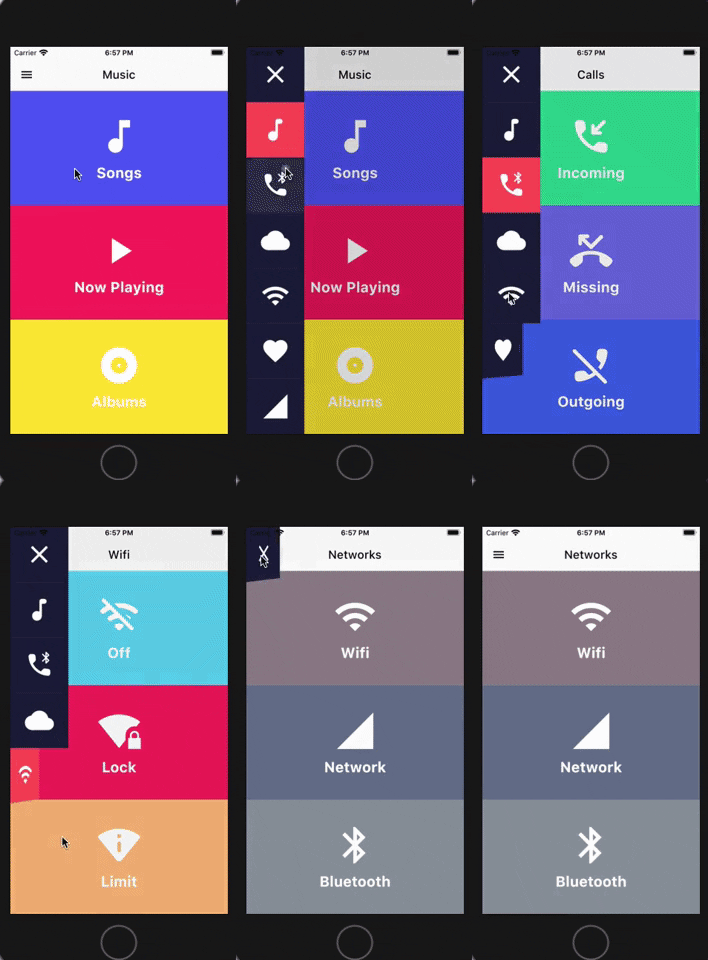
可自定義 UI 的動畫側邊菜單。受到 Yalantis 庫(Android/iOS)啟發。

AndroidiOSWebmacOSWindowsLinux
近 30 天下載
25
喜歡數
97
Pub 分數
150

安裝套件

flutter pub add side_menu_animation

套件介紹

根據套件公開資料產生的選型評估,僅供參考。

一個 Flutter 套件,提供可自訂 UI 的動畫側邊選單,靈感來自 Android 與 iOS 的 Yalantis 庫。它提供流暢的過渡與視覺效果,以提升跨多個平台的導航體驗。此套件支援外觀與行為的完整自訂,非常適合需要現代化、互動式抽屜的應用程式。相容於 Android、iOS、Web、macOS、Windows 與 Linux,確保跨平台的一致性。

適用情境

  • 移動應用導航
  • Web儀表板介面
  • 跨平台應用程式
  • 可客製化的抽屜設計
  • 互動式UI組件

主要特色

  • 流暢的動畫過渡
  • 高度可自訂的使用者介面
  • 跨平台支援
  • 響應式設計
  • 與現有程式碼的輕鬆整合
  • 支援深色模式

適合對象

  • 開發移動或網頁應用的開發者
  • 尋求現代導航模式的設計師
  • 需要動畫側邊菜單的項目
  • 針對多個平台的應用
  • 使用 Flutter 進行全端開發的團隊

使用建議

  • 可能需要在舊設備上進行效能調校
  • 自訂選項可能會增加複雜性
  • 除了基本設定外,文件有限
  • 與其他導航套件可能存在衝突
  • 未針對非常大的選單項目進行優化
  • 需要理解 Flutter 的動畫系統

原始 README

以下為關聯原始碼儲存庫的 README 原文快照,最新內容請造訪原始碼儲存庫。

Side Menu Animation

pub package

Animated Side Menu with customizable UI. Inspired in Yalantis library (Android/iOS). Original Design: https://dribbble.com/shots/1689922-Side-Menu-Animation

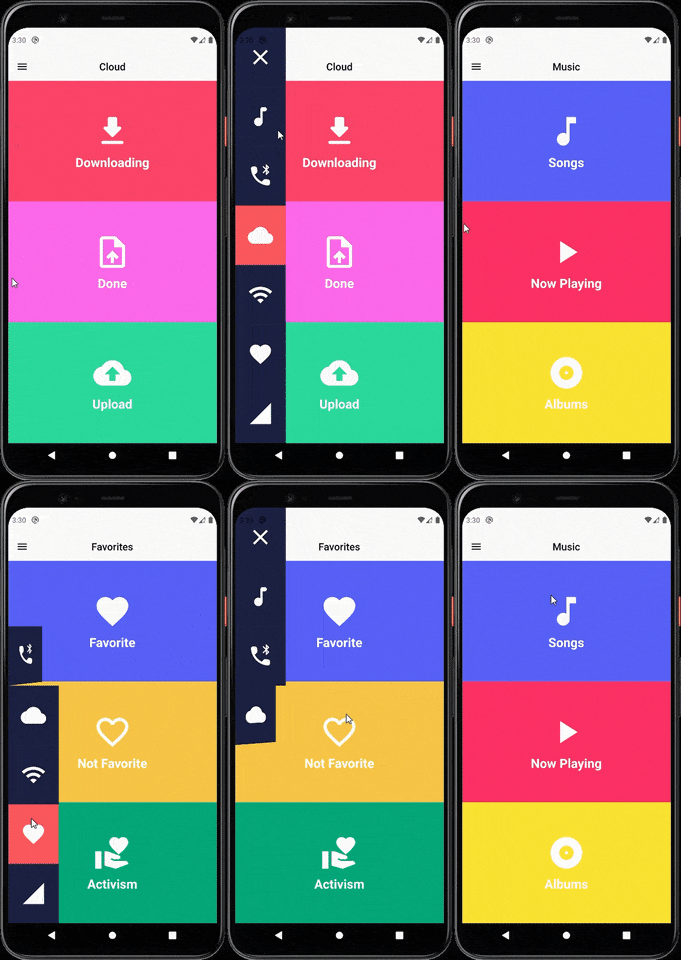
Sample

SIDE MENU ANIMATION SIDE MENU ANIMATION - DRAG GESTURE

Learn how to build this package

  • Video 1: https://www.youtube.com/watch?v=vcdETKdI15E
  • Video 2: https://www.youtube.com/watch?v=W7mxTcwX5Wg

(Don't forget to subscribe and like)

Features

  • Optional parameter to tap outside to dismiss
  • Optional parameter to change the scrimColor
  • Custom color item for the side menu selected
  • Custom color item for the side menu unselected
  • Custom width for the side menu
  • Custom duration of the animation side menu
  • Display the menu from left or right

Getting Started

You should ensure that you add the router as a dependency in your flutter project.

dependencies:
 side_menu_animation: "^0.0.1"

You should then run flutter packages upgrade or update your packages in IntelliJ.

Example Project

There is a example project in the example folder. Check it out. Otherwise, keep reading to get up and running.

Usage

Need to include the import the package to the dart file where it will be used, use the below command,

import 'package:side_menu_animation/side_menu_animation.dart';

SideMenu

class SideMenuScreen extends StatelessWidget {
  final _index = ValueNotifier<int>(1);

  @override
  Widget build(BuildContext context) {
    return Scaffold(
      body: SideMenuAnimation(
        appBarBuilder: (showMenu) => AppBar(
          leading: IconButton(icon: Icon(Icons.menu, color: Colors.black), onPressed: showMenu),
          backgroundColor: Theme.of(context).scaffoldBackgroundColor,
          elevation: 0,
          brightness: Brightness.light,
          centerTitle: true,
          title: ValueListenableBuilder<int>(
            valueListenable: _index,
            builder: (_, value, __) => Text(value.toString(), style: TextStyle(color: Colors.black)),
          ),
        ),
        views: [YourCustomViews1Here(), YourCustomViews2Here()],
        items: [MyCustomItem1Here(), MyCustomItem2Here()],
        selectedColor: Color(0xFFFF595E),
        unselectedColor: Color(0xFF1F2041),
        tapOutsideToDismiss: true,
        scrimColor: Colors.black45,
        onItemSelected: (value) {
          if (value > 0 && value != _index.value) _index.value = value;
        },
      ),
    );
  }
}

SideMenuBuilder

class SideMenuBuilderScreen extends StatelessWidget {
  final _index = ValueNotifier<int>(1);

  @override
  Widget build(BuildContext context) {
    return Scaffold(
      body: SideMenuAnimation.builder(
        builder: (showMenu) {
          return Scaffold(
            appBar: AppBar(
              leading: IconButton(icon: Icon(Icons.menu, color: Colors.black), onPressed: showMenu),
              backgroundColor: Theme.of(context).scaffoldBackgroundColor,
              elevation: 0,
              brightness: Brightness.light,
              centerTitle: true,
              title: ValueListenableBuilder<int>(
                valueListenable: _index,
                builder: (_, value, __) => Text(_value.toString(), style: TextStyle(color: Colors.black)),
              ),
            ),
            body: ValueListenableBuilder<int>(
              valueListenable: _index,
              builder: (_, value, __) => IndexedStack(
                index: value - 1,
                children: [YourCustomViews1Here(), YourCustomViews2Here()],
              ),
            ),
          );
        },
       items: [MyCustomItem1Here(), MyCustomItem2Here()],
        selectedColor: Color(0xFFFF595E),
        unselectedColor: Color(0xFF1F2041),
        onItemSelected: (value) {
          if (value > 0 && value != _index.value) _index.value = value;
        },
      ),
    );
  }
}

For more info about the ussage, check the example project.

Contact

You can follow me on twitter @diegoveloper , Youtube channel

If you want to contribute with the project, just open a Pull request :), all contributions are welcome.

Contribution

If you want to contribute with this package, follow this steps:

  • Fork this repository.
  • Do your changes! You can add your name with link into the CONTRIBUTORS.md file.
  • Before push your changes run dartfmt . -w.
  • Create a Pull request on Github from your fork/branch to my repo(main branch).

所屬分類

原始碼儲存庫

使用此套件的專案

暫無相關資料。