

 v2.2.0
keyboard_attachable
一個用於建立可附加至軟鍵盤的組件的 Flutter 套件。
119喜歡 4950近 30 天下載150Pub 分數
AndroidiOSmacOSWindowsLinux
一個用於建立可附加至軟鍵盤的組件的 Flutter 套件。

以下為英文專案原文快照,最新內容請造訪 GitHub。
A Flutter package to build widgets that can be attached to the soft keyboard.

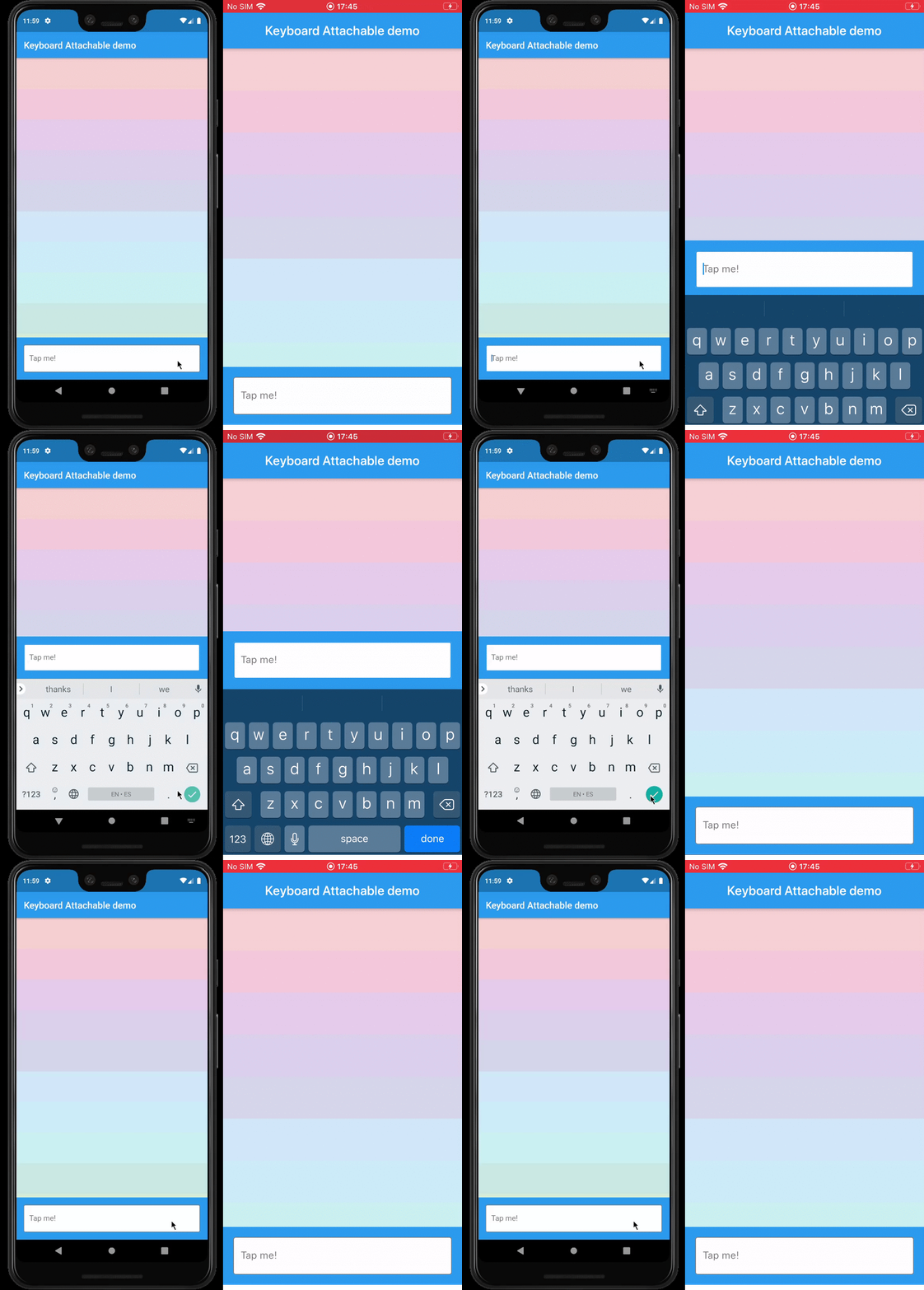
resizeToAvoidBottomInset, with animations.This package exposes a FooterLayout stateless widget and a KeyboardAttachable stateful widget.
FooterLayout is a widget that can lay out a child widget above a footer. It does that by
positioning a footer widget at the bottom of the available space first, and then positioning a
child widget in the remaining space.
    Widget build(BuildContext context) => FooterLayout(
          footer: MyFooterWidget(),
          child: PageMainContent(),
        );
KeyboardAttachable is a widget that adds space below its baseline when the soft keyboard is shown
and hidden with an animation that matches that of the platform keyboard. This widget can be used to
animate its child when the soft keyboard is shown or hidden, so that the child widget appears to be
attached to the keyboard.
You can combine these two widgets by passing a KeyboardAttachable widget as the footer of a
FooterLayout to create a page that shrinks and expands when the soft keyboard appears and
disappears, with an animation that matches the platform keyboard animation. Additionally, you can
pass a child widget to your KeyboardAttachable to have a footer in your page that attaches itself
to the soft keyboard when shown.
Warning: In order for this to work with animations, the
resizeToAvoidBottomInsetparameter of theScaffoldabove the page has to befalse. In addition to that, when there areSafeAreas involved the layout, it is recommended to set theirmaintainBottomViewPaddingproperty totruein order for the animations to run smoothly, like so:
/// Builds a [Scaffold] that lays out a footer at the bottom of the page.
class KeyboardAttachablePage extends StatelessWidget {
  @override
  Widget build(BuildContext context) => Scaffold(
        backgroundColor: Colors.blue,
        resizeToAvoidBottomInset: false,
        appBar: AppBar(title: const Text("Keyboard Attachable demo")),
        body: SafeArea(
          maintainBottomViewPadding: true,
          child: FooterLayout(
            footer: KeyboardAttachableFooter(),
            child: ColorsList(),
          ),
        ),
      );
}
In the pubspec.yaml of your flutter project, add the following dependency:
dependencies:
  keyboard_attachable: "^[LATEST_VERSION]"
Then run $ flutter pub get. In your library, add the following import:
import 'package:keyboard_attachable/keyboard_attachable.dart';
Diego Rogel - GitHub
Check the Changelog page to see what's recently changed.
This project is licensed under the MIT License - see the LICENSE file for details.
依賴清單 3 項
{"sdk":"flutter"}^5.4.1{"sdk":"flutter"}先依使用情境篩選,再比較專案活躍情況,最後到原始儲存庫確認使用要求。
“A repository is the most basic element of GitHub.”
GitHub Docs — About repositories ↗