
 v1.0.3
keyboard_emoji_picker
使用設備鍵盤選擇表情符號的 Flutter 插件。
31喜歡 1220近 30 天下載150Pub 分數
iOS
使用設備鍵盤選擇表情符號的 Flutter 插件
以下為英文專案原文快照,最新內容請造訪 GitHub。
The keyboard_emoji_picker package provides a simple way to use the device's
native emoji keyboard to pick an emoji. It's currently supported on iOS only.
However, adding support for Android is something I'd like to do in the future
(if you'd like to help, please let me know).
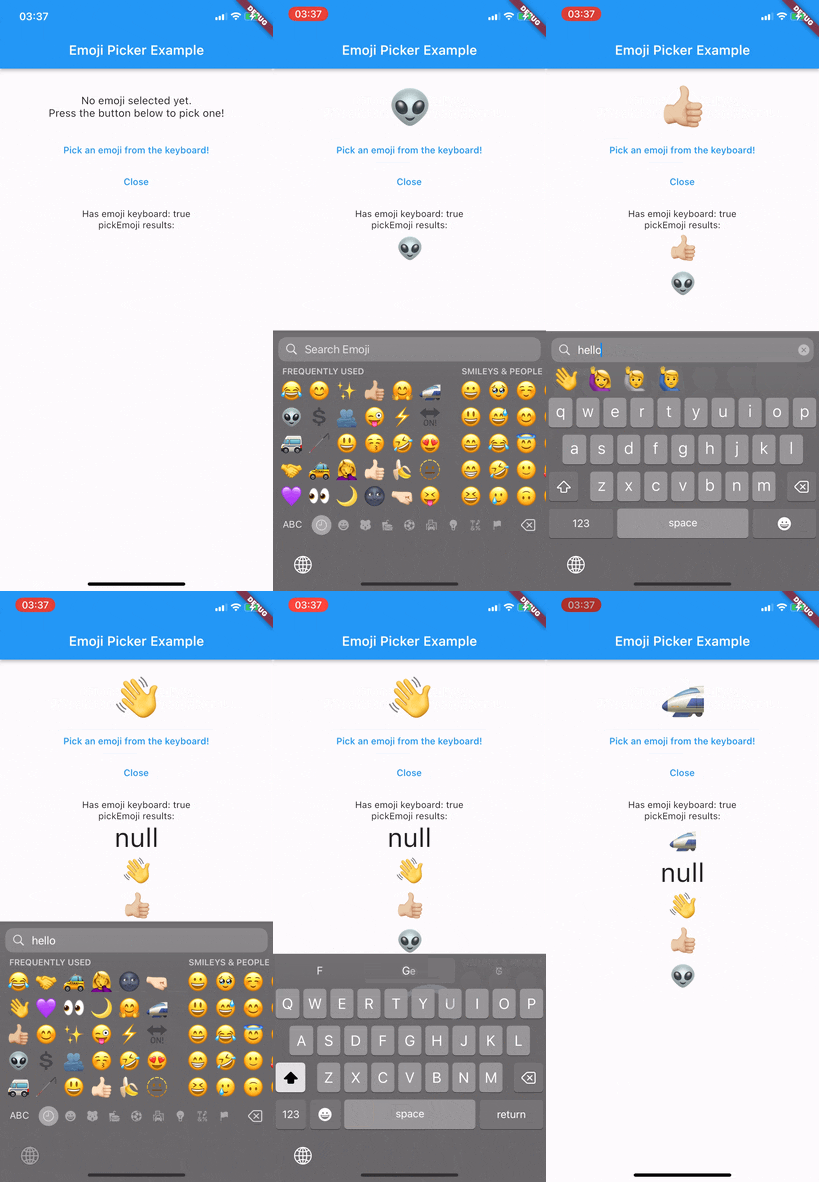
To use KeyboardEmojiPicker, you need to have a KeyboardEmojiPickerWrapper
widget somewhere in your widget tree. This widget will create a hidden
input field in order to make opening the keyboard possible.
import 'package:keyboard_emoji_picker/keyboard_emoji_picker.dart';

class MyApp extends StatelessWidget {
  @override
  Widget build(BuildContext context) {
    // While this example wraps [MaterialApp], you don't have to.
    // You can put it wherever you want to use the picker.
    return KeyboardEmojiPickerWrapper(
      child: MaterialApp(
        title: 'My App',
        home: MyHomePage(),
      ),
    );
  }
}
Since the package uses the device's keyboard, it's not always available. For
example, if the user has disabled the emoji keyboard, it won't open and will
throw a NoEmojiKeyboardFound exception.
To check if the keyboard is available, you can use the checkHasEmojiKeyboard
method.
final hasEmojiKeyboard = await KeyboardEmojiPicker().checkHasEmojiKeyboard();

if (hasEmojiKeyboard) {
  // Open the keyboard.
} else {
  // Use another way to pick an emoji or show a dialog asking the user to
  // enable the emoji keyboard.
}
To pick an emoji, use the pickEmoji method. It will open the keyboard and
wait for the user to pick an emoji. If the user closes the keyboard, the
method will return null.
It is highly recommended to check if the keyboard is available before calling this method to avoid exceptions.
final emoji = await KeyboardEmojiPicker().pickEmoji();
if (emoji != null) {
  // Do something with the emoji
} else {
  // The emoji picking process was cancelled (usually, the keyboard was closed).
}
Since the plugin uses a different hidden input than Flutter itself, you need
to close the keyboard manually. To do so, use the closeKeyboard method.
KeyboardEmojiPicker().closeKeyboard();
Contributions are welcome and appreciated! Feel free to open an issue or a pull request!

依賴清單 4 項
{"sdk":"flutter"}^2.0.2{"sdk":"flutter"}^2.0.0先依使用情境篩選,再比較專案活躍情況,最後到原始儲存庫確認使用要求。
“A repository is the most basic element of GitHub.”
GitHub Docs — About repositories ↗