
 v0.0.8
pricing_cards
適用於您 Flutter 項目的精美靈活定價卡,帶有自訂樣式選項
45喜歡 36近 30 天下載150Pub 分數
AndroidiOSWebmacOSWindowsLinux
適用於您 Flutter 專案的精彩定價卡 😎

{"sdk":"flutter"}^2.0.0-nullsafety.1{"sdk":"flutter"}以下為英文專案原文快照,最新內容請造訪 GitHub。
Awesome pricing cards with custom style options for your flutter project.
You can give as much cards you want to this and personalize the style of each one.
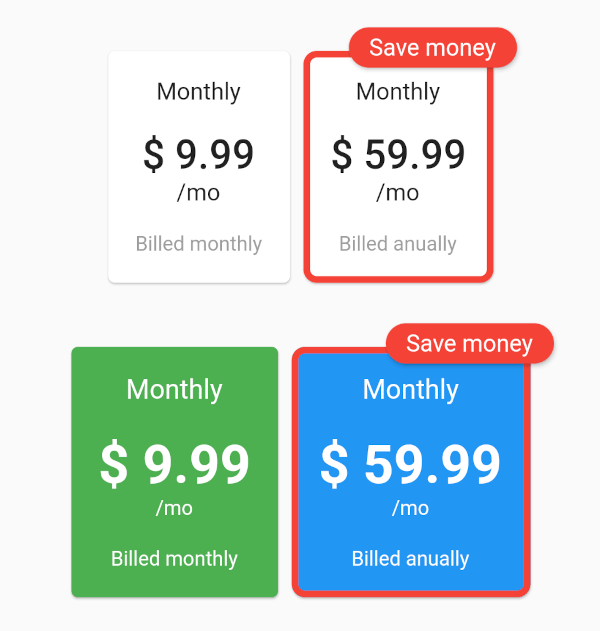
The example with all the parameters:
https://raw.githubusercontent.com/f2acode/pricing_cards/master/example/flutter_01.pngThe code of this:
Column(
    mainAxisAlignment: MainAxisAlignment.center,
    children: [
        PricingCards(
            pricingCards: [
                PricingCard(
                title: 'Monthly',
                price: '\$ 9.99',
                subPriceText: '\/mo',
                billedText: 'Billed monthly',
                onPress: () {
                    // make your business
                },
                ),
                PricingCard(
                title: 'Monthly',
                price: '\$ 59.99',
                subPriceText: '\/mo',
                billedText: 'Billed anually',
                mainPricing: true,
                mainPricingHighlightText: 'Save money',
                onPress: () {
                    // make your business
                },
                )
            ],
        ),
        SizedBox(height: 30),
        PricingCards(
            pricingCards: [
                PricingCard(
                title: 'Monthly',
                price: '\$ 9.99',
                subPriceText: '\/mo',
                billedText: 'Billed monthly',
                onPress: () {
                    // make your business
                },
                cardColor: Colors.green,
                priceStyle: TextStyle(
                    fontSize: 32,
                    fontWeight: FontWeight.bold,
                    color: Colors.white,
                ),
                titleStyle: TextStyle(
                    fontSize: 16,
                    color: Colors.white,
                ),
                billedTextStyle: TextStyle(
                    fontSize: 12,
                    color: Colors.white,
                ),
                subPriceStyle: TextStyle(
                    fontSize: 12,
                    color: Colors.white,
                ),
                cardBorder: RoundedRectangleBorder(
                    side: BorderSide(color: Colors.red, width: 4.0),
                    borderRadius: BorderRadius.circular(8.0),
                ),
                ),
                PricingCard(
                title: 'Monthly',
                price: '\$ 59.99',
                subPriceText: '\/mo',
                billedText: 'Billed anually',
                mainPricing: true,
                mainPricingHighlightText: 'Save money',
                onPress: () {
                    // make your business
                },
                cardColor: Colors.blue,
                priceStyle: TextStyle(
                    fontSize: 32,
                    fontWeight: FontWeight.bold,
                    color: Colors.white,
                ),
                titleStyle: TextStyle(
                    fontSize: 16,
                    color: Colors.white,
                ),
                billedTextStyle: TextStyle(
                    fontSize: 12,
                    color: Colors.white,
                ),
                subPriceStyle: TextStyle(
                    fontSize: 12,
                    color: Colors.white,
                ),
                cardBorder: RoundedRectangleBorder(
                    side: BorderSide(color: Colors.red, width: 4.0),
                    borderRadius: BorderRadius.circular(8.0),
                ),
                )
            ],
        ),
    ],
)